OpenGCUA:把通用 ComputerUse 的全栈公开
OpenGCUA: Toward a Fully Open Stack for Generalist Computer Use
OpenGCUA:迈向完全开放的通用 ComputerUse 技术栈
Hanzhang Zhou * , Long Li * , Quyu Kong * , Lei Wang * , Panrong Tong * , Long Chen, Tianyu Xia, Gongjie Zhang, Xu Zhang, Chen Liu, Jianan Zhang, Chenglin Cai, Zhengwen Zeng, Steven Hoi, Yue Wang † \dagger Alibaba Token Hub, Alibaba Group
Abstract
摘要
Computer use has reached a turning point: the focus is expanding from GUI-only interaction to systems that complete tasks on users’ computers through visual and programmatic interfaces. We define a generalist computer-use agent (GCUA) as a system in which the model chooses how to observe, act, and organize its work across visual and programmatic interfaces. Yet frontier implementations, such as GPT-6 Astra’s computer-use system, remain largely closed, limiting systematic study of their design. We introduce Open Generalist CUA (OpenGCUA), an ongoing project to develop and open the full stack for GCUAs with the community. This report presents the first release of Open Generalist CUA. Code execution is a key feature of our agent design: it lets intermediate results determine subsequent operations and enables models to apply their existing programming capabilities directly to computer interaction. We also propose harness-to-model decision transfer, moving selected observations and task-state decisions from fixed harness rules to the model. On OSWorld-v2, our full configuration improves task scores across all eight evaluated models, including GPT-6 Astra and Claude Opus 5, raising mean partial score by +19.6 points and reducing reported steps per task by an average of 53.0% relative to batched GUI-only execution. We release our implementation and prompts, evaluation trajectories from all eight models, and preliminary versions of a real-device harness and a cross-device SDK. The harness addresses real-device challenges not fully captured by benchmarks, while the SDK provides a common programming interface across computers, mobiles and browsers. Across four real macOS tasks under our real-device harness, selected Qwen3.8-Max runs use 19.4 times as many reported reasoning tokens as GPT-6 Astra, highlighting substantial differences between models in real-device execution efficiency.
ComputerUse 研究正处在转折点:关注点从仅靠 GUI 交互,扩展到能在用户自己的电脑上,同时借助视觉接口与程序接口把任务做完的系统。我们把通用 ComputerUse 智能体(generalist computer-use agent,简称 GCUA)定义为:模型自行决定如何在视觉接口与程序接口之间观察、行动并组织工作的系统。然而像 GPT-6 Astra 的 ComputerUse 系统这类前沿实现大多仍不开放,社区很难系统研究它们的设计。我们推出 Open Generalist CUA(OpenGCUA),这是一项与社区一起开发、并逐步开放 GCUA 全栈的长期项目。本报告给出 Open Generalist CUA 的第一版发布。代码执行是我们智能体设计的关键能力:中间结果可以直接决定后续操作,模型也能把已有编程能力直接用到操作电脑上。我们还提出决策从框架下放到模型(harness-to-model decision transfer):把一部分观察与任务状态决策,从写死在运行框架(harness)里的规则,交给模型自己做。在 OSWorld-v2 上,完整配置抬高了全部八个评测模型的任务分数,其中包括 GPT-6 Astra 和 Claude Opus 5;相对批量、仅 GUI 的执行,平均部分分提高 +19.6 分,报告的每个任务步数平均下降 53.0%。我们公开实现与提示词、八个模型的评测轨迹,以及本机运行框架与跨设备 SDK的初步版本。本机运行框架要应对基准尚未充分覆盖的真实使用挑战;SDK 则给电脑、手机和浏览器提供同一套编程接口。在本机运行框架下跑四项真实 macOS 任务时,选定的 Qwen3.8-Max 运行所报告的推理 token 约为 GPT-6 Astra 的 19.4 倍,说明不同模型在本机执行效率上差距很大。
OpenGCUA GitHub Project Website & Interactive Lab
OpenGCUA GitHub 项目网站与交互实验室
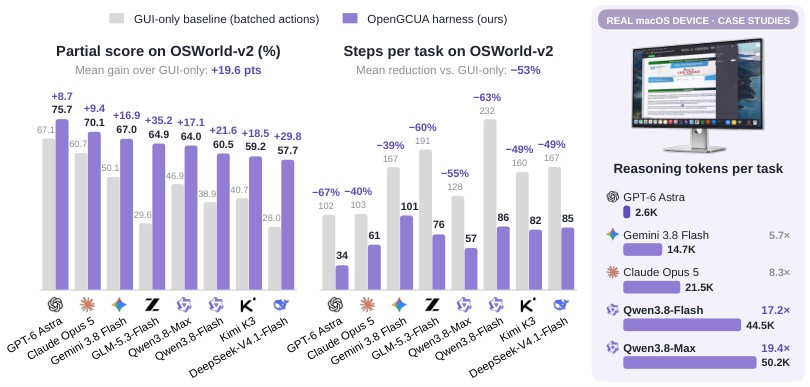
Figure 1: On the offline set of OSWorld-v2, OpenGCUA improves all eight frontier models, raising mean partial score by 19.6 points and reducing steps per task by 53%. On real-device, the gap between models remains large: Qwen3.8-Max uses 19.4 GPT-6 Astra’s reasoning tokens but completes fewer tasks.
图 1:在 OSWorld-v2 离线集上,OpenGCUA 抬高了全部八个前沿模型:平均部分分提高 19.6 分,完成任务所需步数减少 53%。在真实设备环境下,模型之间的差距仍然很大:Qwen3.8-Max 用了 GPT-6 Astra 19.4 的推理 token,完成的任务反而更少。
Contents
目录
1 Introduction
1 引言
Computer use has moved to the center of attention. The GPT-6 Astra release places strong emphasis on computer use, with extensive demonstrations offering an exciting vision of what computer-use agents could make possible (OpenAI, 2026c). Much of the literature studies computer-use agents (CUAs) as GUI-only agents, asking how well models can complete computer tasks through screenshot-based observation and mouse and keyboard actions (Qin et al., 2025; Lu et al., 2026). Recent frontier systems, however, combine GUI interaction with shell commands, accessibility-tree access, and other tools, and OpenAI now recommends code execution, writing GUI operations as code and combining them with programmatic operations in a single model output (OpenAI, 2026b). These systems also target tasks on users’ own computers, where shared control, interaction with background windows, and evolving requests introduce challenges not fully captured by benchmarks. The question has changed, from how well a model operates a GUI interface to how well a system completes work on a real computer by whatever means works. We take this as a turning point in computer-use research, motivating a clearer definition of these broader agents and a systematic study of their design.
ComputerUse 成了眼下最受关注的方向之一。GPT-6 Astra 的发布把 ComputerUse 放在突出位置,大量演示勾勒出 ComputerUse 智能体可能带来的前景(OpenAI, 2026c)。文献里,ComputerUse 智能体(CUA)大多被当作仅靠 GUI 的智能体来研究:模型能不能靠截图观察、靠键鼠动作完成电脑任务(Qin et al., 2025; Lu et al., 2026)。可是近期的前沿系统已经把 GUI 交互与 shell 命令、无障碍树和其他工具组合起来;OpenAI 现在更建议用代码执行——把 GUI 操作写成代码,并在同一次模型输出里和程序化操作组合(OpenAI, 2026b)。这些系统还面向用户自己的电脑:人和智能体共享控制、要操作后台窗口、请求还会中途变化,这些挑战基准测不全。问题已经变了。现在要问的是:系统能不能用一切有效手段,在真实电脑上把任务完成——而不只是模型操作 GUI 有多好。我们把这看作 ComputerUse 研究的转折点,因此需要更清楚地定义这类更广的智能体,并系统研究它们的设计。
We therefore adopt the term generalist computer-use agent (GCUA) to characterize this broader class of systems, following the system-level perspective of Agents’ Last Exam (Sun et al., 2026). GPT-6 Astra’s computer-use system is a representative GCUA. We define a GCUA as an agent system designed to complete diverse computer tasks through both visual interaction and programmatic access, in which the model decides how to observe, act, and organize its work as the task requires. Programmatic access includes shell commands, accessibility APIs, and application or service APIs where available. Essentially, a GCUA chooses how to use the computer to complete a task, rather than being restricted to GUI interaction. Our previous work, Qwen-UI-Agent, began exploring this direction through a unified GUI and CLI action space with batched actions (Zhou et al., 2026). Within our formulation, such GUI+CLI hybrid CUA is a special case of GCUA (Section 2).
因此我们采用 通用 ComputerUse 智能体(GCUA)这个词,来描述这一更广的系统类别,视角沿用 Agents’ Last Exam 的系统级划分(Sun et al., 2026)。GPT-6 Astra 的 ComputerUse 系统就是代表性的 GCUA。我们把 GCUA 定义为:一套智能体系统,既靠视觉交互也靠程序化访问完成多样电脑任务;模型按任务需要,自行决定如何观察、行动与组织工作。程序化访问包括 shell 命令、无障碍 API,以及可用的应用或服务 API。本质上,GCUA 选择「怎样用电脑把任务做完」,而不是被限制在 GUI 交互里。我们此前的 Qwen-UI-Agent 用统一的 GUI 与 CLI 动作空间,加上批量动作,开始朝这个方向探索(Zhou et al., 2026)。在本文表述里,这类 GUI+CLI 混合 CUA 是 GCUA 的一种特例(第 2 节)。
How to design such systems is an open question. A GCUA raises design questions that go beyond those of GUI-only agents: which interfaces to give the model, how to support code execution, which decisions to leave to the model and which to the harness, and what changes when the agent runs on a user’s own computer. However, frontier systems such as GPT-6 Astra remain largely closed (OpenAI, 2026a). Their model weights, full prompting setups, real-device harnesses, device-control SDKs, and execution trajectories are not available. This limits the community’s ability to reproduce system behavior, compare alternative designs, and investigate how design choices and execution mechanisms affect task completion and cost, particularly under real-device conditions.
怎么设计这类系统,仍是开放问题。GCUA 提出的设计问题超出仅靠 GUI 的智能体:给模型哪些接口、怎样支持代码执行、哪些决策留给模型、哪些留给运行框架,以及智能体跑在用户自己电脑上时会发生什么变化。可是 GPT-6 Astra 等前沿系统大多仍不开放(OpenAI, 2026a)。模型权重、完整提示设置、本机运行框架、设备控制 SDK 和执行轨迹都拿不到。这限制了社区复现系统行为、比较不同设计,也限制了研究设计选择与执行机制如何影响任务完成与成本——尤其是在真实设备条件下。
We therefore introduce Open Generalist CUA (OpenGCUA), an ongoing project to develop and open the full stack for generalist computer use with the community (Figure 2): (1) Model. Develop a model that unifies computer and browser use, with code execution and harness-to-model decision transfer central to its agent design. (2) System. A real-device harness that runs on users’ real machines, and lessons we learned in moving from benchmark harnesses to real-device deployment. A cross-device SDK that gives agent programs one interface to computers, browsers, and phones, supporting tasks that span multiple devices. (3) Trajectories. Release trajectories from evaluations of frontier models such as GPT-6 Astra to support analysis of code-execution and harness-to-model decision transfer patterns. (4) Efficiency. Systematically study and improve GCUA execution efficiency through code-execution, concise model reasoning, and harness optimization, while exploring broader system-level improvements. (5) Evaluation. Develop evaluation environments and benchmarks on real devices, particularly on macOS, to assess agents’ ability to complete tasks under real-world operating conditions.
因此我们推出 Open Generalist CUA(OpenGCUA):一项与社区一起开发、并开放通用 ComputerUse 全栈的长期项目(图 2)。(1) 模型。 开发统一 ComputerUse 与浏览器操作的模型,把代码执行、以及决策从运行框架下放到模型,放进智能体设计的核心。(2) 系统。 提供跑在用户本机上的运行框架,并总结从基准运行环境迁到真实部署时学到的经验。跨设备 SDK 让智能体程序用同一套接口面向电脑、浏览器和手机,从而支持跨设备任务。(3) 轨迹。 发布 GPT-6 Astra 等前沿模型的评测轨迹,方便分析代码执行、以及决策从框架下放到模型的模式。(4) 效率。 通过代码执行、更简洁的模型推理和运行框架优化,系统研究并改进 GCUA 的执行效率,同时探索更广的系统级改进。(5) 评测。 在真实设备上——尤其是 macOS——建设评测环境与基准,衡量智能体在真实运行条件下完成任务的能力。
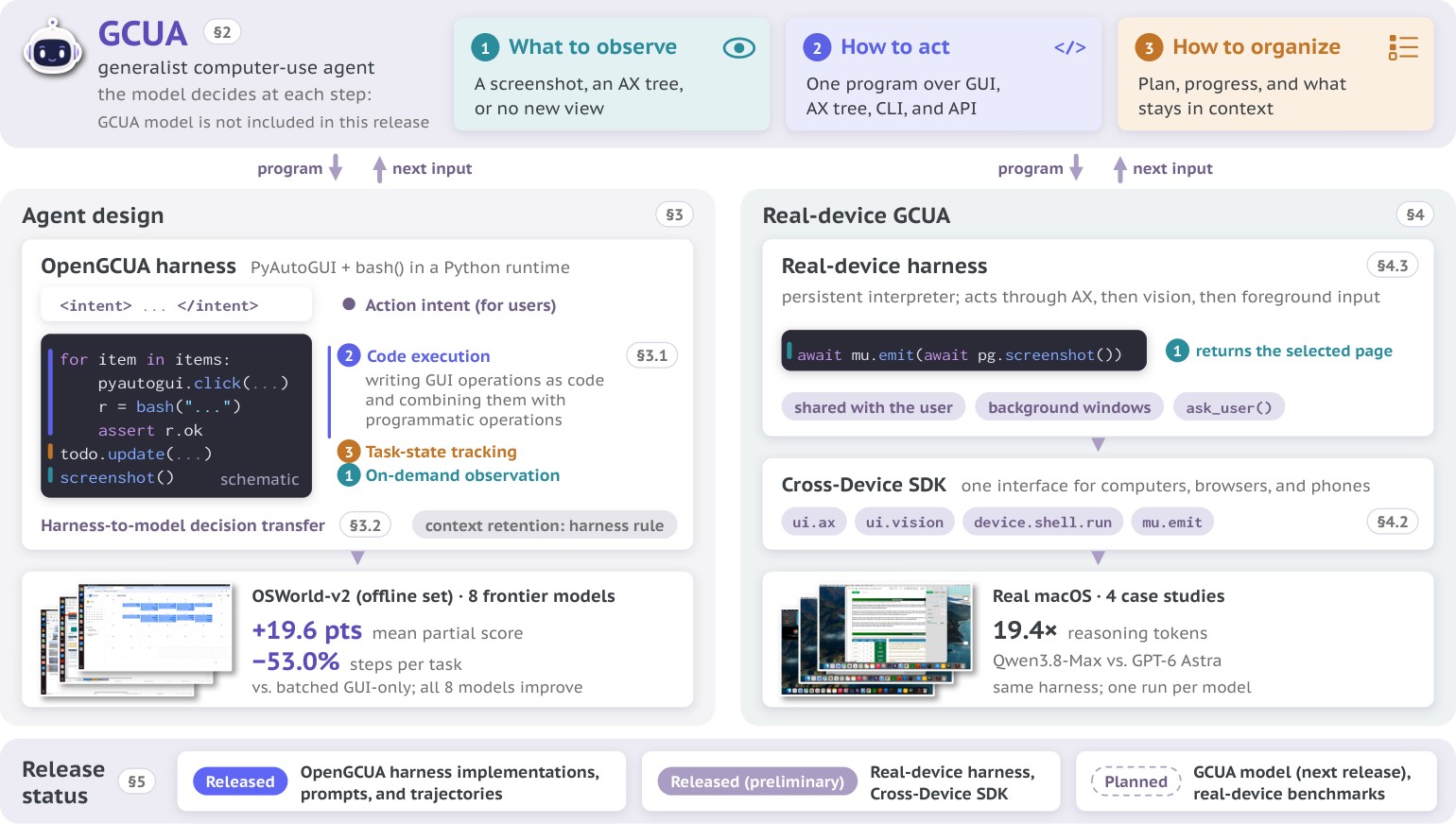
Figure 2: Overview of Open Generalist CUA.
图 2:Open Generalist CUA 概览。
This report presents the first release of the OpenGCUA project. The release does not yet include a trained model. The report covers agent design and evaluation, execution trajectories from frontier models, and preliminary versions of the real-device harness and cross-device SDK, together with a roadmap for subsequent releases. Our main contributions are as follows.
本报告给出 OpenGCUA 项目的第一版发布。这个版本还没有训练好的专用模型。报告覆盖智能体设计与评测、前沿模型的执行轨迹,以及本机运行框架与跨设备 SDK 的初步版本,并附上后续版本的路线图。主要贡献如下。
- • GCUA generalizes existing GUI, CLI, and hybrid agents. We define a GCUA by three decisions that its model makes at each step: what to observe, how to act, and how to organize its work. We show that GUI agents, CLI agents, multi-agent hybrids, and GUI+CLI agents such as Qwen-UI-Agent each fix some of these decisions in advance, and are special cases of GCUA (Section 2).
- • GCUA outperforms GUI-only CUA on every frontier model we test. We implement our GCUA agent design into the OpenGCUA harness, which lets existing models use code execution and harness-to-model decision transfer. We test it with eight frontier models, including GPT-6 Astra and Claude Opus 5. On the offline set of OSWorld-v2, the full GCUA setting raises the mean partial score by 19.6 points, cuts steps per task by 53.0%, and narrows the score gap between the strongest and weakest models by more than half. We release the implementation, prompts, and evaluation trajectories of all eight frontier models (Section 3).
- • Code execution adds value beyond shell access. With the same GUI and shell access, writing GUI operations as code and combining them with programmatic operations adds 6.1 points to the mean partial score and cuts steps per task by 14.8% against the GUI+CLI baseline. Code execution offers two advantages: intermediate results can decide the next operation without another model call, and models can bring their existing programming ability directly to computer interaction. We further identify five recurring patterns of code execution in our case study (Section 3.1).
- • Harness control should move into the model as models improve. Harnesses fix many workflow decisions by rule, such as taking a screenshot after every step. We propose harness-to-model decision transfer, which delegates these harness decisions to the model. In the current implementation, the model decides when to request screenshots and how to track task state. It also states each program’s purpose before execution. On-demand observation alone increases cache hit rates by 10.5 and 14.4 percentage points for two models without lowering task scores (Section 3.2).
- • On real devices, a large gap lies in the model. We release a preliminary real-device harness for users’ own computers, addressing challenges unseen in benchmarks, such as sharing the machine with its user and acting on background windows. With the harness held fixed, Qwen3.8-Max uses 19.4 times as many reasoning tokens as GPT-6 Astra on four real macOS tasks, and 5.7 times as many output tokens in total. Case studies trace this gap to model behavior: large reasoning cost for simple operations, difficulty adapting to real-device conditions and a gap in code execution capability (Section 4).
- • One Programming Interface for Computers, Browsers, and Phones. The preliminary Cross-Device SDK binds every operation to an explicit device, application, window, or tab, keeps accessibility and vision as separate ways to observe and act, and allows one program to coordinate several devices within a task (Section 4.2).
- • GCUA 概括已有的 GUI、CLI 与混合智能体。 我们用模型在每一步做的三项决策定义 GCUA:观察什么、如何行动、如何组织工作。我们表明:GUI 智能体、CLI 智能体、多智能体混合,以及 Qwen-UI-Agent 一类 GUI+CLI 智能体,各自预先固定了其中部分决策,因此都是 GCUA 的特例(第 2 节)。
- • 在我们测试的每个前沿模型上,GCUA 都优于仅 GUI 的 CUA。 我们把 GCUA 的智能体设计做进 OpenGCUA 运行框架,让现有模型也能用代码执行,以及把决策从框架下放到模型。测试覆盖八个前沿模型,包括 GPT-6 Astra 与 Claude Opus 5。在 OSWorld-v2 离线集上,完整 GCUA 设置把平均部分分提高 19.6 分,完成任务所需步数减少 53.0%,并把最强与最弱模型之间的分数差距缩小一半以上。我们公开实现、提示词,以及全部八个前沿模型的评测轨迹(第 3 节)。
- • 代码执行带来的价值超出单纯的 shell 访问。 在同样具备 GUI 与 shell 访问的前提下,把 GUI 操作写成代码并与程序化操作组合,相对 GUI+CLI 基线再把平均部分分提高 6.1 分,完成任务所需步数减少 14.8%。代码执行有两点好处:中间结果可以在不另一次调用模型的情况下决定下一步;模型可以把已有编程能力直接带到操作电脑上。案例研究进一步归纳出五种反复出现的代码执行模式(第 3.1 节)。
- • 模型变强之后,运行框架里的控制应逐步交给模型。 运行框架常按规则固定许多工作流决策,例如每一步后都截图。我们提出决策从框架下放到模型,把这些决策交给模型。当前实现里,模型决定何时请求截图、如何跟踪任务状态,并在执行前说明每个程序的目的。仅「按需观察」一项,就让两个模型的缓存命中率分别提高 10.5 与 14.4 个百分点,且不降低任务分数(第 3.2 节)。
- • 在真实设备上,巨大差距在模型一侧。 我们公开面向用户本机的初步运行框架,应对基准里见不到的挑战——例如与用户共享机器、操作后台窗口。在运行框架固定时,Qwen3.8-Max 在四项真实 macOS 任务上使用的推理 token 约为 GPT-6 Astra 的 19.4 倍,总输出 token 约为 5.7 倍。案例研究把差距追溯到模型行为:简单操作却耗大量推理、难以适应本机条件,以及代码执行能力不足(第 4 节)。
- • 电脑、浏览器与手机共用一套编程接口。 初步跨设备 SDK 把每个操作绑定到明确的设备、应用、窗口或标签页;把无障碍访问与视觉保留为分开的观察与行动方式;并允许一个程序在同一任务里协调多台设备(第 4.2 节)。
This release does not mark the project’s completion, and the harness and SDK remain preliminary. Section 5 outlines our research plans and release milestones for Open Generalist CUA.
这个版本并不等于项目完成,运行框架与 SDK 仍属初步。第 5 节概述 Open Generalist CUA 的研究计划与发布里程碑。
2 Generalist CUA: Definition and Positioning
2 通用 CUA:定义与定位
2.1 Definition
2.1 定义
Agents’ Last Exam takes a system-level view and decomposes an agent into five layers: the model (Brain), GUI perception (Eyes), orchestration (Body), tools (Hands), and a runtime (Feet) (Sun et al., 2026). Under this view, a CLI agent lacks GUI perception, a GUI agent lacks most of the remaining layers, and a generalist agent spans all five. Having all five layers, however, only means an agent can act through both the GUI and the CLI; it does not mean that the agent chooses well between them. At a given step, an agent may click through a dozen screens to do what a single shell command would do, or run a script when it first needs to look at the screen. The layer view cannot tell such an agent apart from one that picks the right way to act at each step. In this report, we therefore define a generalist CUA (GCUA) by the decisions it makes at each step, not by the components it contains.
Agents’ Last Exam 取系统级视角,把智能体拆成五层:模型(Brain)、GUI 感知(Eyes)、编排(Body)、工具(Hands)与运行时(Feet)(Sun et al., 2026)。按这套划分,CLI 智能体缺少 GUI 感知,GUI 智能体缺少其余大部分层,通用智能体则五层都有。可是「五层都有」只说明智能体能经 GUI 也能经 CLI 行动,并不说明它在二者之间选得好。某一步里,智能体可能点十几屏,去做一条 shell 命令就能做完的事;也可能明明该先看屏幕,却先去跑脚本。层视角分不出这种智能体,与每一步都选对行动方式的智能体。因此本报告中,我们用每一步做出的决策来定义通用 CUA(GCUA),而不是用它包含哪些组件。
A GCUA makes three decisions at each step: what to observe, how to act, and how to organize.
GCUA 在每一步做三项决策:观察什么、如何行动、如何组织。
- • What to Observe. The observation can be a screenshot, an accessibility tree (AX Tree), the output of a command, the response of an API, or any combination of these. The model decides which it needs, including whether it needs a new screenshot at all.
- • How to Act. The action can be a GUI operation at a screen coordinate, an operation on an accessibility element, a shell command, an API call, or a program that combines several of these. The model decides which fits the step.
- • How to Organize. Across steps, the agent keeps a plan, tracks what has been done, and decides which past observations stay in context. Most harnesses fix these as rules set by the developer. In a GCUA, the model makes these decisions as the task requires.
- • 观察什么。 观测可以是截图、无障碍树(AX Tree)、命令输出、API 响应,或它们的任意组合。模型决定需要哪些,也包括要不要新截图。
- • 如何行动。 动作可以是屏幕坐标上的 GUI 操作、对无障碍元素的操作、shell 命令、API 调用,或把其中若干项组合起来的程序。模型决定这一步用哪一种。
- • 如何组织。 跨越多步时,智能体要保持计划、跟踪已完成内容,并决定哪些过去的观测留在上下文里。多数运行框架把这些写成开发者定死的规则。在 GCUA 里,模型按任务需要自己做这些决策。
Four Interfaces.
The first two decisions range over four interfaces to the computer, and each offers both a way to observe and a way to act.
四种接口。
前两项决策覆盖通往电脑的四种接口;每种接口既提供观察方式,也提供行动方式。
- • GUI. The agent sees a screenshot and clicks, drags, scrolls, or types at a screen coordinate. This is the interface that always works, since every application has pixels.
- • Accessibility Tree. The agent reads the elements of a window, with their roles, names, and values, and operates on an element directly. It needs no coordinate, does not bring the window to the front, and never moves the user’s pointer on real devices.
- • CLI. The agent runs shell commands and reads their output. This is the natural route for files, data, and software.
- • API. The agent calls external services, such as web search, and reads their responses. This reaches what neither the screen nor the shell can.
- • GUI。 智能体看到截图,在屏幕坐标上点击、拖拽、滚动或输入。这是总能用的接口——每个应用都有像素。
- • 无障碍树。 智能体读取窗口元素及其角色、名称与值,直接操作元素。不需要坐标,不必把窗口置前,在真实设备上也从不挪动用户的指针。
- • CLI。 智能体运行 shell 命令并读取输出。处理文件、数据与软件时,这是自然路径。
- • API。 智能体调用外部服务(例如网络搜索)并读取响应。这能触及屏幕与 shell 都够不到的内容。
Each interface offers both a way to observe and a way to act, and each has its own strength. No single interface is best for every step, so what matters is choosing the right one at each step and combining them when a step needs more than one.
每种接口都既能观察也能行动,且各有所长。没有哪一种接口对每一步都最好;关键是每一步选对接口,并在一步需要多种能力时把它们组合起来。
Putting these together yields the definition used throughout the report: A GCUA is an agent system designed to complete diverse computer tasks through both visual interaction and programmatic access, in which the model decides how to observe, act, and organize its work as the task requires. This definition refines that of ALE rather than replacing it. Visual interaction and programmatic access require all five layers, and our definition further asks who makes the decisions within them.
由此得到全文使用的定义:GCUA 是一套智能体系统,既靠视觉交互也靠程序化访问完成多样电脑任务;模型按任务需要,自行决定如何观察、行动与组织工作。这一定义是在细化 ALE 的定义,而不是取代它。视觉交互与程序化访问需要全部五层;我们的定义进一步追问:层内的决策由谁来做。
Formalization.
Let be the state of the computer at step , the agent’s working state, and the observation returned by the previous step, with containing the task instruction. At each step, a GCUA policy makes the three decisions jointly:
形式化。
令 为第 步的电脑状态, 为智能体的工作状态, 为上一步返回的观测,且 含任务指令。在每一步,GCUA 策略 联合做出三项决策:
What to observe: CLI/API output is returned automatically. The model selects additional views through , where means that no additional view is requested. How to act: is a program whose statements call primitives in and may use loops, branches, and variables. A single primitive call is the simplest program. How to organize its work: is the updated working state, including the plan, the record of progress, and the observations kept in context. Executing moves the computer to and produces an execution output , such as command output or API responses. The next observation is
观察什么: CLI/API 输出会自动返回。模型经 选择额外视图; 表示不请求额外视图。如何行动: 是一段程序,语句调用 中的原语,并可用循环、分支与变量。单次原语调用就是最简单的程序。如何组织工作: 是更新后的工作状态,包括计划、进度记录,以及保留在上下文中的观测。执行 把电脑推进到 ,并产生执行输出 (例如命令输出或 API 响应)。下一观测为
where renders view of the computer state. The model therefore observes both the views it requests through , such as a screenshot or an accessibility tree, and what its program prints in .
其中 渲染电脑状态的视图 。因此模型既看到经 请求的视图(如截图或无障碍树),也看到程序在 里打印的内容。
A Special Case: GUI+CLI Agents.
Our recent GUI+CLI agent, Qwen-UI-Agent (Zhou et al., 2026), released shortly before GPT-6 Astra, is an instructive special case of Eq. (1). It places GUI and CLI actions in one action space and lets the model emit a batch of several actions in one call. In our notation, it fixes
特例:GUI+CLI 智能体。
我们近期的 GUI+CLI 智能体 Qwen-UI-Agent(Zhou et al., 2026)在 GPT-6 Astra 前不久发布,正好用来说明式 (1)——它是其中的一个特例。它把 GUI 与 CLI 动作放进同一动作空间,并让模型在一次调用里发出一批动作。用我们的记号,它固定
where is a fixed harness rule, such as keeping the last screenshots. The model already chooses, action by action, whether to click or to run a command, and this alone improved both success and efficiency over GUI-only execution. GCUA lifts each of these three constraints. Where the GUI+CLI agent emits a fixed sequence , a GCUA writes a program over the full set , which adds accessibility and API operations as well as loops, branches, and variables. Inside such a program, a click, an accessibility operation, a shell command, and an API call are simply four kinds of statements. Where the GUI+CLI agent receives a screenshot after every step, a GCUA decides which views to request, including none at all. And where the GUI+CLI agent follows the harness rule , a GCUA decides for itself what to keep in its working state. In our formulation, batched GUI+CLI hybrid agents are a restricted case of GCUA.
其中 是固定的运行框架规则,例如只保留最近 张截图。模型已经能按动作选择「点一下」还是「跑一条命令」;仅此一项,相对仅 GUI 的执行,就已经同时改进成功率与效率。GCUA 解除这三项约束。GUI+CLI 智能体发出固定序列 ;GCUA 则在全集 上写程序,加入无障碍与 API 操作,以及循环、分支与变量。在这样的程序里,点击、无障碍操作、shell 命令与 API 调用只是四类语句。GUI+CLI 智能体每一步都会收到截图;GCUA 自己决定请求哪些视图,也可以一个都不要。GUI+CLI 智能体遵循运行框架规则 ;GCUA 自己决定工作状态里保留什么。在我们的表述中,批量 GUI+CLI 混合智能体是 GCUA 的受限情形。
2.2 Relation to Existing Agents
2.2 与已有智能体的关系
The formalization in Eq. (1) also lets us compare GCUA with existing agents. Each existing family can be written in the same form, except that some of the three decisions (what to observe, how to act, and how to organize) are fixed in advance instead of being made by the model at each step. Table 1 lists what each family fixes, and the paragraphs below discuss each family in turn.
式 (1) 的形式化也方便我们比较 GCUA 与已有智能体。每一类已有智能体都可以写成同一形式,只是三项决策(观察什么、如何行动、如何组织)里有一部分被预先固定,而不是由模型在每一步做出。表 1 列出各类固定了什么;下文分段讨论。
| Decision at each step | ||||
|---|---|---|---|---|
| Family | What to observe | How to act | How to organize | Interface choice |
| GUI agent | Screenshot only | One GUI action | Harness rule, e.g., last screenshots | No choice (GUI only) |
| CLI agent | Command output only , only | Shell commands and scripts program over | Partly by the model, e.g., context summaries | No choice (shell only) |
| Multi-agent hybrid | Fixed for each sub-agent | Fixed for each sub-agent over | Split between orchestrator and sub-agents | Orchestrator, per subtask |
| Qwen-UI-Agent (GUI+CLI) | Screenshot every step, plus command output when a command runs , plus | A batch of GUI and CLI actions sequence over | Harness rule | Model, per action (GUI or shell) |
| GCUA | Chosen per step, plus program output , plus | Program over all interfaces program over | Decided by the model | Model, per step |
Table 1: Existing agent families and GCUA compared on the three decisions. Gray text gives the formal notation. The observation after each step contains the views selected by and the execution output (Eq. 2). Existing families fix some of these decisions in advance. The shaded rows mark the path this report follows, from our earlier GUI+CLI agent to GCUA, in which the model makes all three decisions at each step.
| 每步决策 | ||||
|---|---|---|---|---|
| 类别 | 观察什么 | 如何行动 | 如何组织 | 接口选择 |
| GUI 智能体 | 仅截图 | 一次 GUI 动作 | 运行框架规则,如最近 张截图 | 无选择(仅 GUI) |
| CLI 智能体 | 仅命令输出 ,只有 | shell 命令与脚本,程序覆盖 | 部分由模型决定,如上下文摘要 | 无选择(仅 shell) |
| 多智能体混合 | 每个子智能体固定 | 每个子智能体固定, 覆盖 | 在编排器与子智能体之间分割 | 编排器按子任务选择 |
| Qwen-UI-Agent(GUI+CLI) | 每步截图;命令运行时再加命令输出 ,加 | GUI 与 CLI 动作批量,序列覆盖 | 运行框架规则 | 模型按动作选择(GUI 或 shell) |
| GCUA | 每步自选,再加程序输出 ,加 | 覆盖全部接口的程序,覆盖 | 由模型决定 | 模型每步选择 |
表 1:已有智能体类别与 GCUA 在三项决策上的比较。灰色文字给出形式记号。每步后的观测含 所选视图与执行输出 (式 2)。已有类别预先固定其中部分决策。阴影行标出本报告的路径:从我们更早的 GUI+CLI 智能体,走到由模型在每一步做全部三项决策的 GCUA。
GUI Agents.
A GUI agent fixes all three decisions (Qin et al., 2025; Wang et al., 2025b; Lu et al., 2026). It always observes a screenshot, so . It acts through one GUI operation per step, so is a single primitive in . Its working state follows a harness rule , such as keeping the last screenshots. The model still chooses where to click, but not what to observe, which interface to use, or what to keep.
GUI 智能体。
GUI 智能体固定全部三项决策(Qin et al., 2025; Wang et al., 2025b; Lu et al., 2026)。它总是观测截图,故 。它每一步经一次 GUI 操作行动,故 是 中的单个原语。其工作状态遵循运行框架规则 ,例如只保留最近 张截图。模型仍选择点哪里,但不选择观察什么、用哪个接口,或保留什么。
CLI Agents.
A CLI agent fixes what it observes and restricts how it acts. It has no view of the screen, so and it sees only the execution output . It acts only through the shell, so is a program over . It is more flexible than a GUI agent. Its commands and scripts can use loops, branches, and variables. Recent coding agents also let the model decide part of how it organizes its work, for example by summarizing earlier context when it grows long (Anthropic, 2025; OpenAI, 2025). What a CLI agent cannot do is operate an application that can only be used through its graphical interface. Agent frameworks such as OpenClaw support more than the shell, but they also come without built-in GUI control (Sun et al., 2026).
CLI 智能体。
CLI 智能体固定观察内容,并限制行动方式。它看不到屏幕,故 ,只看到执行输出 。它只经 shell 行动,故 是覆盖 的程序。它比 GUI 智能体更灵活:命令与脚本可用循环、分支与变量。近期的编码智能体也让模型决定部分「如何组织工作」,例如在上下文变长时摘要更早内容(Anthropic, 2025; OpenAI, 2025)。CLI 智能体做不到的是:操作只能经图形界面使用的应用。OpenClaw 一类智能体框架支持的不只是 shell,但也没有内置 GUI 控制(Sun et al., 2026)。
Multi-Agent Hybrid Systems.
Some recent systems combine GUI and programmatic control by dividing the work among several agents. For example, an orchestrator splits a task into subtasks and sends each one to either a GUI operator or a programmer (Song et al., 2026). Each sub-agent has its own fixed interface. The GUI operator sees screenshots and acts through GUI operations, and the programmer writes and runs code. In terms of Eq. (1), while sub-agent handles a subtask, and are limited to its own sets and . Together, the sub-agents cover the same interfaces as a GCUA. The difference is where the choice of interface is made. In these systems, the orchestrator makes it once per subtask. In a GCUA, a single model makes it at every step, and one program can combine several interfaces.
多智能体混合系统。
一些近期系统通过在多个智能体之间分工,把 GUI 与程序化控制组合起来。例如,编排器把任务拆成子任务,再分别送给 GUI 操作者或程序员(Song et al., 2026)。每个子智能体有自己的固定接口:GUI 操作者看截图、经 GUI 操作行动;程序员写代码并运行。就式 (1) 而言,当子智能体 处理子任务时, 与 限于其自己的集合 与 。子智能体合起来覆盖的接口与 GCUA 相同。差别在于接口选择在哪里做出:这些系统里,编排器按子任务做一次;在 GCUA 里,单一模型在每一步做出,且一个程序可以组合多种接口。
2.3 Why Now: The Route Flip to Code Execution
2.3 为何是现在:路线转向代码执行
In 2026, the frontier began to shift from clicking toward programming, and the shift is visible in vendor documentation rather than only in benchmark scores. With the release of GPT-6 Astra, OpenAI’s computer-use guide began recommending that models write and run short programs, for example with PyAutoGUI or Playwright, rather than rely primarily on the earlier computer tool for mouse and keyboard actions (OpenAI, 2026b). The guide’s examples reflect this shift: the computer tool still targets the previous model (i.e., GPT-5.6 Sol), while code-execution examples use GPT-6 Astra. A similar pattern appears on OSWorld-v2, where frontier agents perform more actions through code, APIs, and file operations rather than clicks (Yuan et al., 2026). OpenAI also reports that GPT-6 Astra completes OSWorld 2.0 tasks in about 47% less time than GPT-5.6 Sol and is 1.9 faster on Mind2Web (OpenAI, 2026c). OpenAI does not say how much of this gain comes from code execution, but it is the kind of gain one would expect when each model call does more work.
2026 年,前沿开始从「点击」转向「编程」;这一转变写在厂商文档里,而不只出现在基准分数上。GPT-6 Astra 发布后,OpenAI 的 ComputerUse 指南开始建议模型编写并运行短程序(例如用 PyAutoGUI 或 Playwright),而不是主要依赖更早的键鼠电脑工具(OpenAI, 2026b)。指南里的示例也反映这一转变:电脑工具仍面向前一模型(即 GPT-5.6 Sol),代码执行示例则用 GPT-6 Astra。类似模式出现在 OSWorld-v2:前沿智能体更多经代码、API 与文件操作行动,而不是靠点击(Yuan et al., 2026)。OpenAI 还报告:GPT-6 Astra 完成 OSWorld 2.0 任务的时间约比 GPT-5.6 Sol 少 47%,在 Mind2Web 上快 1.9(OpenAI, 2026c)。OpenAI 没有说明增益有多少来自代码执行,但这正是「每次模型调用完成更多工作」时会预期的一类增益。
Code Execution versus Batched Actions. With batched actions, each model call yields a list of actions that were fixed when the call was generated: the model must decide every click before it sees the result of the first one. With code execution, each model call yields a program, and control flow is decided while the program runs. Three things become possible in a single call that were impossible before: a condition (if the dialog is visible, dismiss it), a loop (for each row, fill the three fields), and a verification (assert the status now reads Saved). A task that took a dozen round trips becomes one. This is also why batched actions, which our earlier work introduced (Zhou et al., 2026), are a stepping stone rather than an endpoint: a batch is a program without control flow.
代码执行对比批量动作。 在批量动作下,每次模型调用产出一份在调用生成时就已定死的动作列表:模型必须在看到第一次点击结果之前,就决定每一次点击。在代码执行下,每次模型调用产出一段程序,控制流在程序运行时决定。一次调用里变得可能、而此前不可能的有三件事:条件(若对话框可见则关闭)、循环(对每一行填写三个字段),以及验证(断言状态现为 Saved)。原先需要十几轮往返的任务,可以压成一次。这也是为何我们更早工作引入的批量动作(Zhou et al., 2026)是过渡形态而不是终点:批量相当于没有控制流的程序。
2.4 Efficiency as a First-Class Metric
2.4 把效率当作一等指标
Success rate remains our primary measure, but it does not capture the resources required to complete a task. For interactive tasks, an important threshold is reached when delegation delivers results sooner than manual execution, potentially saving both human effort and time to completion. We therefore evaluate efficiency using four metrics: steps per task, output tokens, reasoning tokens, and cost.
成功率仍是我们的主度量,但它反映不出完成任务所需的资源。对交互任务来说,当把任务交给智能体比自己动手更快交付结果时,就跨过一条重要门槛——既可能省人力,也可能缩短完成时间。因此我们用四项指标评估效率:完成任务所需步数、输出 token、推理 token 与成本。
Each step is one model call, which may generate multiple actions through batching or code execution. Fewer steps reduce model-call overhead, while fewer output tokens can lower generation time and cost. Reasoning tokens are included in output tokens but reported separately. When reasoning accounts for a large share of output, reducing unnecessary reasoning can improve efficiency without shortening the executable code, provided task performance is maintained. We compute cost from input and output token usage at each model’s published prices, including cache discounts.
每一步是一次模型调用,可通过批量或代码执行生成多个动作。步数更少,模型调用开销更低;输出 token 更少,生成时间与成本也可能更低。推理 token 计入输出 token,但单独报告。当推理占输出很大份额时,在保持任务表现的前提下减少不必要推理,可以在不缩短可执行代码的情况下改进效率。我们按各模型公布价格,用输入与输出 token 用量计算成本,并计入缓存折扣。
3 Agent Design: Code Execution and Harness-to-Model Decision Transfer
3 智能体设计:代码执行与决策从框架下放到模型
This section studies two behaviors we aim to develop in GCUA models. The first is code execution, which concerns how to act: the model combines graphical interaction and programmatic operations within a single program. The second is harness-to-model decision transfer, which concerns what to observe and how to organize: the model makes selected workflow control decisions that a harness would otherwise fix with rules, such as when to look at the screen and how to organize task state. This release does not introduce a trained model. Instead, we study how the prompts, tool interfaces, and execution runtime of Open Generalist CUA support these behaviors in existing frontier models. We first explain the design and illustrate it with execution trajectories, then evaluate its effects on task completion and cost.
本节研究我们希望在 GCUA 模型里养成的两类行为。第一是代码执行,对应「如何行动」:模型在单一程序里组合图形交互与程序化操作。第二是决策从框架下放到模型,对应「观察什么」与「如何组织」:模型接手本可由运行框架用规则定死的若干工作流控制决策,例如何时看屏幕、如何组织任务状态。本版本不引入训练好的专用模型。我们转而研究:Open Generalist CUA 的提示词、工具接口与执行运行时,如何在现有前沿模型里支撑这些行为。我们先说明设计,并用执行轨迹举例,再评估它对任务完成与成本的影响。
3.1 Code Execution over GUI and CLI
3.1 覆盖 GUI 与 CLI 的代码执行
Code execution gives graphical interaction and programmatic operations a unified executable form. The model writes a program in which GUI actions, such as pyautogui.click(), can be combined with shell commands and Python computation. The model can therefore specify not only what operations to perform, but also how execution should proceed. Loops and conditional logic allow the program to repeat operations and choose subsequent actions based on intermediate results, without requiring a new model call for each operation. On OSWorld-v2, this design improves Qwen3.8-Max’s mean task score by 5.2 points and reduces steps per task by 17.0% relative to a hybrid CUA baseline with batched GUI+CLI actions (Section 3.3).
代码执行给图形交互与程序化操作一套统一的可执行形式。模型写程序时,可以把 GUI 动作(例如 pyautogui.click())与 shell 命令、Python 计算写在一起。因此模型不仅规定「做什么」,也规定「执行怎么推进」。循环与条件逻辑让程序能根据中间结果重复操作、选择后续动作,而不必为每一次操作再调用一次模型。在 OSWorld-v2 上,相对带批量 GUI+CLI 动作的混合 CUA 基线,该设计把 Qwen3.8-Max 的平均任务分数提高 5.2 分,完成任务所需步数减少 17.0%(第 3.3 节)。
3.1.1 Implementation
Prompt Design. The system prompt specifies the programming interfaces and output format for code execution. The OSWorld-v2 configuration specifies PyAutoGUI for desktop interaction and the Python function bash() for executing shell commands. The prompt for the real-device harness additionally describes Playwright for browser interaction. The prompt requires one Python program in a block per step and includes examples that combine interface operations, shell commands, and checks on intermediate results. The full prompt is given in Appendix C.
3.1.1 实现
提示设计。 系统提示规定代码执行的编程接口与输出格式。OSWorld-v2 配置指定用 PyAutoGUI 做桌面交互,用 Python 函数 bash() 执行 shell 命令。本机运行框架的提示还会额外说明用 Playwright 做浏览器交互。提示要求每一步在一个 块里给出一个 Python 程序,并附上把接口操作、shell 命令与中间结果检查组合起来的示例。完整提示见附录 C。
Program Execution. The harness extracts and syntax-checks the code block, then executes it in the computer environment. The runtime supports desktop interaction through PyAutoGUI and, in the real-device harness, browser interaction through Playwright. Shell commands execute through bash(), which returns command output and exit status. The Python control flow coordinates these calls, allowing loops and conditions to combine GUI and shell operations within one program.
程序执行。 运行框架抽出代码块、做语法检查,再在电脑环境里执行。运行时经 PyAutoGUI 支持桌面交互;在本机运行框架里,还经 Playwright 支持浏览器交互。shell 命令经 bash() 执行,返回命令输出与退出状态。Python 控制流协调这些调用,使循环与条件能在同一个程序里组合 GUI 与 shell 操作。
Execution Feedback. The harness returns captured standard output, standard error, and execution status to the model. With on-demand observation enabled, observations include a new screenshot when the program requests one through the screenshot() action. The real-device harness additionally returns accessibility-tree observations when requested by the model. We have open-sourced both the preliminary real-device harness and the code execution harness.
执行反馈。 运行框架把捕获的标准输出、标准错误与执行状态返回给模型。启用按需观察时,若程序经 screenshot() 动作请求,观测里会带上新截图。本机运行框架在模型请求时还会返回无障碍树观测。我们已开源初步的本机运行框架,以及代码执行运行框架。
3.1.2 Representative Code-Execution Patterns
The implementation specifies what a program can contain, but we want to see how models actually write programs to solve concrete tasks. We therefore examine GPT-6 Astra on OSWorld-v2, and find five recurring patterns in how its programs connect actions, intermediate results, and model observations. The examples illustrate complementary uses of code, rather than mutually exclusive categories or isolated performance gains.
3.1.2 代表性代码执行模式
实现规定了程序可以装什么;我们还想看模型怎样真正写程序去解具体任务。因此我们查看 GPT-6 Astra 在 OSWorld-v2 上的轨迹,并在其程序如何连接动作、中间结果与模型观测里,归纳出五种反复出现的模式。这些例子说明代码的互补用法,而不是互斥类别,也不是单独某一项带来的分数增益。
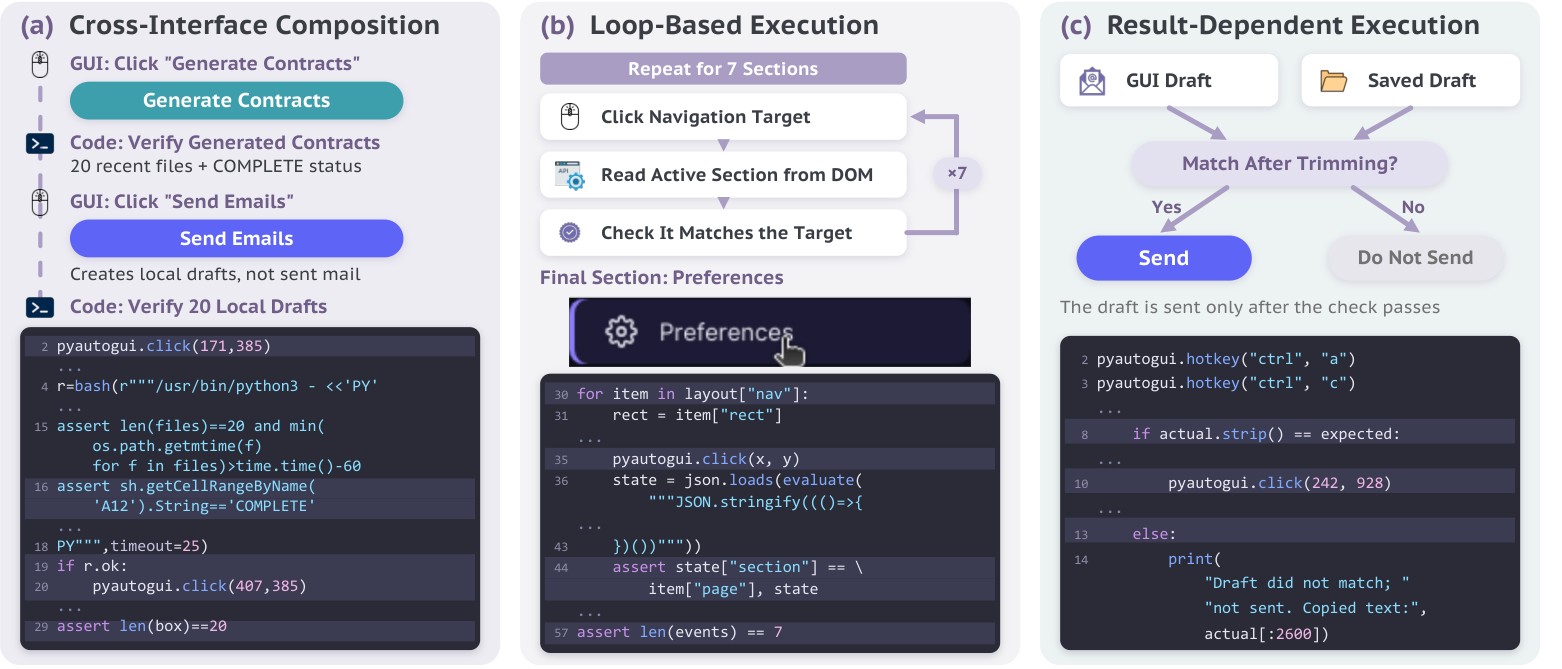
Figure 3: Programs coordinate actions and checks. (a) GUI clicks alternate with checks of generated contracts and local drafts. (b) A loop visits seven webpage sections and checks each active section through the DOM. (c) A draft comparison determines whether to click Send, without verifying delivery.
图 3:程序协调动作与检查。 (a) GUI 点击与生成合同、本地草稿的检查交替进行。(b) 循环访问七个网页区段,经 DOM 检查每个活动区段。(c) 草稿比较决定是否点击 Send,不验证是否送达。
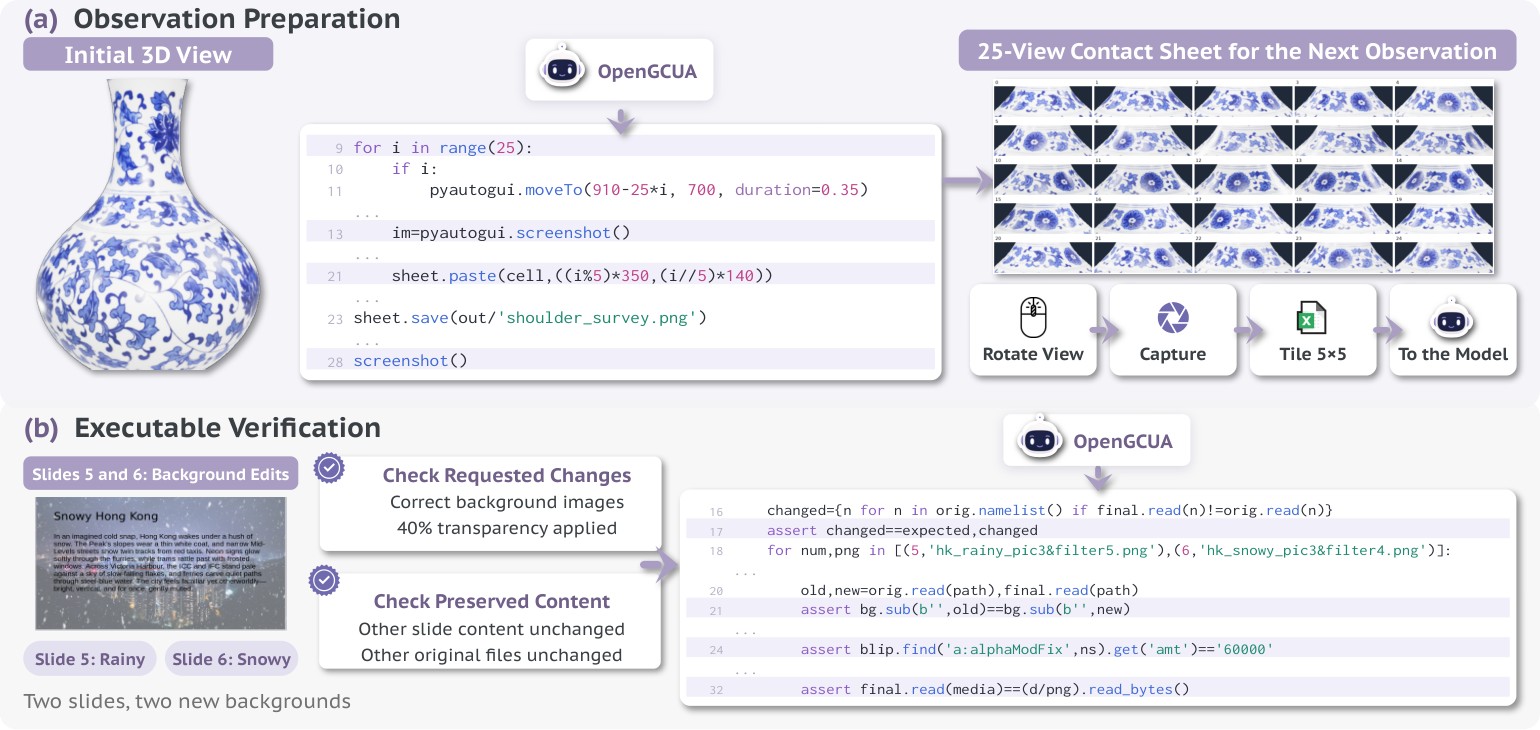
Figure 4: Programs prepare and verify evidence. (a) A program assembles 25 views into a contact sheet for the model’s next observation. (b) Assertions check background images and transparency, and verify that non-background content remains unchanged.
图 4:程序准备并核验证据。 (a) 程序把 25 个视图拼成联系表,供模型下一步观测。(b) 断言检查背景图与透明度,并核验非背景内容保持不变。
Cross-Interface Composition. A single program can use information from one interface to guide operations through another. A program can alternate between GUI actions and programmatic checks within one model step. In a contract-generation task, the agent clicks a spreadsheet button, reads the application’s completion status, and checks the output files. Only after these checks pass does it click a second button to create local email drafts, which it then inspects programmatically. This example connects GUI execution with structured feedback from both the application and its files (Figure 3a).
跨接口组合。 单一程序可以用一个接口拿到的信息,去引导另一个接口上的操作;也可以在同一次模型步里,在 GUI 动作与程序化检查之间来回切换。在合同生成任务中,智能体点击电子表格按钮,读取应用完成状态,并检查输出文件。这些检查通过之后,才点击第二个按钮创建本地邮件草稿,再做程序化检查。该例把 GUI 执行,与来自应用及其文件的结构化反馈连在一起(图 3a)。
Loop-Based Execution. Loops let the model specify a procedure once and repeat it across multiple targets within one program. Unlike a fixed action list, the targets and number of iterations can be determined during execution, for example from file contents or application state. This allows repeated work to proceed without generating a separate action sequence or making a new model call for each iteration. To record a website walkthrough, the agent iterates over seven navigation targets, clicks each target, and reads the active section from the DOM. An assertion checks that the resulting section matches the intended target before the loop continues. The program handles all seven visits and checks without returning to the model between iterations (Figure 3b).
基于循环的执行。 循环让模型一次写明过程,并在一个程序里对多个目标重复。与固定动作列表不同,目标与迭代次数可以在执行期间决定——例如来自文件内容或应用状态。这样,重复工作不必为每一次迭代另生成动作序列,也不必再调用一次模型。为记录网站导览,智能体迭代七个导航目标:点击每个目标,并从 DOM 读取活动区段;断言在循环继续前检查所得区段是否匹配目标。程序处理全部七次访问与检查,而不在迭代之间返回模型(图 3b)。
Result-Dependent Execution. Conditional logic lets the program respond to what happens during execution. It can inspect command output or application state, check a result, and decide whether to continue. Such decisions can remain within the program when their conditions are computable, rather than requiring the model to interpret each intermediate result. A local check can determine whether a GUI action should proceed. Before sending an email reply, the agent copies the draft from the interface and compares it with a saved version after trimming leading and trailing whitespace. Its program clicks Send only if the texts match and reports a mismatch otherwise. The recorded execution follows the matching branch, but delivery is not verified within this step (Figure 3c).
依赖结果的执行。 条件逻辑让程序能响应执行中发生的事:检查命令输出或应用状态、核对结果,再决定是否继续。当条件可计算时,这类决策可以留在程序里,不必让模型解释每一个中间结果。本地检查也可以决定 GUI 动作该不该继续。发送邮件回复前,智能体从界面复制草稿,去掉首尾空白后与保存版本比较;仅当文本匹配时才点击 Send,否则报告不匹配。记录的执行走匹配分支,但本步不验证是否送达(图 3c)。
Observation Preparation. Programs can gather and organize evidence for the next model decision. They can collect multiple views, crop relevant regions, or arrange images into a visual summary. This extends code execution from performing actions to preparing observations that the model can then interpret. While inspecting a three-dimensional object, the agent collects 25 views, crops the relevant region from each, and assembles a numbered contact sheet. It opens this sheet and requests one new visual observation. The program collects and arranges views for the model’s visual judgment (Figure 4a).
观测准备。 程序可为下一步模型决策收集并整理证据:收集多个视图、裁剪相关区域,或把图像排成视觉摘要。这把代码执行从「执行动作」扩展到「准备模型随后可解释的观测」。检查三维物体时,智能体收集 25 个视图,从每个裁剪相关区域,拼成编号联系表;再打开该表并请求一次新的视觉观测。程序为模型的视觉判断收集并排列视图(图 4a)。
Executable Verification. Programs can check both intended changes and content that should remain unchanged. After editing two slide backgrounds, the agent compares the original and saved presentation packages. It checks the expected changes, verifies that the other 64 original package entries are unchanged, and compares slide content outside the background elements. These assertions make selected preservation requirements explicit, but do not replace independent evaluation (Figure 4b).
可执行核验。 程序既能检查预期变化,也能检查本应保持不变的内容。编辑两页幻灯片背景后,智能体比较原始与保存的演示包:核对预期变化,核验其余 64 个原始包条目未变,并比较背景元素之外的幻灯片内容。这些断言把选定的「保持不变」要求说清楚,但不能代替独立评测(图 4b)。
These examples show a useful division of work: programs execute locally specified operations and checks, while the model chooses the procedure and interprets evidence that still requires judgment.
这些例子勾勒出一种有用的分工:程序执行局部规定的操作与检查;模型选择过程,并解释仍需判断的证据。
3.1.3 Limits of Visual-Only Feedback
Result-dependent control is harder when interface observations are limited to screenshots. Conditions such as whether a button is enabled or an input field contains the expected value are not directly exposed as program-readable values, so checking them may require another model call. Accessibility trees can expose text and control states as structured data, allowing programs to query supported interface properties and use them in loops and conditional logic. This motivates combining visual observation with accessibility-tree access in our real-device harness design.
3.1.3 仅靠视觉反馈的局限
当接口观测只剩截图时,依赖结果的控制更难做。按钮是否启用、输入框是否含有预期值——这类条件并不直接暴露为程序可读值,检查它们往往要再调用一次模型。无障碍树可以把文本与控件状态暴露成结构化数据,让程序查询支持的接口属性,并用于循环与条件逻辑。这也是我们在本机运行框架设计里,把视觉观测与无障碍树访问合起来用的动机。
3.2 Harness-to-Model Decision Transfer
3.2 决策从框架下放到模型
Code execution addresses how to act by allowing the model to express computer operations as programs. A GCUA must also decide what to observe and how to organize its work. We study harness-to-model decision transfer: replacing selected fixed harness rules with task-dependent model decisions. A screenshot, for example, may be necessary after a GUI action but redundant when program output already answers the relevant question. Deciding whether to request it should depend on the information needed to continue.
代码执行通过让模型把 ComputerUse 写成程序,解决的是如何行动。GCUA 还必须决定观察什么,以及如何组织工作。我们研究决策从框架下放到模型:用依赖任务的模型决策,替换运行框架里若干固定规则。例如,截图在 GUI 动作之后往往必要;但当程序输出已经回答相关问题时,再截一张就多余。要不要请求,应取决于继续前进还需要什么信息。
Mechanism in the Harness, Decision in the Model. As models become more capable, we envision progressively shifting selected workflow decisions from fixed harness rules to the model. The harness should provide reliable mechanisms, while the model decides when and how to use them based on the task and available evidence. In the current implementation, screenshot requests and task-state updates are model-initiated workflow operations, complemented by model-generated action-intent annotations. The harness continues to execute interface calls, preserve task records, and manage context retention.
机制放在运行框架,决策交给模型。 随着模型变强,我们设想把选定的工作流决策,逐步从固定的运行框架规则移交到模型。运行框架应提供可靠机制;模型根据任务与可用证据,决定何时、如何使用它们。当前实现里,截图请求与任务状态更新由模型发起,并辅以模型生成的动作意图标注。运行框架继续执行接口调用、保留任务记录,并管理上下文如何留存。
3.2.1 Mechanisms for Harness-to-Model Decision Transfer
On-Demand Observation. The screenshot function lets the model decide whether its next input needs a new screenshot. It can request visual feedback after a GUI action or continue without it when text output is sufficient. On-demand observation can reduce context length by omitting screenshots that add little information. The environment still captures a screenshot after every step, so the mechanism changes what the model receives, not what the environment records.
3.2.1 决策从框架下放到模型的机制
按需观察。 截图函数让模型决定:下一步输入要不要新截图。它可以在 GUI 动作后请求视觉反馈;也可以在文本输出已够时继续,不再请求。按需观察可通过省略信息量很少的截图来缩短上下文。环境仍在每一步后捕获截图——该机制改变的是模型收到什么,而不是环境记录什么。
Task-State Tracking. The todo interface lets the model maintain a persistent record of progress, facts, and unresolved questions. It updates this record through todo.update() and retrieves it through todo.list(). Statuses distinguish pending work, attempted changes, unverified changes, and claimed verification, helping the model track what still needs checking. These entries record the model’s assessment rather than independently verifying the environment.
任务状态跟踪。 todo 接口让模型维护一份关于进度、事实与未决问题的持久记录:经 todo.update() 更新,经 todo.list() 检索。状态区分待办、已尝试更改、未验证更改与声称已验证,帮助模型跟踪还要检查什么。这些条目记录的是模型的评估,而不是对环境的独立核验。
Action Intent. The intent annotation makes the purpose of each code-execution step explicit. Before each program runs, the model provides a short block stating what the code is intended to accomplish. A program may combine many operations, making its overall purpose difficult to infer from the code alone. In real-device use, the harness can display this description to users, helping them understand what the agent is trying to do at each step without reading the program.
动作意图。 意图标注说明每一步代码执行的目的。每个程序运行前,模型提供一段简短 ,说明代码打算完成什么。程序可能组合许多操作,单看代码很难推断总体目的。在本机使用时,运行框架可以把这段说明展示给用户,让他们不必读程序,也能明白智能体这一步想做什么。
Harness-Managed Context. The harness manages historical tool outputs and screenshots through two fixed policies. A rolling screenshot buffer removes older images in batches, limiting visual context while reducing disruption to prompt caching (Anthropic, 2026a). Micro-compaction applies a similar rolling-buffer policy to textual tool outputs, replacing older outputs with short placeholders in batches while retaining recent results. These retention decisions remain with the harness, complementing the model’s choices about when to obtain new observations and how to track task progress.
由运行框架管理的上下文。 运行框架用两项固定策略管理历史工具输出与截图。滚动截图缓冲按批移除更旧图像,限制视觉上下文,同时减少对提示缓存的干扰(Anthropic, 2026a)。微压缩对文本工具输出施加类似的滚动缓冲策略:按批用短占位符替换更旧输出,同时保留近期结果。这些「保留什么」的决策仍在运行框架,用来补充模型关于何时获取新观测、如何跟踪任务进度的选择。
3.2.2 Representative Harness-to-Model Decision Transfer Patterns
Figure 5 shows these interfaces in model outputs. The examples come from GPT-6 Astra trajectories on OSWorld-v2. They illustrate the mechanisms, not their individual effects on task success.
3.2.2 决策从框架下放到模型的代表性模式
图 5 展示模型输出里的这些接口。示例来自 GPT-6 Astra 在 OSWorld-v2 上的轨迹。它们说明机制本身,而不是单独某一项对任务成功的影响。
Requesting Visual Feedback Only When Needed. In a calendar task, the model checks saved events and calls screenshot(). Its next input contains text output and a new screenshot. The following program inspects event styles without requesting another image, so the next input contains text feedback but no new screenshot. These adjacent steps show the observation decision: the model can request visual input or continue with programmatic feedback. Earlier screenshots may still remain in context.
只在需要时请求视觉反馈。 在日历任务中,模型检查已保存事件并调用 screenshot();下一步输入含文本输出与新截图。随后的程序检查事件样式,不再请求图像,因此下一输入只有文本反馈、没有新截图。相邻两步展示了观察决策:模型可以请求视觉输入,也可以继续只用程序化反馈。更早的截图可能仍留在上下文里。
Keeping Unfinished Work Explicit across Programs. In a form-filling task, the model records that all fields have been entered but submission is still pending. It marks the task changed_unverified. After a later program clicks Submit and reads the page’s confirmation, the model updates the same record to claimed_verified. The persistent record distinguishes work performed from an outcome checked. Its status remains the model’s assessment, not an independent evaluation.
跨程序把未完成工作标明。 在填表任务中,模型记录:全部字段已填入,但提交仍待定,并把任务标为 changed_unverified。后续程序点击 Submit 并读取页面确认后,模型把同一记录更新为 claimed_verified。持久记录区分「做了什么」与「结果是否已核对」。其状态仍是模型评估,不是独立评测。
Stating a Program’s Purpose before Execution. In a CRM task, one intent statement summarizes a 64-line program: update 29 lead statuses while preserving the original customer details. The program performs status-only updates and checks other fields, allowing modification timestamps to change. The block makes both the intended change and the preservation requirement explicit without requiring the reader to reconstruct them from the code.
执行前说明程序目的。 在 CRM 任务中,一条意图陈述概括 64 行程序:更新 29 条线索状态,同时保留原始客户细节。程序只做状态更新并检查其他字段,允许修改时间戳变化。 块标明预期更改与「保持不变」的要求,读者不必从代码反推。
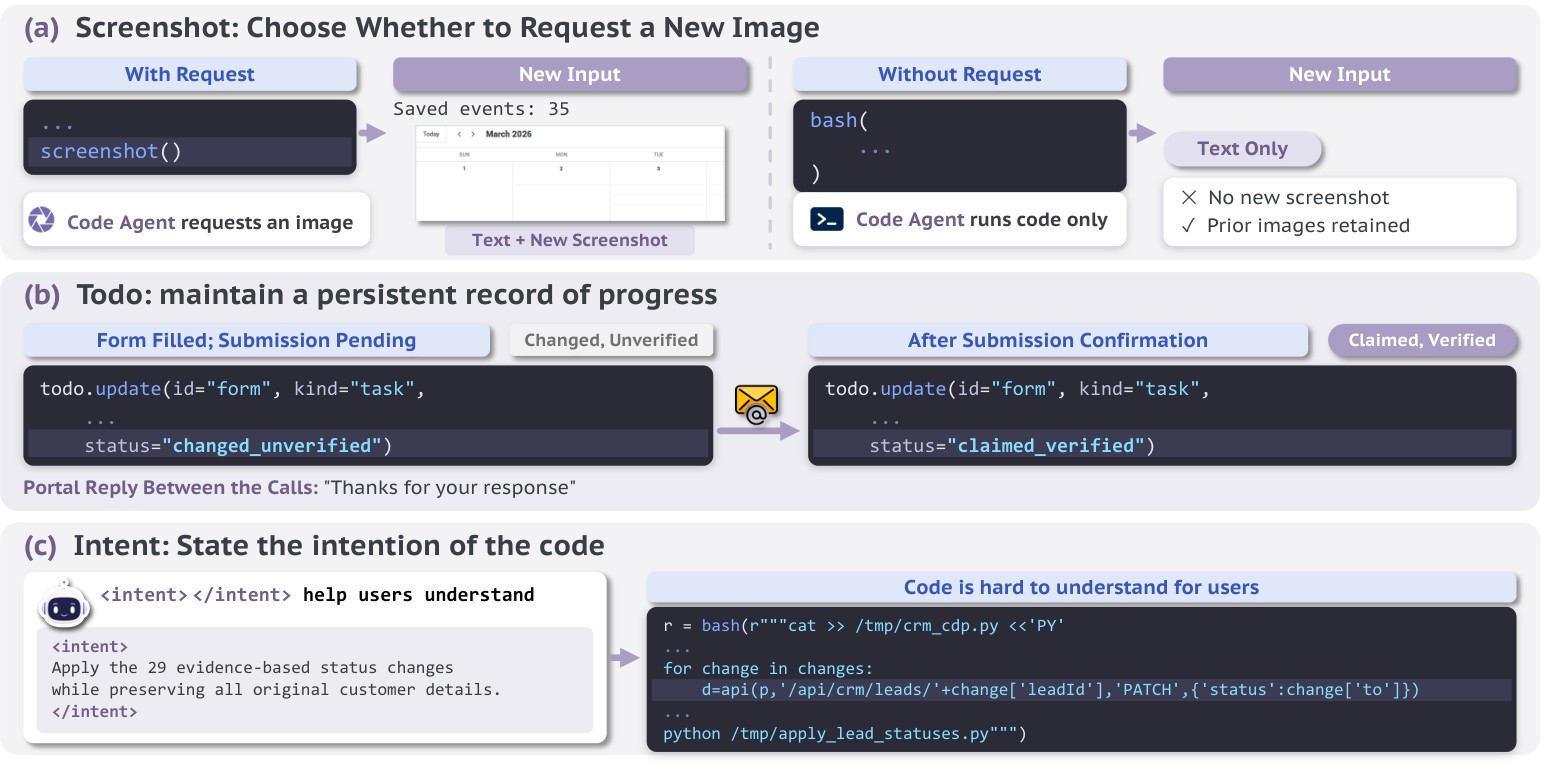
Figure 5: Model outputs for observation, task state, and intent. (a) The two programs differ in whether they request a new screenshot for the next input. (b) A form record remains unverified until the model reads submission confirmation. (c) Intent states what the program should change and preserve.
图 5:观察、任务状态与意图的模型输出。 (a) 两个程序的差别在于是否为下一步输入请求新截图。(b) 表单记录在模型读取提交确认前保持未验证。(c) 意图说明程序应更改什么、保持什么。
3.3 Experiments on Agent Design
3.3 智能体设计实验
We evaluate whether the agent design presented in this report helps frontier models complete computer tasks more effectively. We first compare the full GCUA configuration with a GUI-only baseline that already supports batched actions. We then separate the effects of interface access, code execution, and harness-to-model decision transfer.
我们评估:本报告给出的智能体设计,是否帮助前沿模型更有效地完成电脑任务。先把完整 GCUA 配置,与已支持批量动作的仅 GUI 基线比较;再分开看接口访问、代码执行,以及决策从框架下放到模型各自的效应。
3.3.1 Models and Configuration
Benchmark and Models. Following the evaluation protocol of the GPT-6 Astra release (OpenAI, 2026c), we evaluate on the 82-task offline subset of OSWorld-v2 (v2.1) (Yuan et al., 2026), which excludes the 26 tasks that require internet access and so keeps results independent of external websites at run time. The main comparison covers eight models: Claude Opus 5, GPT-6 Astra, Gemini 3.8 Flash, Qwen3.8-Max, Qwen3.8-Flash, Kimi K3, DeepSeek-V4.1-Flash, and GLM-5.3-Flash.
3.3.1 模型与配置
基准与模型。 遵循 GPT-6 Astra 发布时的评测协议(OpenAI, 2026c),我们在 OSWorld-v2(v2.1)的 82 任务离线子集上评测(Yuan et al., 2026)。该子集排除 26 个需联网任务,使结果在运行时不依赖外部网站。主比较覆盖八个模型:Claude Opus 5、GPT-6 Astra、Gemini 3.8 Flash、Qwen3.8-Max、Qwen3.8-Flash、Kimi K3、DeepSeek-V4.1-Flash 与 GLM-5.3-Flash。
Execution Configurations. The CUA baseline uses GUI-only interaction with batched actions enabled. The full Open Generalist CUA (OpenGCUA) configuration combines code execution over GUI and shell operations with the model-initiated workflow control and harness-managed context policies described above. For the ablations of code execution, harness-to-model decision transfer, and harness-managed context policies, we explicitly specify which components are enabled in each setting.
执行配置。 CUA 基线只用 GUI 交互,并启用批量动作。完整 Open Generalist CUA(OpenGCUA)配置把覆盖 GUI 与 shell 操作的代码执行,与上文所述由模型发起的工作流控制、以及由运行框架管理的上下文策略合起来用。对代码执行、决策从框架下放到模型、以及运行框架管理上下文策略做消融时,我们会明确写出各设置启用了哪些组件。
Metrics. We evaluate task performance and execution efficiency. Following OSWorld-v2, we report binary success and partial-credit scores to measure full and partial task completion, respectively. We measure efficiency by mean steps per task and mean output tokens per task.
指标。 我们评估任务表现与执行效率。遵循 OSWorld-v2,分别报告二元成功与部分分,度量完整完成与部分完成。效率用平均每个任务的步数与平均每个任务的输出 token 度量。
3.3.2 CUA versus GCUA
| Model | Configuration | Task completion | Interaction cost | ||
|---|---|---|---|---|---|
| Score | Success | Steps/task | Output K/task | ||
| Claude Opus 5 | GUI + batch | 60.7 | 29.3 | 103.1 | 378.3 |
| OpenGCUA | 70.1(+9.4) | 36.6 | 61.4() | 89.3 | |
| GPT-6 Astra | GUI + batch | 67.1 | 36.6 | 102.1 | 30.8 |
| OpenGCUA | 75.7(+8.7) | 46.3 | 33.5() | 31.9 | |
| Gemini 3.8 Flash | GUI + batch | 50.1 | 22.0 | 166.8 | 80.3 |
| OpenGCUA | 67.0(+16.9) | 31.7 | 101.2() | 82.0 | |
| Qwen3.8-Max | GUI + batch | 46.9 | 17.1 | 127.7 | 122.3 |
| OpenGCUA | 64.0(+17.1) | 28.9 | 57.0() | 99.5 | |
| Qwen3.8-Flash | GUI + batch | 38.9 | 14.2 | 232.0 | 189.8 |
| OpenGCUA | 60.5(+21.6) | 27.6 | 86.2() | 159.6 | |
| Kimi K3 | GUI + batch | 40.7 | 15.9 | 160.1 | 302.5 |
| OpenGCUA | 59.2(+18.5) | 22.0 | 81.9() | 139.6 | |
| DeepSeek-V4.1-Flash | GUI + batch | 28.0 | 8.5 | 167.3 | 316.0 |
| OpenGCUA | 57.7(+29.8) | 26.8 | 84.9() | 180.4 | |
| GLM-5.3-Flash | GUI + batch | 29.6 | 14.6 | 190.8 | 155.7 |
| OpenGCUA | 64.9(+35.2) | 29.3 | 75.5() | 131.0 | |
| Mean gain: +19.6 score points 53.0% fewer steps 27.2% fewer output tokens |
Table 2: CUA versus OpenGCUA on the OSWorld-v2 offline set. Each model is evaluated with a GUI-only baseline that supports batched actions and the full GCUA configuration with code execution and harness-to-model decision transfer. Bold marks the better value within each model and metric. K denotes 1,000 tokens.
3.3.2 CUA 对比 GCUA
| 模型 | 配置 | 任务完成 | 交互成本 | ||
|---|---|---|---|---|---|
| 分数 | 成功 | 步/任务 | 输出 K/任务 | ||
| Claude Opus 5 | GUI + batch | 60.7 | 29.3 | 103.1 | 378.3 |
| OpenGCUA | 70.1(+9.4) | 36.6 | 61.4() | 89.3 | |
| GPT-6 Astra | GUI + batch | 67.1 | 36.6 | 102.1 | 30.8 |
| OpenGCUA | 75.7(+8.7) | 46.3 | 33.5() | 31.9 | |
| Gemini 3.8 Flash | GUI + batch | 50.1 | 22.0 | 166.8 | 80.3 |
| OpenGCUA | 67.0(+16.9) | 31.7 | 101.2() | 82.0 | |
| Qwen3.8-Max | GUI + batch | 46.9 | 17.1 | 127.7 | 122.3 |
| OpenGCUA | 64.0(+17.1) | 28.9 | 57.0() | 99.5 | |
| Qwen3.8-Flash | GUI + batch | 38.9 | 14.2 | 232.0 | 189.8 |
| OpenGCUA | 60.5(+21.6) | 27.6 | 86.2() | 159.6 | |
| Kimi K3 | GUI + batch | 40.7 | 15.9 | 160.1 | 302.5 |
| OpenGCUA | 59.2(+18.5) | 22.0 | 81.9() | 139.6 | |
| DeepSeek-V4.1-Flash | GUI + batch | 28.0 | 8.5 | 167.3 | 316.0 |
| OpenGCUA | 57.7(+29.8) | 26.8 | 84.9() | 180.4 | |
| GLM-5.3-Flash | GUI + batch | 29.6 | 14.6 | 190.8 | 155.7 |
| OpenGCUA | 64.9(+35.2) | 29.3 | 75.5() | 131.0 | |
| 平均增益:+19.6 分 步数少 53.0% 输出 token 少 27.2% |
表 2:OSWorld-v2 离线集上 CUA 对比 OpenGCUA。 每个模型分别在「支持批量动作的仅 GUI 基线」与「带代码执行、以及把决策从框架下放到模型的完整 GCUA 配置」下评测。粗体标出每个模型、每个指标内更好的值。K 表示 1,000 token。
We compare the conventional GUI-only CUA setting with the full OpenGCUA configuration to examine the performance and efficiency gains from moving toward generalist computer use. OpenGCUA gives the model greater control over what to observe, how to act, and how to organize its work. The CUA baseline already supports batched actions, while OpenGCUA combines code execution with harness-to-model decision transfer.
我们比较传统仅 GUI 的 CUA 设置与完整 OpenGCUA 配置,考察迈向通用 ComputerUse 带来的表现与效率增益。OpenGCUA 让模型对「观察什么、如何行动、如何组织工作」有更大控制。CUA 基线已支持批量动作;OpenGCUA 则把代码执行与决策从框架下放到模型结合起来。
OpenGCUA improves task scores and reduces steps across all eight models. As shown in Table 2, the cross-model mean partial score increases from 45.3 to 64.9, a gain of 19.6 points, while steps per task decrease by an average of 53.0%, computed from each model’s relative reduction. The largest score gains reach 35.2 points for GLM-5.3-Flash and 29.8 points for DeepSeek-V4.1-Flash. Full-task success also increases for every model. These results show a substantial gap between batched GUI-only execution and the full OpenGCUA design in both task performance and interaction efficiency.
OpenGCUA 在全部八个模型上提高任务分数并减少步数。 如表 2 所示,跨模型平均部分分从 45.3 升到 64.9,增益 19.6 分;完成任务所需步数平均减少 53.0%(按各模型相对降幅计算)。最大分数增益来自 GLM-5.3-Flash 的 35.2 分与 DeepSeek-V4.1-Flash 的 29.8 分。每个模型的完整任务成功率也上升。结果表明:批量、仅 GUI 的执行,与完整 OpenGCUA 设计之间,在任务表现与交互效率上存在明显差距。
The gains hold despite large differences in baseline performance and efficiency. The benefits are not limited to models with low initial task scores. GPT-6 Astra, which has the highest baseline score, improves from 67.1 to 75.7 and reduces steps per task from 102.1 to 33.5, a 67.2% reduction. At the other end of the efficiency range, Qwen3.8-Flash starts with 232.0 steps per task, yet gains 21.6 points while using 62.8% fewer steps. The consistent improvements across all 8 frontier models support the broad applicability of the OpenGCUA design.
尽管基线表现与效率差异很大,增益仍然成立。 收益不限于初始任务分数低的模型。基线分数最高的 GPT-6 Astra 从 67.1 升到 75.7,完成任务所需步数从 102.1 降到 33.5,降幅 67.2%。在效率区间另一端,Qwen3.8-Flash 起始每个任务 232.0 步,却仍增益 21.6 分,并用上 62.8% 更少的步数。全部 8 个前沿模型上的一致改进,支持 OpenGCUA 设计具有较广的适用性。
Fewer interaction steps do not necessarily require fewer output tokens. Output tokens per task decrease for six of the eight models, with an average relative reduction of 27.2%. Claude Opus 5 reduces its output from 378.3K to 89.3K tokens per task, and Kimi K3 from 302.5K to 139.6K. GPT-6 Astra, however, uses approximately the same output-token budget, despite its large reduction in steps. Fewer steps per task can reduce model round trips and their overhead, even without reducing output tokens. End-to-end latency must be measured separately, accounting for model response time and tool execution time. We report both steps and output tokens to distinguish interaction efficiency from output-token usage.
更少交互步数,不一定意味着更少输出 token。 八个模型里有六个的每个任务输出 token 下降,平均相对降幅 27.2%。Claude Opus 5 从每个任务 378.3K 降到 89.3K,Kimi K3 从 302.5K 降到 139.6K。可是 GPT-6 Astra 尽管步数大幅减少,输出 token 预算大致不变。更少的步数可以减少模型往返及其开销,即便输出 token 没有减少。端到端延迟须单独度量,并计入模型响应时间与工具执行时间。我们同时报告步数与输出 token,以区分交互效率与输出 token 用量。
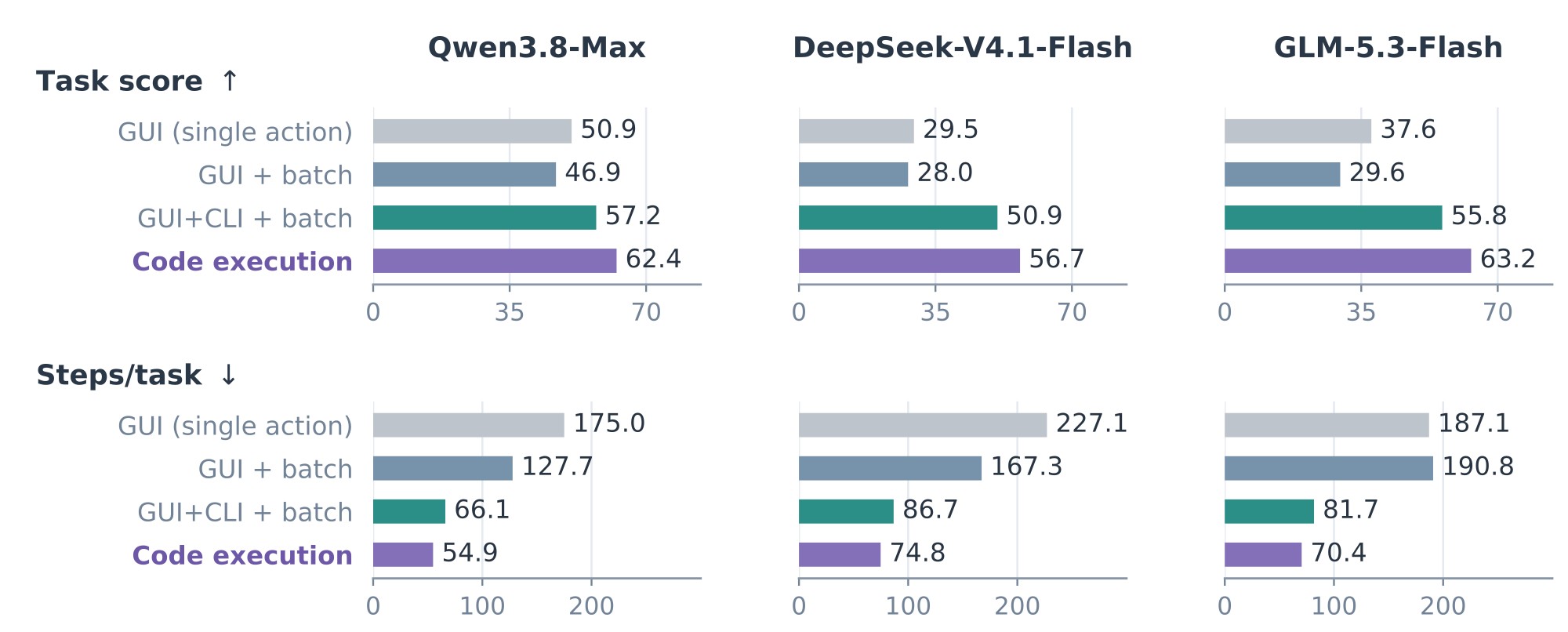
Figure 6: Code-execution ablation on OSWorld-v2. Code execution achieves higher task scores and fewer steps than single-action GUI, batched GUI, and batched GUI+CLI setting across all three models.
图 6:OSWorld-v2 上的代码执行消融。 相对单动作 GUI、批量 GUI 与批量 GUI+CLI 设置,代码执行在全部三个模型上获得更高任务分数与更少步数。
3.3.3 GUI+CLI Hybrid CUA versus GCUA
| Model | Task score | Steps/task | ||
|---|---|---|---|---|
| GUI+CLI | GCUA | GUI+CLI | GCUA | |
| Qwen3.8-Max | 57.2 | 64.0 | 66.1 | 57.0 |
| DeepSeek-V4.1-Flash | 50.9 | 57.7 | 86.7 | 84.9 |
| GLM-5.3-Flash | 55.8 | 64.9 | 81.7 | 75.5 |
| Claude Opus 5 | 65.7 | 70.1 | 61.6 | 61.4 |
Table 3: Full GCUA versus batched GUI+CLI.
3.3.3 GUI+CLI 混合 CUA 对比 GCUA
| 模型 | 任务分数 | 步/任务 | ||
|---|---|---|---|---|
| GUI+CLI | GCUA | GUI+CLI | GCUA | |
| Qwen3.8-Max | 57.2 | 64.0 | 66.1 | 57.0 |
| DeepSeek-V4.1-Flash | 50.9 | 57.7 | 86.7 | 84.9 |
| GLM-5.3-Flash | 55.8 | 64.9 | 81.7 | 75.5 |
| Claude Opus 5 | 65.7 | 70.1 | 61.6 | 61.4 |
表 3:完整 GCUA 对比批量 GUI+CLI。
GUI+CLI hybrid agents have become an active direction in computer-use research (Song et al., 2026), including our previous work, Qwen-UI-Agent (Zhou et al., 2026). As discussed in Section 2.1, the batched GUI+CLI formulation is a special case of GCUA. We compare this baseline with the full OpenGCUA setting. Both provide GUI and CLI access, but OpenGCUA introduces code execution and model-initiated workflow control, letting the model decide what to observe, how to act, and how to organize its work.
GUI+CLI 混合智能体已成为 ComputerUse 研究里的活跃方向(Song et al., 2026),也包括我们此前的 Qwen-UI-Agent(Zhou et al., 2026)。如第 2.1 节所述,批量 GUI+CLI 表述是 GCUA 的特例。我们把该基线与完整 OpenGCUA 设置比较。二者都提供 GUI 与 CLI 访问;但 OpenGCUA 引入代码执行与由模型发起的工作流控制,让模型决定观察什么、如何行动、如何组织工作。
OpenGCUA achieves higher task scores with fewer reported steps. In the selected runs, OpenGCUA increases task scores by 4.4 to 9.1 points across all four models, with lower reported steps per task (Table 3). Qwen3.8-Max improves from 57.2 to 64.0 with 13.8% fewer steps, while GLM-5.3-Flash improves from 55.8 to 64.9 with 7.6% fewer steps. These results suggest that effective hybrid computer use depends not only on interface access, but also on control over execution and workflow. Code execution lets intermediate results determine subsequent GUI and shell operations within a single program. Harness-to-model decision transfer extends the model’s control to when visual feedback is requested and how task progress is recorded. The comparison evaluates these mechanisms jointly.
OpenGCUA 用更少报告步数取得更高任务分数。 在所选运行中,OpenGCUA 在全部四个模型上把任务分数提高 4.4 到 9.1 分,且每个任务的报告步数更低(表 3)。Qwen3.8-Max 从 57.2 升到 64.0,步数少 13.8%;GLM-5.3-Flash 从 55.8 升到 64.9,步数少 7.6%。结果表明:有效的混合 ComputerUse,不仅依赖接口访问,也依赖对执行与工作流的控制。代码执行让中间结果在单一程序内决定后续 GUI 与 shell 操作。决策从框架下放到模型,把模型控制扩展到「何时请求视觉反馈」以及「如何记录任务进度」。该比较联合评估这些机制。
3.3.4 Code-Execution Ablation
Code execution improves task scores and reduces interaction steps. We compare four execution configurations for Qwen3.8-Max, DeepSeek-V4.1-Flash, and GLM-5.3-Flash: single-action GUI execution, batched GUI actions, batched GUI+CLI actions, and code execution over GUI and CLI operations. In the selected runs, code execution achieves higher task scores and fewer steps than each alternative across all three models (Figure 6). Relative to batched GUI actions, task scores improve by 15.5 to 33.6 points, while steps per task decrease by 55.3% to 63.1%.
3.3.4 代码执行消融
代码执行提高任务分数并减少交互步数。 我们为 Qwen3.8-Max、DeepSeek-V4.1-Flash 与 GLM-5.3-Flash 比较四种执行配置:单动作 GUI、批量 GUI、批量 GUI+CLI,以及覆盖 GUI 与 CLI 操作的代码执行。在所选运行中,代码执行在全部三个模型上相对每种替代方案取得更高任务分数与更少步数(图 6)。相对批量 GUI 动作,任务分数提高 15.5 到 33.6 分,完成任务所需步数减少 55.3% 到 63.1%。
Executable control adds value beyond GUI+CLI access. The batched GUI+CLI baseline provides the same interfaces and already supports shell scripts. Nevertheless, code execution raises GLM-5.3-Flash’s task score from 55.8 to 63.2, a gain of 7.4 points, and reduces Qwen3.8-Max’s steps per task from 66.1 to 54.9, a 17.0% reduction. The key distinction is how operations are coordinated within a step. A batch fixes the sequence of GUI and shell actions in advance, whereas a program can use intermediate results to determine subsequent operations across both interfaces. Loops, conditional branches, and retries can thus consolidate work that might otherwise require multiple model calls. This unified interface also lets models apply their existing programming capabilities directly to computer interaction, rather than expressing computer interaction through a separate action-list format. Together, these properties may help explain the observed improvements in task scores and interaction efficiency.
可执行控制带来的价值,超出单纯的 GUI+CLI 访问。 批量 GUI+CLI 基线提供相同接口,并已支持 shell 脚本。尽管如此,代码执行仍把 GLM-5.3-Flash 的任务分数从 55.8 提到 63.2,增益 7.4 分;并把 Qwen3.8-Max 的完成任务所需步数从 66.1 降到 54.9,降幅 17.0%。关键差别在于:一步之内如何协调操作。批量预先固定 GUI 与 shell 动作序列;程序则可用中间结果决定跨两种接口的后续操作。循环、条件分支与重试因而可以合并本可能需要多次模型调用的工作。这一统一接口也让模型把已有编程能力直接用到操作电脑上,而不必用单独的动作列表格式来表达。综合来看,这些性质或有助于解释我们看到的任务分数与交互效率改进。
3.3.5 Harness-to-Model Decision Transfer Ablation
Most mechanisms are not designed primarily to improve task scores. We ablate the mechanisms supporting harness-to-model decision transfer and the harness-managed context policies. Using code execution as the baseline, we add each feature separately and then combine all features for Qwen3.8-Max and DeepSeek-V4.1-Flash (Table 4). While todo aims to support task completion, the other features primarily target observation efficiency, interpretability, or context management. We therefore assess cache reuse where relevant and check whether task scores are maintained.
3.3.5 决策从框架下放到模型的消融
多数机制并非主要为提高任务分数而设计。 我们消融支持决策从框架下放到模型的机制,以及由运行框架管理的上下文策略。以代码执行为基线,我们为 Qwen3.8-Max 与 DeepSeek-V4.1-Flash 分别加入各功能,再组合全部功能(表 4)。todo 旨在支持任务完成;其他功能主要面向观察效率、可解释性或上下文管理。因此我们在相关处评估缓存复用,并检查任务分数是否保持。
| Configuration | Qwen3.8-Max | DeepSeek-V4.1-Flash | ||||
|---|---|---|---|---|---|---|
| Score | Steps/task | Cache hit (%) | Score | Steps/task | Cache hit (%) | |
| Code execution | 62.4 | 54.9 | 75.6 | 56.7 | 74.5 | 61.9 |
| + screenshot | 64.3 | 63.0 | 86.1 | 58.1 | 90.0 | 76.3 |
| + todo | 64.0 | 56.7 | – | 58.5 | 74.1 | – |
| + intent | 61.5 | 53.4 | – | 53.3 | 82.4 | – |
| + micro-compaction | 63.4 | 58.7 | 68.6 | 56.8 | 79.7 | 58.9 |
| + rolling screenshot buffer | 64.4 | 53.2 | 91.6 | 57.2 | 79.2 | 75.3 |
| + all mechanisms | 64.0 | 57.0 | 84.1 | 57.7 | 84.9 | 70.5 |
Table 4: Ablation of harness-to-model decision transfer and harness-managed context policies. Each mechanism is added separately to code execution; the final row combines all mechanisms. Cache hit is the fraction of input tokens served from cache; dashes indicate omitted rates.
| 配置 | Qwen3.8-Max | DeepSeek-V4.1-Flash | ||||
|---|---|---|---|---|---|---|
| 分数 | 步/任务 | 缓存命中 (%) | 分数 | 步/任务 | 缓存命中 (%) | |
| 代码执行 | 62.4 | 54.9 | 75.6 | 56.7 | 74.5 | 61.9 |
| + screenshot | 64.3 | 63.0 | 86.1 | 58.1 | 90.0 | 76.3 |
| + todo | 64.0 | 56.7 | – | 58.5 | 74.1 | – |
| + intent | 61.5 | 53.4 | – | 53.3 | 82.4 | – |
| + micro-compaction | 63.4 | 58.7 | 68.6 | 56.8 | 79.7 | 58.9 |
| + rolling screenshot buffer | 64.4 | 53.2 | 91.6 | 57.2 | 79.2 | 75.3 |
| + 全部机制 | 64.0 | 57.0 | 84.1 | 57.7 | 84.9 | 70.5 |
表 4:决策从框架下放到模型与运行框架管理上下文策略的消融。 各机制分别加到代码执行上;末行组合全部机制。缓存命中为从缓存服务的输入 token 比例;破折号表示省略的比率。
On-demand observation improves cache reuse. The screenshot action lets the model omit screenshots when program output is sufficient, aiming to reduce unnecessary visual context. In the selected runs, cache hit rises from 75.6% to 86.1% for Qwen3.8-Max and from 61.9% to 76.3% for DeepSeek-V4.1-Flash, with higher task scores in both cases.
按需观察改进缓存复用。 screenshot 动作让模型在程序输出已够时省略截图,意在减少不必要的视觉上下文。在所选运行中,Qwen3.8-Max 的缓存命中从 75.6% 升到 86.1%,DeepSeek-V4.1-Flash 从 61.9% 升到 76.3%,二者任务分数均更高。
Task-state tracking and action intent serve distinct goals. The todo interface supports task completion by maintaining a record of progress and unresolved work. Task score increases from 62.4 to 64.0 for Qwen3.8-Max and from 56.7 to 58.5 for DeepSeek-V4.1-Flash. In contrast, the intent annotation makes each program’s purpose explicit so that real-device users can understand what the agent is doing. Its primary goal is user understanding rather than benchmark performance. Scores fall slightly.
任务状态跟踪与动作意图服务不同目标。 todo 接口通过维护进度与未决工作记录支持任务完成:Qwen3.8-Max 任务分数从 62.4 升到 64.0,DeepSeek-V4.1-Flash 从 56.7 升到 58.5。相比之下,意图标注说明每个程序的目的,方便本机用户理解智能体在做什么——首要目标是用户理解,而不是基准分数。分数略降。
Cache reuse and context length matter for practical agent execution. As interaction histories grow, context policies must control their length while preserving cache reuse. The rolling screenshot buffer removes older images in batches, reducing how often prior context is modified. In the selected runs, cache hit improves by 16.0 and 13.4 percentage points for Qwen3.8-Max and DeepSeek-V4.1-Flash, respectively. Micro-compaction instead replaces older tool outputs with short placeholders to limit context growth, at the potential cost of invalidating cached prefixes. Cache hit falls from 75.6% to 68.6% for Qwen3.8-Max, and from 61.9% to 58.9% for DeepSeek-V4.1-Flash. Neither context policy lowers task score in these selected comparisons.
缓存复用与上下文长度,对实际智能体执行很重要。 随交互历史增长,上下文策略必须在控制长度的同时保持缓存复用。滚动截图缓冲按批移除更旧图像,减少先前上下文被修改的频率。在所选运行中,Qwen3.8-Max 与 DeepSeek-V4.1-Flash 的缓存命中分别提高 16.0 与 13.4 个百分点。微压缩则用短占位符替换更旧工具输出以限制上下文增长,可能代价是使缓存前缀失效:Qwen3.8-Max 缓存命中从 75.6% 降到 68.6%,DeepSeek-V4.1-Flash 从 61.9% 降到 58.9%。在这些选定比较中,两种上下文策略都不降低任务分数。
3.3.6 How Much Task Performance Can Money and Time Buy?
Final benchmark scores alone do not show how much performance is available under limited resources. We therefore examine monetary and time constraints using the same selected full-setting runs as the main evaluation on the offline subset of OSWorld-v2.
3.3.6 金钱与时间能买到多少任务表现?
只看最终基准分数,看不出有限资源下还剩多少表现可用。因此我们用与 OSWorld-v2 离线子集主评测相同的选定完整设置运行,考察金钱与时间约束。
Measuring Performance under Resource Limits. We retrospectively apply a common spending cap to every task. A trajectory contributes its recorded final partial score only if its full cost fits within the cap; otherwise, it contributes zero. We estimate spending by assuming that each attempt ends when its recorded trajectory finishes or its spending cap is reached, whichever comes first. Spending on unsuccessful attempts is also included. Figure 7(a) plots the resulting score against average expenditure per task, not the cap itself. Panel (b) applies the same scoring rule to a per-task time limit. Scores are averaged over all tasks.
度量资源限制下的表现。 我们回溯地对每个任务施加共同支出上限。仅当轨迹的全部成本落在上限内时,才贡献其记录的最终部分分;否则贡献零。我们假设每次尝试在「记录轨迹结束」或其「支出上限到达」时结束,以较早者为准,并据此估计支出;不成功尝试的支出也计入。图 7(a) 绘制所得分数相对每个任务的平均支出,而不是相对上限本身。面板 (b) 对每个任务的时间限制施加同一计分规则。分数对全部任务平均。
Notably, recorded wall-clock time depends on API bandwidth and rate limits, the number of concurrently active evaluation environments, provider-side queuing, and tool execution latency. These conditions were not controlled across models, limiting the comparability of the measurements. We therefore report the time curves as exploratory evidence and treat their trends as indicative rather than conclusive.
需要说明:记录的挂钟时间依赖 API 带宽与速率限制、并发活跃评测环境数、提供方侧排队,以及工具执行延迟。这些条件未跨模型控制,限制了度量的可比性。因此我们把时间曲线作为探索性证据报告,并将其趋势视为指示性而非结论性。
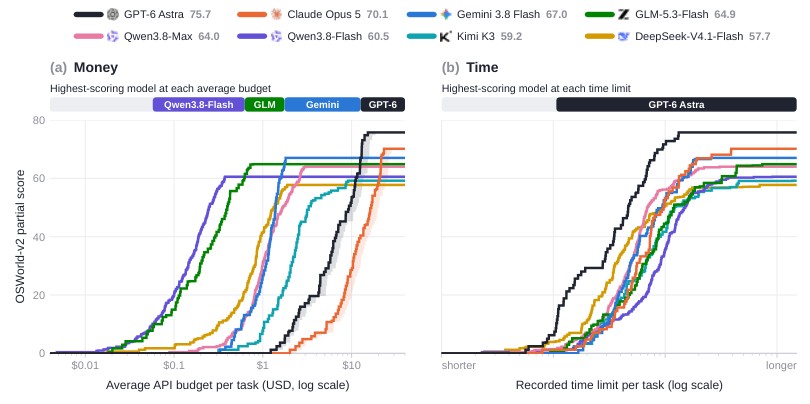
Figure 7: Task performance under monetary and time constraints. Mean partial scores on the 82-task offline subset of OSWorld-v2 under increasing per-task spending caps (a) and recorded time limits (b). Panel (a) reports average expenditure, including unsuccessful attempts. Top bars identify the highest-scoring models; shading indicates cache-write cost bounds. Time comparisons are exploratory.
图 7:金钱与时间约束下的任务表现。 OSWorld-v2 的 82 任务离线子集上,在递增的每个任务支出上限 (a) 与记录时间限制 (b) 下的平均部分分。面板 (a) 报告平均支出,含不成功尝试。顶栏标识最高分模型;阴影表示缓存写入成本界。时间比较为探索性。
Money and Time Favor Different Models. Under the assumed API prices, the highest-scoring model shifts from Qwen3.8-Flash to GLM-5.3-Flash, Gemini 3.8 Flash, and eventually GPT-6 Astra as the monetary budget increases. For example, Qwen3.8-Flash reaches 60.5 points at approximately 15.26 per task. In the recorded-time comparison, however, GPT-6 Astra achieves higher scores at most time limits.
金钱与时间偏向不同模型。 在假定 API 价格下,随金钱预算增加,最高分模型从 Qwen3.8-Flash 转到 GLM-5.3-Flash、Gemini 3.8 Flash,最终到 GPT-6 Astra。例如,Qwen3.8-Flash 在约每个任务 15.26 达到最高分 75.7。可是在记录时间的比较中,GPT-6 Astra 在多数时间限制下取得更高分数。
From Benchmark Scores to Resource-Aware Model Selection. In practice, the relevant question is not only which model achieves the highest benchmark score, but which delivers the most task performance within a given budget or an acceptable completion time. These curves make this distinction explicit: models with lower final scores may be preferable under tighter resource constraints.
从基准分数到资源感知的模型选择。 实践中,相关问题不仅是哪个模型取得最高基准分数,而是哪个在给定预算或可接受完成时间内交付最多任务表现。这些曲线把这一区分说清楚:在更紧的资源约束下,最终分数较低的模型可能更可取。
4 Real-Device Generalist CUA
4 本机通用 CUA
In Section 3, we study code execution and harness-to-model decision transfer on OSWorld-v2, where every task runs in a controlled benchmark environment. Users, however, run agents on their own computers. There, the environment is not initialized for the task, many application windows overlap, the user works at the same time, and requests change as the task goes on, so an agent that performs well on a benchmark may still struggle on a real device. This section first describes how real devices differ from benchmarks (Section 4.1). It then presents the Cross-Device SDK, the programming interface through which the model operates different devices (Section 4.2), and the harness we built for real devices, organized into five layers with clear responsibilities (Section 4.3).
第 3 节里,我们在 OSWorld-v2 上研究代码执行,以及决策从框架下放到模型——每个任务都跑在受控基准环境里。可是用户是在自己的电脑上跑智能体。那里的环境并非为任务初始化,许多应用窗口叠在一起,用户同时在工作,请求还会随任务推进而变化。因此,基准上表现好的智能体,在真实设备上仍可能吃力。本节先说明真实设备与基准的差异(第 4.1 节);再介绍跨设备 SDK——模型操作不同设备的编程接口(第 4.2 节);以及我们为本机构建、按职责分成五层的运行框架(第 4.3 节)。
4.1 The Gap Between Benchmarks and Real Machines
4.1 基准与本机之间的鸿沟
Controlled computer-use evaluations typically provide prepared task states, an initial instruction, and an environment reserved for the agent. Such settings simplify evaluation but do not fully capture the demands of operating a user’s computer. We highlight five requirements that become especially important when the agent works alongside a user in an existing, changing environment.
受控的 ComputerUse 评测通常提供准备好的任务状态、初始指令,以及专供智能体的环境。这类设置简化了评测,却覆盖不全:智能体与用户同处既有、且不断变化的环境时,真正需要什么。我们强调五个在这种场景下尤其重要的要求。
The user and agent share control. The user may continue working while the agent runs, so the agent cannot assume exclusive control of the pointer, keyboard, or focused window. It must account for user activity rather than attribute every change to its own actions. Where supported, it should prefer accessibility actions or background-window operations that leave the user’s current interaction undisturbed. When these methods cannot complete an operation, foreground interaction requires coordination with the user before taking control.
用户与智能体共享控制。 智能体运行时用户可能继续工作,因此智能体不能假定独占指针、键盘或焦点窗口。它必须把用户活动算进去,而不是把每次变化都归因于自己的动作。在支持的地方,应优先用无障碍动作或后台窗口操作,以免打扰用户当前交互。当这些方法做不完操作时,前台交互在接管控制前需要与用户协调。
The screen keeps changing. Application windows open, close, and move, and one window can cover another. These changes may come from applications unrelated to the task and continue while the agent is reasoning. A coordinate or element reference that was valid when observed may therefore be wrong by the time the agent acts.
屏幕持续变化。 应用窗口会打开、关闭与移动,一个窗口可以盖住另一个。这些变化可能来自与任务无关的应用,并在智能体推理时继续发生。因此,观察时还有效的坐标或元素引用,到智能体行动时可能已经错了。
User requests evolve during execution. Users may clarify an initial request, correct the agent’s approach, or add constraints as work proceeds. The agent must keep track of the overall task goal and relevant progress across interruptions and turns, while revising its plan to reflect the user’s latest instructions.
用户请求在执行期间会变化。 用户可能澄清初始请求、纠正智能体做法,或在工作推进时加入约束。智能体必须在打断与多轮之间跟踪总体任务目标与相关进度,同时修订计划以反映用户最新指令。
Observation and control require explicit targets. On a user’s computer, the task-relevant application, window, or browser tab need not be in the foreground. A full-desktop screenshot shows the visible composition of windows, not the contents of every addressable target. The model must therefore choose both what to inspect and how to inspect it: a target-specific image, an accessibility tree, or a programmatic query may expose different aspects of the same target. For example, an agent inspecting a background product page may receive an unrelated login page if it requests a desktop screenshot rather than an image of the selected tab, as illustrated in Section 4.3.4.
观察与控制需要明确目标。 在用户电脑上,任务相关应用、窗口或浏览器标签页未必在前台。整桌面截图显示的是窗口的可见组合,而不是每个可寻址目标的内容。因此模型必须同时选择检查什么、以及如何检查:目标专属图像、无障碍树或程序化查询,可能暴露同一目标的不同方面。例如,检查后台商品页的智能体若请求桌面截图而非所选标签页图像,可能收到无关登录页,如第 4.3.4 节所示。
Observation and control also impose different requirements. Being able to inspect a background target does not imply that every operation on it can run in the background. The model must select a supported control method, while the harness makes target identities, available capabilities, and foreground-input requirements explicit. Observations and actions should remain tied to their selected targets rather than silently following changes in desktop focus. These requirements link the model’s observation and action choices to the resource bindings and capability declarations in the Cross-Device SDK (Section 4.2).
观察与控制的要求也不一样。能检查后台目标,并不意味着其上的每次操作都能在后台跑。模型必须选择受支持的控制方法;运行框架则明确给出目标身份、可用能力与前台输入要求。观察与动作应保持绑定到所选目标,而不是默默跟随桌面焦点变化。这些要求把模型的观察与动作选择,与跨设备 SDK 中的资源绑定及能力声明联系起来(第 4.2 节)。
Tasks begin in an existing user environment. Benchmark tasks typically start from a prepared state. A user’s computer instead retains files, open tabs, application windows, and account sessions from prior use. Relevant materials may be mixed with unrelated content or similarly named files, requiring the agent to identify the correct inputs before acting. Expired sessions or missing permissions may also require user involvement before execution can continue.
任务始于既有用户环境。 基准任务通常从准备好的状态开始。用户电脑则保留先前使用留下的文件、打开标签页、应用窗口与账户会话。相关材料可能与无关内容或同名文件混杂,要求智能体在行动前识别正确输入。过期会话或缺失权限,也可能需要用户介入才能继续执行。
These requirements mean that benchmark scores alone do not establish reliable operation on users’ devices. We therefore study real-device capability alongside benchmark performance, rather than treating deployment as an implementation detail. The following sections describe our SDK and harness, and Section 4.3.3 reports preliminary real-device results.
这些要求意味着:仅靠基准分数,不能确立在用户设备上的可靠操作。因此我们把本机能力与基准表现一并研究,而不是把部署当作实现细节。后续各节描述我们的 SDK 与运行框架;第 4.3.3 节报告初步本机结果。
4.2 Cross-Device SDK
4.2 跨设备 SDK
A computer-use task may span a mobile application, desktop tools, and a browser-based service. The Cross-Device SDK provides a common programming interface through which one agent can coordinate these environments. It supports both the reuse of common operations across platforms and the composition of cross-device workflows within a single task. Its programming model builds on code-execution-based computer-use interfaces (OpenAI, 2026b; OpenAI, 2026a).
ComputerUse 任务可能横跨移动应用、桌面工具与基于浏览器的服务。跨设备 SDK 提供共同编程接口,使一个智能体可以协调这些环境。它既支持跨平台复用常见操作,也支持在单任务内组合跨设备工作流。其编程模型建立在基于代码执行的 ComputerUse 接口之上(OpenAI, 2026b; OpenAI, 2026a)。
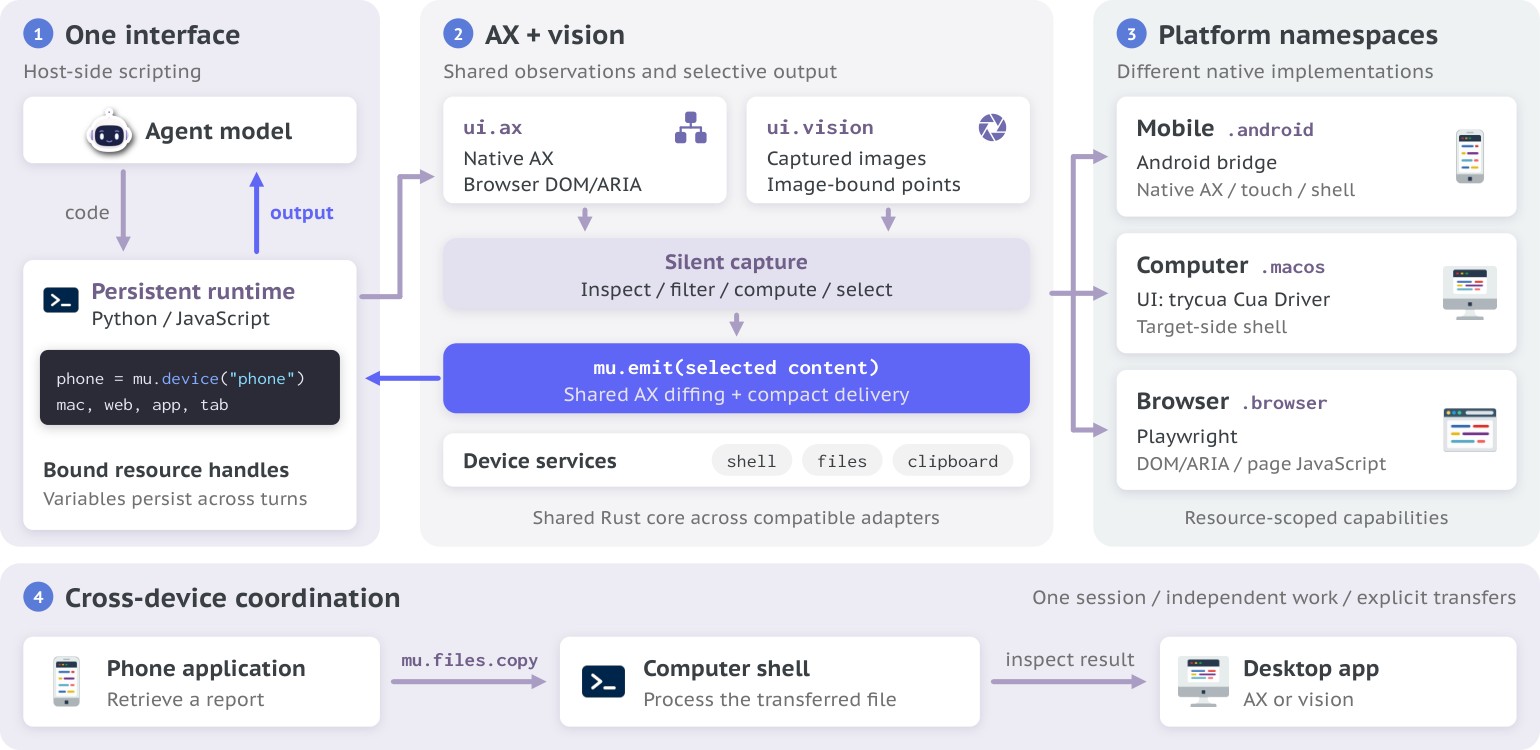
Figure 8: Architecture of the Cross-Device SDK. A common programming interface connects agent programs to computers, mobile devices, and browser environments, enabling cross-device workflows through platform-specific adapters.
图 8:跨设备 SDK 架构。 共同编程接口把智能体程序连接到电脑、移动设备与浏览器环境,通过平台专属适配器实现跨设备工作流。
Shared Operations with Explicit Targets.
Common operations use a shared vocabulary, while platform adapters implement their native behavior. For example, the macOS adapter uses the unmodified Cua Driver from trycua (trycua, 2026). Each operation is scoped to an explicit resource, such as a device, application, window, or browser tab. Resource handles retain their targets independently, so selecting a new target does not redirect earlier bindings. This gives agent programs a consistent way to address multiple devices and applications without relying on a single implicitly selected target.
带明确目标的共享操作。
常见操作使用共享词汇,平台适配器实现其原生行为。例如,macOS 适配器使用 trycua 未修改的 Cua Driver(trycua, 2026)。每次操作限定到明确资源,如设备、应用、窗口或浏览器标签页。资源句柄独立保留其目标,因此选择新目标不会重定向更早绑定。这给智能体程序一致方式来寻址多设备与多应用,而无需依赖单一隐式选定目标。
Cross-Device Coordination within One Task.
Within one session, programs can combine observations and actions from multiple resources while reusing host-side variables and bindings across turns. The program executes in the host runtime, whereas device.shell.run executes commands on the selected device where supported. File transfers through mu.files.copy identify both source and destination resources. These mechanisms allow intermediate results from one environment to guide operations in another. As an illustrative workflow, an agent could retrieve a report through a phone application, transfer it to a computer for analysis, and enter the results into a browser-based service, coordinating all three stages within the same task.
单任务内的跨设备协调。
在同一会话内,程序可组合来自多个资源的观察与动作,同时跨轮复用主机侧变量与绑定。程序在主机运行时执行;device.shell.run 在支持时于所选设备上执行命令。经 mu.files.copy 的文件传输同时标识源与目标资源。这些机制让一个环境的中间结果可以引导另一环境的操作。作为示意工作流:智能体可通过手机应用取回报告、传到电脑分析,再把结果录入基于浏览器的服务,在同一任务内协调全部三阶段。
Shared Observation Processing and Selective Delivery.
The SDK exposes ui.ax for structured semantic observations and element-based actions, and ui.vision for images and coordinate-based interaction. Semantic state supports programmatic conditions and checks, while vision provides complementary information when semantic observations are insufficient. Adapters normalize native accessibility and browser semantic trees into common representations, allowing filtering and compact rendering to be reused across compatible platforms.
共享观察处理与选择性投递。
SDK 暴露 ui.ax,用于结构化语义观察与基于元素的动作;以及 ui.vision,用于图像与基于坐标的交互。语义状态支持程序化条件与检查;视觉在语义观察不足时提供互补信息。适配器把原生无障碍与浏览器语义树规范化为共同表示,使过滤与紧凑渲染可在兼容平台间复用。
Observation capture is separate from delivery to the model. Calls such as ui.ax.observe() return data to the program, while mu.emit delivers selected observations or computed results to the model. A program can therefore inspect multiple targets, use structured results to determine subsequent operations, and return only the information needed for the next model decision. This separation supports cross-device execution without requiring a model call for every intermediate structured observation.
观察捕获与向模型的投递是分开的。如 ui.ax.observe() 的调用把数据返回给程序;mu.emit 把选定观察或计算结果投递给模型。因此程序可检查多个目标、用结构化结果决定后续操作,并只返回下一模型决策所需信息。这种分离支持跨设备执行,而无需对每个中间结构化观察都做一次模型调用。
Explicit Platform Capabilities.
A common interface does not imply identical capabilities across platforms. Each resource declares its supported operations and options. Common UI operations and device services share interfaces, while platform-specific features remain explicit through namespaces such as .android, .macos, and .browser. Operations such as Android navigation and browser page evaluation thus retain their own semantics, allowing programs to reuse common interaction patterns while selecting methods appropriate to each target.
明确的平台能力。
共同接口并不意味着跨平台能力相同。每个资源声明其支持的操作与选项。常见 UI 操作与设备服务共享接口;平台专属功能通过如 .android、.macos 与 .browser 的命名空间保持明确。Android 导航与浏览器页面求值等操作因而保留各自语义,让程序在复用常见交互模式的同时,为每个目标选择合适方法。
4.3 Real-Device Harness
4.3 本机运行框架
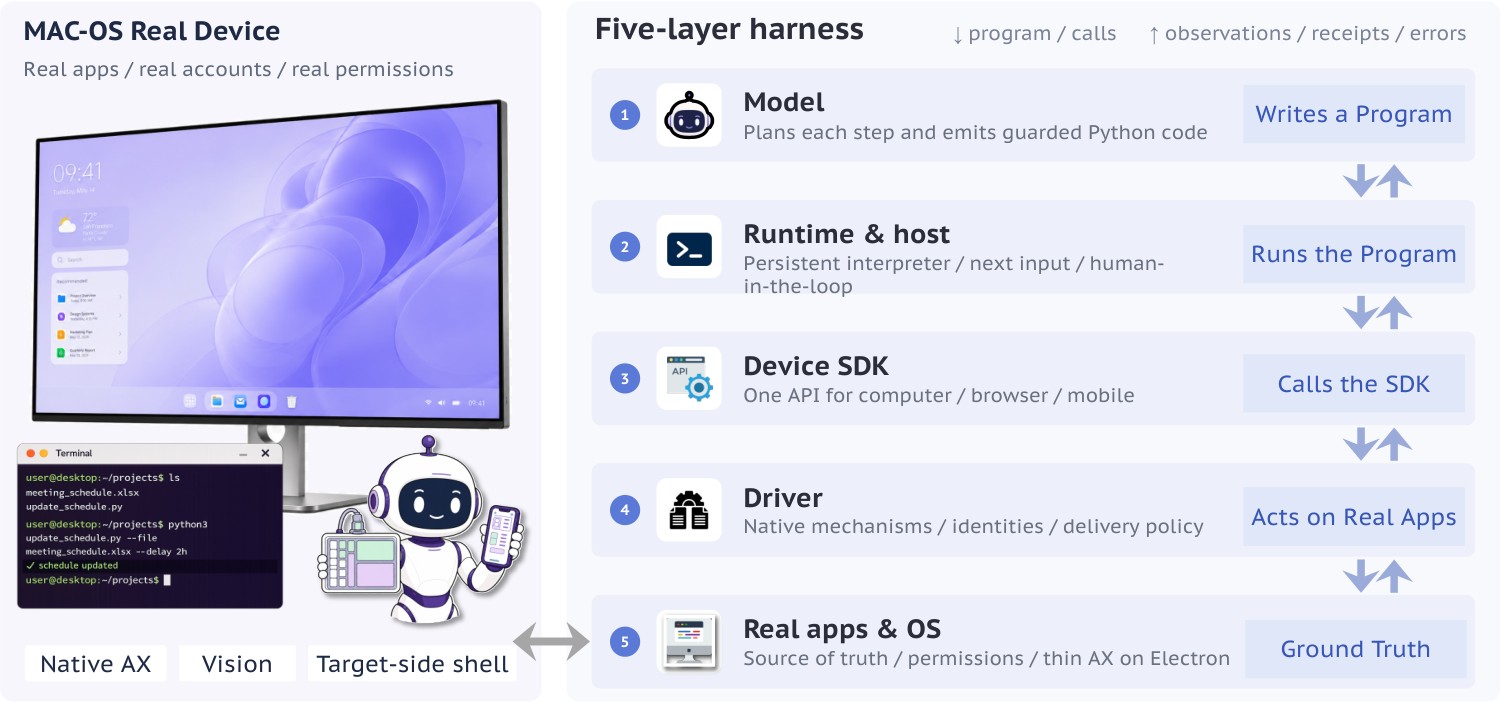
Figure 9: Five-layer architecture of the real-device harness. The runtime executes model-generated programs through the SDK and platform drivers to interact with applications and the operating system.
图 9:本机运行框架的五层架构。 运行时通过 SDK 与平台驱动执行模型生成的程序,以与应用及操作系统交互。
The Cross-Device SDK defines the programming interface for device observation and control. The real-device harness integrates this interface with the agent loop, program execution, and platform-specific mechanisms, enabling the model to work on a user’s computer while retaining task state across turns.
跨设备 SDK 定义设备观察与控制的编程接口。本机运行框架把该接口与智能体循环、程序执行及平台专属机制接起来,使模型能在用户电脑上工作,同时跨轮保留任务状态。
4.3.1 Five-Layer Architecture
We separate the system into five layers (Figure 9). The model generates a program, the runtime executes it, and SDK calls are translated by the driver into operations on applications and the operating system. Explicit interfaces separate responsibilities and allow compatible components to be replaced independently. Detectable execution failures are reported where they occur; successful action delivery is not treated as evidence that the intended task-level effect has occurred.
4.3.1 五层架构
我们把系统分成五层(图 9)。模型生成程序,运行时执行它,SDK 调用由驱动翻译成对应用与操作系统的操作。明确接口分离职责,并允许独立替换兼容组件。可检测的执行失败在发生处报告;成功投递动作,不视为「意图任务级效应已发生」的证据。
Model. Conditioned on the task, system prompt, and interaction history, the model decides how to observe, act, and organize its work. It selects targets and operations, maintains task state, and determines when to request user input. These decisions are expressed as Python programs against a common SDK, allowing device operations and programmatic checks to share the same control flow.
模型。 以任务、系统提示与交互历史为条件,模型决定如何观察、行动与组织工作。它选择目标与操作、维护任务状态,并决定何时请求用户输入。这些决策表达为相对共同 SDK 的 Python 程序,使设备操作与程序化检查共享同一控制流。
Runtime. The runtime manages the agent loop and executes programs in a persistent interpreter. Variables, imports, and the working directory persist across turns, supporting incremental execution. It collects execution feedback and explicitly emitted observations, applies the configured context-retention policies, and constructs the next model input.
运行时。 运行时管理智能体循环,并在持久解释器中执行程序。变量、导入与工作目录跨轮持久,支持增量执行。它收集执行反馈与显式发出的观察,应用配置的上下文保留策略,并构造下一模型输入。
Device SDK. The SDK binds observations and actions to explicit resources, such as devices, windows, and browser tabs (Section 4.2). Short element IDs written directly by the model must originate from observations delivered to it; programs may also obtain element references from fresh observations and use them within the same execution. Resource resets or rebinding invalidate associated references. These constraints establish the provenance and scope of action targets, but do not guarantee that the interface remains unchanged before execution.
设备 SDK。 SDK 把观察与动作绑定到明确资源,如设备、窗口与浏览器标签页(第 4.2 节)。模型直接写出的短元素 ID 必须来自投递给它的观察;程序也可从新鲜观察获得元素引用并在同一执行内使用。资源重置或重新绑定会使相关引用失效。这些约束确立动作目标的出处与范围,但不保证接口在执行前保持不变。
Driver. The driver translates SDK requests into supported native operations, including accessibility actions and coordinate-based input. It manages element identities and snapshot metadata, selects action-delivery mechanisms, and applies foreground or background delivery policies. Detectable native failures are returned as typed errors so that the agent can distinguish execution failures from outcomes requiring further inspection.
驱动。 驱动把 SDK 请求翻译成受支持的原生操作,包括无障碍动作与基于坐标的输入。它管理元素身份与快照元数据,选择动作投递机制,并应用前台或后台投递策略。可检测的原生失败以类型化错误返回,使智能体能区分执行失败与需进一步检查的结果。
Applications and Operating System. Applications and the operating system determine the available observations and control capabilities. Permissions, application state, and accessibility support constrain which operations can be performed. The harness must expose these limitations and use alternative interaction methods where supported.
应用与操作系统。 应用与操作系统决定可用观察与控制能力。权限、应用状态与无障碍支持,约束哪些操作可执行。运行框架必须暴露这些限制,并在支持处使用替代交互方法。
4.3.2 Responding to Real-Device Challenges
The constraints discussed in Section 4.1 motivate four design choices that connect these layers.
4.3.2 回应本机挑战
第 4.1 节讨论的约束,促使四个连接这些层的设计选择。
Minimizing Interference on Shared Machines. An agent operating alongside a user cannot assume exclusive control of the pointer, keyboard, or focused window. The harness therefore prefers element-level accessibility actions, followed by window-targeted coordinate input, and finally foreground input. Background delivery is used only where the target and platform support it; window-relative coordinates alone do not imply background execution. When a less intrusive method is unavailable or ineffective, the agent can escalate to a supported alternative, coordinating with the user before foreground input.
尽量减少共享机器上的干扰。 与用户并肩操作的智能体,不能假定独占指针、键盘或焦点窗口。因此运行框架优先元素级无障碍动作,其次窗口定向坐标输入,最后前台输入。仅在目标与平台支持时使用后台投递;仅有窗口相对坐标,并不意味着后台执行。当侵入性更低的方法不可用或无效时,智能体可升级到受支持的替代方案,并在前台输入前与用户协调。
Selecting Observations Explicitly. A full-desktop screenshot may show the user’s activity rather than the agent’s target, and visual input may be unnecessary during programmatic work. Following the model-initiated observation design in Section 3.2, the agent chooses when to observe and which target to inspect. A program can capture observations, process structured results, and emit relevant information within one execution; images are interpreted by the model when delivered in a subsequent input. Bounded history and image retention limit accumulated context. These mechanisms reduce unnecessary observations, but do not eliminate the need to refresh state when the interface changes.
明确选择观察。 整桌面截图可能显示用户活动而非智能体目标;在程序化工作时,视觉输入也可能不必要。遵循第 3.2 节由模型发起的观察设计,智能体选择何时观察、以及检查哪个目标。程序可在一次执行内捕获观察、处理结构化结果并发出相关信息;图像在后续输入中投递时由模型解释。有界历史与图像保留限制累积上下文。这些机制减少不必要观察,但在接口变化时并不消除刷新状态的需要。
Managing Accessibility Information. Accessibility observations vary in size, stability, and coverage across applications. The harness filters irrelevant nodes and represents the retained hierarchy as a flat list linked by parent_id. Element identities and snapshot versions support reference tracking, while search, page, and read retrieve relevant information from a retained snapshot without repeatedly capturing the window. When accessibility information is insufficient, visual observation provides a complementary source of evidence. The choice of action-delivery mechanism remains separate from the choice of observation modality.
管理无障碍信息。 无障碍观察在应用间的大小、稳定性与覆盖各异。运行框架过滤无关节点,并把保留层次表示为由 parent_id 链接的扁平列表。元素身份与快照版本支持引用跟踪;search、page 与 read 从保留快照检索相关信息,无需反复捕获窗口。当无障碍信息不足时,视觉观察提供互补证据。动作投递机制的选择,与观察模态的选择保持分离。
Maintaining Task Continuity through User Interaction. Real-device tasks may require clarification, authentication, or authorization that the agent cannot supply independently. The ask_user interface supports these exchanges, including resolving ambiguous targets, requesting assistance with login or verification, and obtaining authorization for consequential actions. User responses and corrections become part of the ongoing task. The runtime preserves interpreter state, resource bindings, and interaction history, allowing execution to resume without rebuilding the workflow.
经用户交互保持任务连续性。 本机任务可能需要澄清、认证或授权,而智能体无法独立提供。ask_user 接口支持这些交换,包括解析模糊目标、请求登录或验证协助,以及为有后果的动作取得授权。用户响应与纠正成为进行中任务的一部分。运行时保留解释器状态、资源绑定与交互历史,使执行可在不重建工作流的情况下恢复。
| Model | Interaction cost | Task completion | ||
|---|---|---|---|---|
| Steps/task | Out K/task | Est. USD/task | Complete | |
| GPT-6 Astra | 34.5 | 12.9 | 18.290 | 4/4 |
| Claude Opus 5 | 52.3 | 42.3 | 17.117 | 3/4 |
| Gemini 3.8 Flash | 36.0 | 31.9 | 0.662 | 2/4 |
| Qwen3.8-Max | 50.8 | 73.4 | 1.494 | 3/4 |
| Qwen3.8-Flash | 67.3 | 75.7 | 0.120 | 2/4 |
Table 5: Real-device results on four macOS tasks. Costs and completion use the same selected run per task (run 1). Costs are four-task means; Complete counts tasks judged complete. DeepSeek lacks a hotel trajectory, so its aggregates are unavailable.
| 模型 | 交互成本 | 任务完成 | ||
|---|---|---|---|---|
| 步/任务 | 输出 K/任务 | 估. USD/任务 | 完成 | |
| GPT-6 Astra | 34.5 | 12.9 | 18.290 | 4/4 |
| Claude Opus 5 | 52.3 | 42.3 | 17.117 | 3/4 |
| Gemini 3.8 Flash | 36.0 | 31.9 | 0.662 | 2/4 |
| Qwen3.8-Max | 50.8 | 73.4 | 1.494 | 3/4 |
| Qwen3.8-Flash | 67.3 | 75.7 | 0.120 | 2/4 |
表 5:四个 macOS 任务上的本机结果。 成本与完成使用每任务同一选定运行(run 1)。成本为四任务均值;Complete 计被判定完成的任务数。DeepSeek 缺少酒店轨迹,故其汇总不可用。
4.3.3 Preliminary Real-Device Results
As our real-device benchmark is still under development, we study seven model configurations on four macOS tasks: workbook reasoning, PDF form filling, dietary-constrained shopping research, and hotel comparison, with up to three recorded runs per task and model. Table 5 summarizes five configurations, reporting mean interaction costs across all four tasks, including incomplete tasks. Steps count model responses, and output tokens include reasoning where recorded. Dollar costs are estimated from recorded response usage, cache hits, and public API prices.
4.3.3 初步本机结果
由于本机基准仍在开发,我们在四个 macOS 任务上研究七种模型配置:工作簿推理、PDF 表单填写、有饮食约束的购物调研,以及酒店比较;每任务与模型最多三条记录运行。表 5 汇总五种配置,报告全部四个任务(含未完成任务)的平均交互成本。步数计模型响应;输出 token 在有记录处含推理。美元成本由记录的响应用量、缓存命中与公开 API 价格估计。
Execution Efficiency. Generation volume differs more sharply than interaction length. GPT-6 Astra averages 34.5 steps and 12.9K output tokens per task, compared with 50.8 steps and 73.4K tokens for Qwen3.8-Max: 1.5 times as many steps and 5.7 times as many output tokens. Much of this difference lies in reported reasoning, which averages 2.6K tokens for GPT and 50.2K for Qwen. Claude Opus 5 and Gemini 3.8 Flash use 42.3K and 31.9K output tokens per task, respectively. Token usage and monetary cost need not rank models in the same order: under the archived pricing assumptions, Qwen3.8-Max costs 18.29 for GPT-6 Astra.
执行效率。 生成量差异比交互长度更尖锐。GPT-6 Astra 平均每个任务 34.5 步与 12.9K 输出 token;Qwen3.8-Max 为 50.8 步与 73.4K token:步数约 1.5 倍,输出 token 约 5.7 倍。差异很大一部分在报告的推理:GPT 平均 2.6K token,Qwen 为 50.2K。Claude Opus 5 与 Gemini 3.8 Flash 每个任务分别用 42.3K 与 31.9K 输出 token。token 用量与金钱成本不必以同一顺序给模型排序:在归档定价假设下,Qwen3.8-Max 每个任务约 18.29。
Task-Level Differences.
On the workbook task, both selected runs satisfy the evaluation criteria, but GPT-6 Astra uses 22 steps and 8,783 output tokens, compared with 37 steps and 120,831 tokens for Qwen3.8-Max. Reported reasoning accounts for 1,487 and 92,974 tokens, respectively. On the PDF task, Qwen also uses significantly more output tokens (28,268 versus 10,013). The following case studies examine how observation choices and code execution contribute to the observed differences. With only four tasks and one run per model, these results characterize the evaluated configurations rather than establish a general model ranking.
任务级差异。
在工作簿任务上,两条选定运行都满足评测标准,但 GPT-6 Astra 用 22 步与 8,783 输出 token,而 Qwen3.8-Max 用 37 步与 120,831 token。报告推理分别占 1,487 与 92,974 token。在 PDF 任务上,Qwen 也显著多用输出 token(28,268 对 10,013)。后续案例研究考察观察选择与代码执行如何促成观测差异。仅有四个任务且每模型一条运行,这些结果刻画所评配置,而非确立一般模型排名。
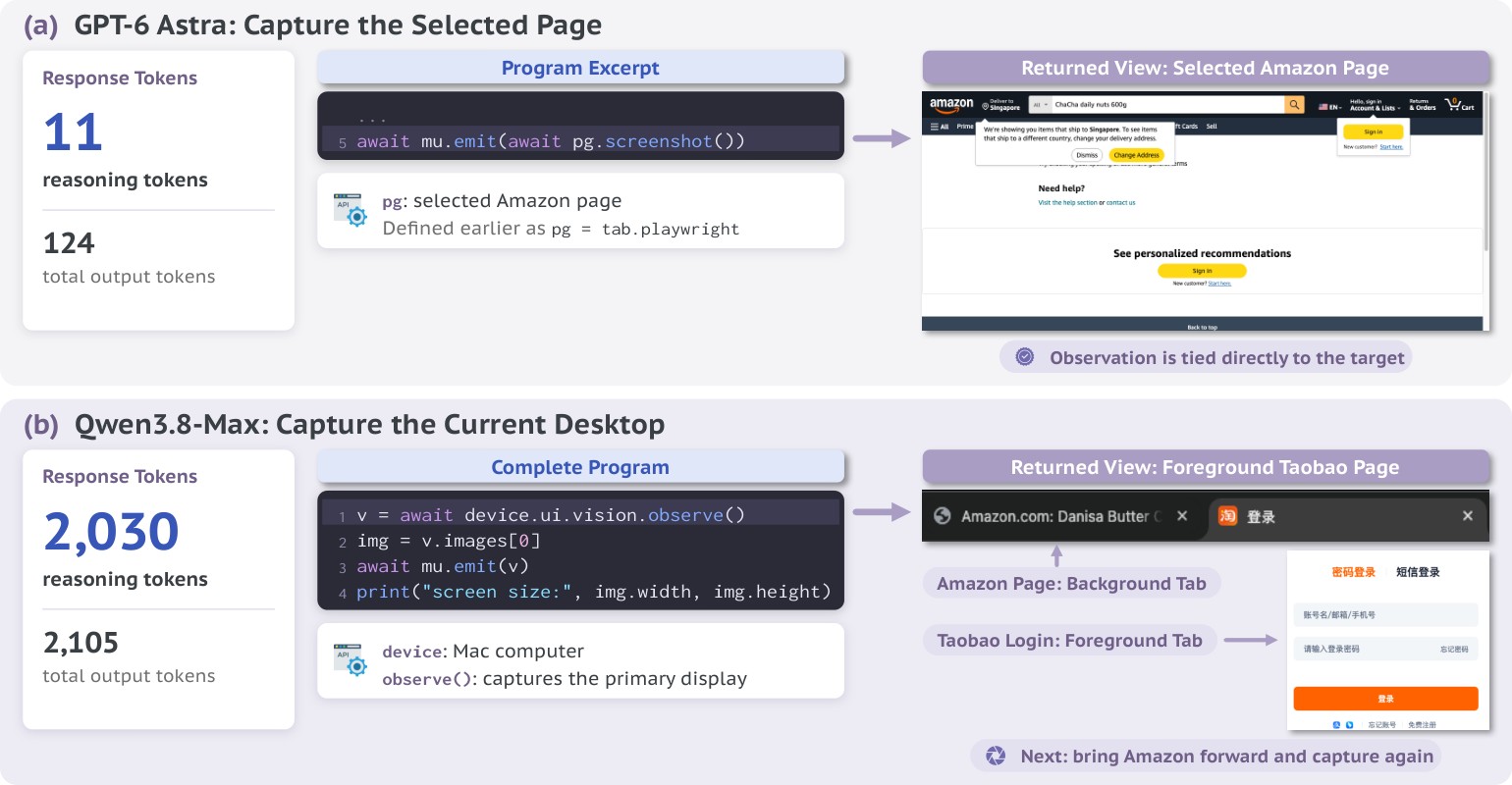
Figure 10: Reasoning cost and observation-target selection. GPT-6 Astra captures the selected Amazon page, while Qwen3.8-Max captures the foreground Taobao page and then switches to Amazon. Qwen3.8-Max uses substantially more reasoning tokens.
图 10:推理成本与观察目标选择。 GPT-6 Astra 捕获所选 Amazon 页面;Qwen3.8-Max 捕获前台淘宝页再切到 Amazon。Qwen3.8-Max 使用显著更多推理 token。
4.3.4 Case Studies
The gap in real-device execution extends from basic operation to completing an entire task. We compare GPT-6 Astra and Qwen3.8-Max through earlier low-effort trajectories under the same harness on real-device tasks, separate from the selected runs in Table 5. The following cases show differences in the cost of routine operations, the selection of observation targets, and the ability to turn a task into an effective program.
4.3.4 案例研究
本机执行差距从基本操作延伸到完成整个任务。 我们在同一运行框架下,通过较早的低努力轨迹,比较 GPT-6 Astra 与 Qwen3.8-Max 在本机任务上的表现,与表 5 的选定运行分开。以下案例显示:常规操作成本、观察目标选择,以及把任务变成有效程序的能力上的差异。
Large Differences in Reasoning Cost for Simple Operations. In a shopping task, Qwen produces a four-line program that captures and returns a desktop screenshot. The program returns an image, but the model response uses 2,105 output tokens, including 2,030 reasoning tokens. GPT also obtains a screenshot in another step of the same task, but its entire response uses only 124 output tokens, including 11 reasoning tokens (Figure 10). This contrast shows that a substantial reasoning-cost gap can arise even in a simple observation step. Such generation overhead can introduce substantial execution latency.
简单操作上推理成本的巨大差异。 在购物任务中,Qwen 生成四行程序捕获并返回桌面截图。程序返回图像,但模型响应用 2,105 输出 token,其中 2,030 为推理 token。GPT 在同一任务另一步也取得截图,但整个响应用仅 124 输出 token,其中 11 为推理 token(图 10)。这一对比表明:即便在简单观察步上,也可能出现显著推理成本差距。此类生成开销可引入显著执行延迟。
Difficulty Adapting to Real-Device Conditions. On a real device, the page an agent needs to inspect may not be in the foreground. In the shopping task, Qwen is working with an Amazon browser object but requests a desktop screenshot, which shows the foreground Taobao login page. It then brings Amazon forward and captures again. GPT instead requests a screenshot directly from its selected browser page. Both models use screenshots; the contrast concerns observation scope, illustrating why the intended task target cannot be assumed to coincide with the foreground interface.
适应本机条件的困难。 在真实设备上,智能体需要检查的页面可能不在前台。在购物任务中,Qwen 正与 Amazon 浏览器对象工作,却请求桌面截图,显示的是前台淘宝登录页;它随后把 Amazon 带到前台再捕获。GPT 则直接从其选定浏览器页请求截图。两个模型都用截图;对比关乎观察范围,说明意图任务目标不能假定与前台界面重合。
A Gap in Task-Level Code Execution. A workbook task reveals a difference in how models translate task requirements into programs. GPT-6 Astra builds a reusable solver, checks it against seven supplied examples, and identifies question rows from the workbook contents. Its program generates answers for all 125 questions. Qwen3.8-Max also uses functions and loops, but processes fixed row ranges that cover only 85 questions. Although its program reports this count, Qwen3.8-Max does not check for omitted questions. An audit of the saved workbooks confirms that GPT fills all 125 required Level answer cells, while Qwen3.8-Max leaves 40 empty (Figure 11). The gap is therefore not simply whether a model can write executable code with loops and conditions, but whether it can use code correctly to cover the full task and check for incomplete work.
任务级代码执行上的差距。 工作簿任务揭示模型如何把任务要求翻译成程序的差异。GPT-6 Astra 构建可复用求解器,对照七个给定示例检查,并从工作簿内容识别问题行;其程序为全部 125 题生成答案。Qwen3.8-Max 也用函数与循环,但处理仅覆盖 85 题的固定行范围。尽管其程序报告该计数,Qwen3.8-Max 并不检查遗漏题目。对已保存工作簿的审计确认:GPT 填满全部 125 个所需 Level 答案单元格,而 Qwen3.8-Max 留下 40 个空(图 11)。因此差距不仅是模型能否写出带循环与条件的可执行代码,而是能否正确用代码覆盖完整任务,并检查未完成工作。
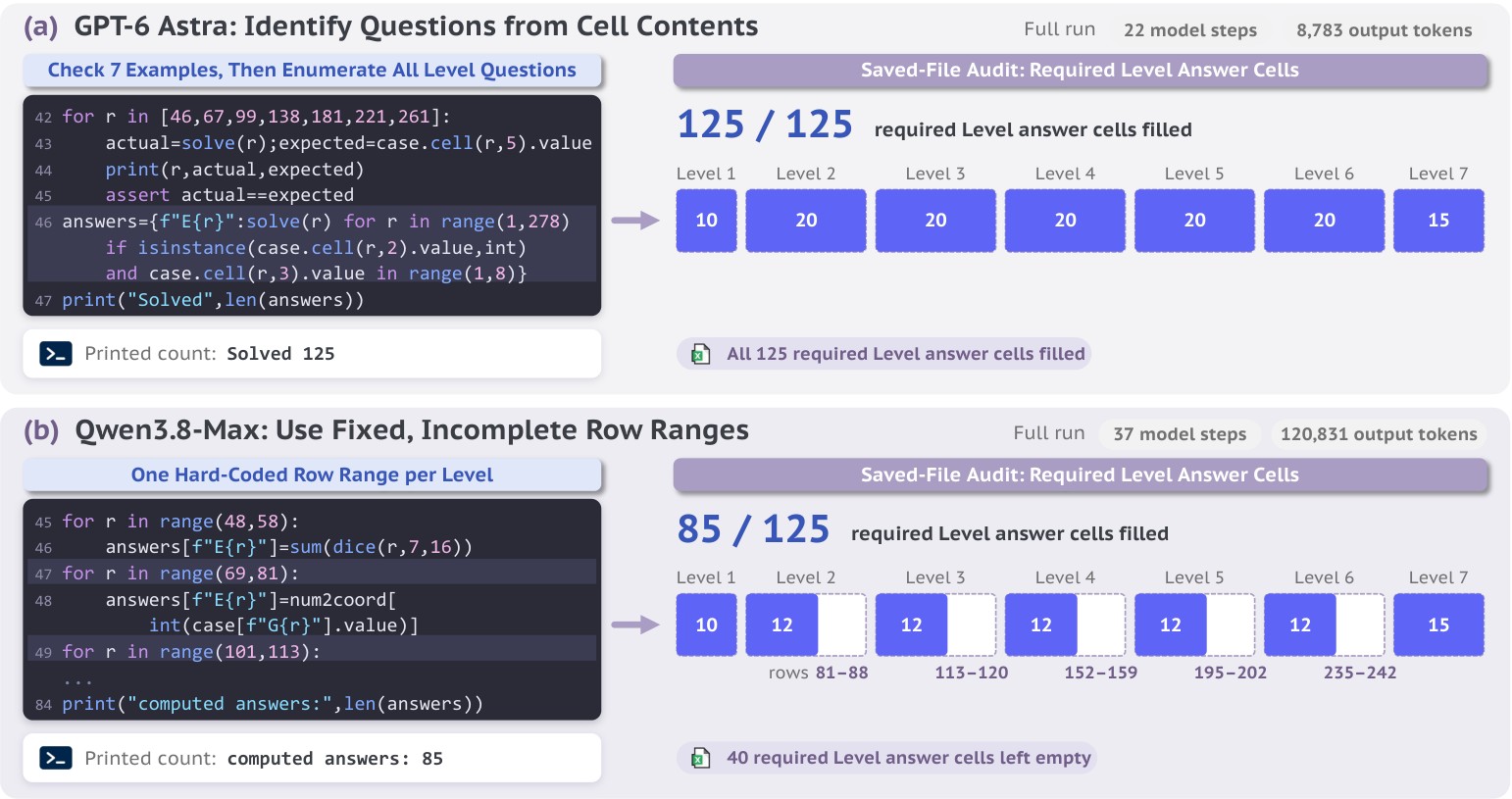
Figure 11: Task coverage in code execution. GPT-6 Astra fills all 125 required Level answer cells, while Qwen3.8-Max leaves 40 empty.
图 11:代码执行中的任务覆盖。 GPT-6 Astra 填满全部 125 个所需 Level 答案单元格,而 Qwen3.8-Max 留下 40 个空。
5 Roadmap
5 路线图
Open Generalist CUA aims to make generalist computer use a shared research effort in which models, execution systems, and real-device evaluation advance together. This first release provides an initial basis for that work.
Open Generalist CUA 旨在使通用 ComputerUse 成为共享研究努力:模型、执行系统与本机评测共同推进。本首次发布为该工作提供初步基础。
5.1 From Design Validation to Model Release
5.1 从设计验证到模型发布
The model-side contribution of this report is empirical validation of agent design using existing models, rather than a newly trained model. We study code execution and harness-to-model decision transfer, and release implementations, prompts, and evaluation trajectories alongside preliminary versions of the real-device harness and cross-device SDK.
本报告的模型侧贡献是用既有模型对智能体设计做经验验证,而非新训练的模型。我们研究代码执行,以及决策从框架下放到模型;并随初步版本的本机运行框架与跨设备 SDK,一并发布实现、提示与评测轨迹。
A GCUA model is the central addition planned for the next release. We aim to unify computer and browser use and turn the designs studied here into learned capabilities: coordinating visual and programmatic operations through code, requesting observations when needed, maintaining task state throughout execution, and particularly enhancing the capability in real-device scenario.
GCUA 模型是下一发布计划的核心增补。 我们旨在统一电脑与浏览器操作,并把此处研究的设计变成学到的能力:经代码协调视觉与程序化操作、在需要时请求观察、在执行全程维护任务状态,并特别增强本机场景能力。
5.2 Research Priorities
5.2 研究优先级
More Efficient Reasoning and Execution. We will optimize the model’s thinking, making reasoning more concise for routine operations and mitigating overthinking. On the harness and infrastructure side, we will improve code execution, context management, and infrastructure optimization. We will also explore new system architectures and other system-level solutions for efficiency.
更高效的推理与执行。 我们将优化模型思考,使常规操作的推理更精练,并缓解过度思考。在运行框架与基础设施侧,我们将改进代码执行、上下文管理与基础设施优化。我们也将探索新系统架构,以及其他面向效率的系统级方案。
Reliable Work on Users’ Devices. We plan to extend the harness and SDK toward tasks spanning computers, browsers, and potentially mobile devices. Priorities include reliable target selection, recovery from execution failures, and task continuity when users interrupt or change their requests. We will also investigate which additional workflow decisions should move from fixed harness rules to the model.
在用户设备上可靠工作。 我们计划把运行框架与 SDK 扩展到横跨电脑、浏览器乃至移动设备的任务。优先级包括可靠目标选择、从执行失败中恢复,以及用户打断或更改请求时的任务连续性。我们也将研究:哪些额外工作流决策应从固定运行框架规则移到模型。
Real-Device Environments and Benchmarks. We will develop evaluation environments and benchmarks on real devices, particularly macOS, covering a wider range of applications, user interactions, and changing device states. The goal is to measure whether agents complete useful work under real operating conditions, together with the time and resources required.
本机环境与基准。 我们将在真实设备(尤其 macOS)上开发评测环境与基准,覆盖更广应用、用户交互与变化设备状态。目标是度量智能体在真实运行条件下是否完成有用工作,以及所需时间与资源。
5.3 How to Contribute
5.3 如何贡献
We welcome contributions to both the implementation and the research agenda:
我们欢迎对实现与研究议程两方面的贡献:
- • Improve the Harness and SDK. Contribute platform adapters, more reliable observation and control, execution optimizations, or real-device testing and documentation.
- • Build Real-Device Evaluation. Contribute environments, realistic tasks, evaluation criteria, and benchmark infrastructure, including execution traces that expose current limitations.
- • Propose Research Goals. Identify workflows agents should support, capabilities worth developing, or questions to investigate through the released systems and trajectories.
- • 改进运行框架与 SDK。 贡献平台适配器、更可靠的观察与控制、执行优化,或本机测试与文档。
- • 建设本机评测。 贡献环境、贴近真实的任务、评测标准与基准基础设施,包括暴露当前局限的执行轨迹。
- • 提出研究目标。 指出智能体应支持的工作流、值得发展的能力,或通过已发布系统与轨迹可调查的问题。
These priorities guide planned releases without fixing a delivery timeline. The agenda will evolve with experimental evidence and community proposals, including directions beyond those listed here. Our goal is for the community to help shape not only how GCUAs are built, but also what they should be able to do and how progress should be measured.
这些优先级指导计划中的发布,但不固定交付时间表。议程会随实验证据与社区提案演化,也包括此处未列出的方向。我们的目标是:社区不仅参与塑造 GCUA 如何构建,也参与塑造它们应能做什么、以及如何度量进展。
6 Related Work
6 相关工作
Frontier Computer Use. OpenAI positions GPT-6 Astra for difficult end-to-end work and describes computer use as a new frontier in speed, accuracy, and safety. It recommends code execution for computer-use tasks while retaining the structured computer tool as an alternative (OpenAI, 2026c; OpenAI, 2026b). In Codex, Computer Use can see and operate graphical user interfaces on macOS and Windows, support workflows spanning multiple applications, and, on macOS, run scoped background tasks while the user continues working elsewhere (OpenAI, 2026a). Anthropic also provides computer use in Claude Cowork and Claude Code: Claude first reaches for the most precise tool, such as connectors to services like Slack or Google Calendar, and can directly control the browser, mouse, keyboard, and screen when no connector is available. Its Dispatch feature further lets users assign tasks from a phone and open the completed work on a computer (Anthropic, 2026b). Despite these capabilities, the public releases leave key implementation details and execution trajectories unavailable, making their system designs difficult for the community to reproduce and study systematically.
前沿 ComputerUse。 OpenAI 把 GPT-6 Astra 定位于困难的端到端工作,并把 ComputerUse 描述为速度、准确与安全方面的新前沿。它建议对 ComputerUse 任务采用代码执行,同时保留结构化电脑工具作为替代(OpenAI, 2026c; OpenAI, 2026b)。在 Codex 中,Computer Use 可以在 macOS 与 Windows 上看到并操作图形界面,支持跨多个应用的工作流;在 macOS 上,还可以在用户继续在别处工作时,运行有范围的后台任务(OpenAI, 2026a)。Anthropic 也在 Claude Cowork 与 Claude Code 中提供 ComputerUse:Claude 先伸手够最精确的工具(例如连到 Slack 或 Google Calendar 的连接器);没有连接器时,可以直接控制浏览器、鼠标、键盘与屏幕。其 Dispatch 功能进一步让用户从手机派发任务,并在电脑上打开已完成的工作(Anthropic, 2026b)。尽管有这些能力,公开版本仍不开放关键实现细节与执行轨迹,使社区难以复现并系统研究其系统设计。
Computer-Use Agents. Prior open CUA models remain largely GUI-centric. UI-TARS and UI-TARS-2 (Qin et al., 2025; Wang et al., 2025a), OpenCUA (Wang et al., 2025b), ScaleCUA (Liu et al., 2025), EvoCUA (Huang et al., 2026), and Fara (Microsoft, 2026) release open models for computer use and report strong results on relevant benchmarks. Recent work has begun to explore hybrid GUI–programmatic execution: CoAct-1, ComputerRL, UltraCUA, ToolCUA, and StateAct combine GUI control with code, APIs, tool calls, or program-state operations (Song et al., 2026; Lai et al., 2025; Yang et al., 2026b; Hu et al., 2026; Yang et al., 2026a); RecreationWorld and WeaveBench respectively provide environments and benchmarks for such interleaved trajectories (Bai et al., 2026; Li et al., 2026). Our previous work, Qwen-UI-Agent, introduced a unified GUI–CLI action space with batched actions, a real-device mobile runtime, and a harness for proactive cross-platform execution (Zhou et al., 2026; Zhou et al., 2025). To capture this broader setting, following the system-level perspective of Agents’ Last Exam (Sun et al., 2026), we use the term Generalist Computer-Use Agent (GCUA). We define a GCUA as an agent system that completes diverse computer tasks through visual interaction and programmatic access, choosing how to observe, act, and organize its work as each task requires.
ComputerUse 智能体。 此前的开放 CUA 模型大体仍以 GUI 为中心。UI-TARS 与 UI-TARS-2(Qin et al., 2025; Wang et al., 2025a)、OpenCUA(Wang et al., 2025b)、ScaleCUA(Liu et al., 2025)、EvoCUA(Huang et al., 2026)以及 Fara(Microsoft, 2026)发布了面向 ComputerUse 的开放模型,并在相关基准上报告了较强结果。近期工作开始探索 GUI 与程序化执行的混合:CoAct-1、ComputerRL、UltraCUA、ToolCUA 与 StateAct 把 GUI 控制与代码、API、工具调用或程序状态操作组合起来(Song et al., 2026; Lai et al., 2025; Yang et al., 2026b; Hu et al., 2026; Yang et al., 2026a);RecreationWorld 与 WeaveBench 分别为此类交错轨迹提供环境与基准(Bai et al., 2026; Li et al., 2026)。我们此前的 Qwen-UI-Agent 引入了统一的 GUI–CLI 动作空间与批量动作、本机移动运行时,以及面向主动跨平台执行的运行框架(Zhou et al., 2026; Zhou et al., 2025)。为刻画这一更广设定,我们沿用 Agents’ Last Exam 的系统级视角(Sun et al., 2026),使用 通用 ComputerUse 智能体(GCUA)这一术语。我们把 GCUA 定义为:一套智能体系统,经视觉交互与程序化访问完成多样电脑任务,并按每个任务的需要选择如何观察、行动与组织工作。
Open Computer-Use Infrastructure. Several projects provide open harnesses for computer-use agents. The cua project provides cross-platform desktop drivers and sandbox SDKs (trycua, 2026). The Agent S series provides open orchestration frameworks with memory, visual grounding, and increasingly code-based execution (Agashe et al., 2025a; Agashe et al., 2025b; Gonzalez-Pumariega et al., 2026). Open Computer Use provides an MCP-wrapped desktop-control runtime, including macOS control through Accessibility (iFurySt, 2026). These are complementary to our work. Open Generalist CUA is an ongoing project to open a full GCUA research stack that couples a trained model with a real-device harness, a cross-device SDK, and execution trajectories.
开放的 ComputerUse 基础设施。 若干项目为 ComputerUse 智能体提供开放运行框架。cua 项目提供跨平台桌面驱动与沙箱 SDK(trycua, 2026)。Agent S 系列提供带记忆、视觉 grounding、以及日益偏向代码执行的开放编排框架(Agashe et al., 2025a; Agashe et al., 2025b; Gonzalez-Pumariega et al., 2026)。Open Computer Use 提供经 MCP 封装的桌面控制运行时,包括经 Accessibility 的 macOS 控制(iFurySt, 2026)。这些工作与我们互补。Open Generalist CUA 是一项持续项目:开放完整的 GCUA 研究栈,把训练好的模型与本机运行框架、跨设备 SDK 以及执行轨迹耦合在一起。
7 Conclusion
7 结论
We presented the first release of Open Generalist CUA, an ongoing project to develop and open the full stack for generalist computer use. Our GCUA formulation centers on three model decisions: what to observe, how to act, and how to organize work. Code execution lets models use intermediate results to coordinate GUI and programmatic operations and apply their existing programming capabilities to computer interaction. Harness-to-model decision transfer complements this design by moving selected observation and task-state decisions from fixed harness rules to the model. On the offline subset of OSWorld-v2, the full OpenGCUA configuration improves task scores across all eight evaluated models, raising mean partial score by 19.6 points and reducing reported steps per task by an average of 53.0% relative to batched GUI-only execution. Ablations show additional benefits from code execution with the same GUI and CLI access, indicating that execution design matters beyond interface access.
我们给出了 Open Generalist CUA 的第一版发布——一项开发并开放通用 ComputerUse 全栈的持续项目。我们的 GCUA 表述围绕模型的三项决策:观察什么、如何行动、如何组织工作。代码执行让模型用中间结果协调 GUI 与程序化操作,并把已有编程能力用到操作电脑上。决策从框架下放到模型补充这一设计:把选定的观察与任务状态决策,从固定运行框架规则交给模型。在 OSWorld-v2 离线子集上,完整 OpenGCUA 配置抬高了全部八个评测模型的任务分数:相对批量、仅 GUI 的执行,平均部分分提高 19.6 分,报告的完成任务所需步数平均减少 53.0%。消融表明:在同样具备 GUI 与 CLI 访问时,代码执行仍有额外收益——说明执行设计的重要性超出接口访问本身。
We release our implementation, prompts, and evaluation trajectories, alongside preliminary versions of a real-device harness and cross-device SDK. Evaluations on four macOS tasks reveal substantial differences in reported reasoning-token usage and task completion under the same harness. This report studies GCUA designs rather than introducing a newly trained model. OpenGCUA will continue through further research and releases on GCUA models, reasoning and execution efficiency, and real-device environments and benchmarks.
我们发布实现、提示与评测轨迹,并附初步版本的本机运行框架与跨设备 SDK。在四个 macOS 任务上的评测显示:在同一运行框架下,报告的推理 token 用量与任务完成存在巨大差异。本报告研究的是 GCUA 设计,而不是引入新训练的模型。OpenGCUA 将继续推进:围绕 GCUA 模型、推理与执行效率,以及本机环境与基准,做进一步研究和发布。
References
参考文献
Agashe et al. (2025a) Saaket Agashe, Jiuzhou Han, Shuyu Gan, Jiachen Yang, Ang Li, and Xin Eric Wang. Agent S: An open agentic framework that uses computers like a human. In The Thirteenth International Conference on Learning Representations , 2025a. URL https://openreview.net/forum?id=lIVRgt4nLv .
Agashe et al. (2025b) Saaket Agashe, Kyle Wong, Vincent Tu, Jiachen Yang, Ang Li, and Xin Eric Wang. Agent S2: A compositional generalist-specialist framework for computer use agents, 2025b. URL https://arxiv.org/abs/2504.00906 .
Anthropic (2025) Anthropic. Claude code. https://code.claude.com/docs/en/overview , 2025. Accessed: 2026-09-24.
Anthropic (2026a) Anthropic. Best practices for computer and browser use with claude. https://claude.com/blog/best-practices-for-computer-and-browser-use-with-claude , May 2026a.
Anthropic (2026b) Anthropic. Put claude to work on your computer. https://claude.com/blog/dispatch-and-computer-use , March 2026b.
Bai et al. (2026) Shuai Bai, Jiayong Deng, Sicheng Fan, et al. RecreationWorld: Scalable and verifiable environments for hybrid computer-use agents, 2026. URL https://arxiv.org/abs/2609.22000 .
Gonzalez-Pumariega et al. (2026) Gonzalo Gonzalez-Pumariega, Vincent Tu, Chih-Lun Lee, Jiachen Yang, Ang Li, and Xin Eric Wang. Scaling agents for computer use, 2026. URL https://arxiv.org/abs/2510.02250 .
Hu et al. (2026) Xuhao Hu, Xi Zhang, Haiyang Xu, et al. ToolCUA: Towards optimal GUI-tool path orchestration for computer use agents, 2026. URL https://arxiv.org/abs/2605.12481 .
Huang et al. (2026) Mianqiu Huang, Taofeng Xue, Chong Peng, Jinrui Ding, Sicheng Fan, Jiale Hong, Yufei Gao, Xiaocheng Zhang, Linsen Guo, Xin Yang, et al. Evocua-1.5: Online reinforcement learning for multi-turn computer-use agents. arXiv preprint arXiv:2607.09773 , 2026.
iFurySt (2026) iFurySt. Open computer use: An open-source alternative to codex computer use. https://github.com/ifuryst/open-codex-computer-use , 2026. Accessed 2026-09.
Lai et al. (2025) Hanyu Lai, Xiao Liu, Yanxiao Zhao, et al. ComputerRL: Scaling end-to-end online reinforcement learning for computer use agents, 2025. URL https://arxiv.org/abs/2508.14040 .
Li et al. (2026) Wanli Li, Bowen Zhou, Yunyao Yu, et al. WeaveBench: A long-horizon, real-world benchmark for computer-use agents with hybrid interfaces, 2026. URL https://arxiv.org/abs/2606.09426 .
Liu et al. (2025) Zhaoyang Liu, Jingjing Xie, Zichen Ding, Zehao Li, Bowen Yang, Zhenyu Wu, Xuehui Wang, Qiushi Sun, Shi Liu, Weiyun Wang, Shenglong Ye, Qingyun Li, Xuan Dong, Yue Yu, Chenyu Lu, YunXiang Mo, Yao Yan, Zeyue Tian, Xiao Zhang, Yuan Huang, Yiqian Liu, Weijie Su, Gen Luo, Xiangyu Yue, Biqing Qi, Kai Chen, Bowen Zhou, Yu Qiao, Qifeng Chen, and Wenhai Wang. Scalecua: Scaling open-source computer use agents with cross-platform data. arXiv preprint arXiv:2509.15221 , 2025. URL https://github.com/OpenGVLab/ScaleCUA . Preprint.
Lu et al. (2026) Dunjie Lu, Shuai Bai, Tianyi Bai, Sicheng Fan, Chang Gao, Jian Guan, Feng Hu, Mianqiu Huang, Xingyang Huang, Yizhen Jiang, et al. Qwen-cua: Native computer use for (almost) everything. arXiv preprint arXiv:2608.02352 , 2026.
Microsoft (2026) Microsoft. Fara-7B: An efficient agentic model for computer use. https://github.com/microsoft/fara , 2026. Accessed 2026-09.
OpenAI (2025) OpenAI. Codex CLI. https://github.com/openai/codex , 2025. Accessed: 2026-09-24.
OpenAI (2026a) OpenAI. Codex computer use. https://learn.chatgpt.com/codex/computer-use , 2026a. Product documentation. Accessed 2026-09.
OpenAI (2026b) OpenAI. Computer use: Building computer-using agents with the responses API. https://developers.openai.com/api/docs/guides/tools-computer-use , 2026b. Developer documentation; revised for GPT-6 Astra. Accessed 2026-09.
OpenAI (2026c) OpenAI. GPT-6 Astra: A new generation of intelligence. https://openai.com/index/gpt-6-astra/ , September 2026c. Accessed 2026-09.
Qin et al. (2025) Yujia Qin, Yining Ye, Junjie Fang, Haoming Wang, Shihao Liang, Shizuo Tian, Junda Zhang, Jiahao Li, Yunxin Li, Shijue Huang, et al. Ui-tars: Pioneering automated gui interaction with native agents. arXiv preprint arXiv:2501.12326 , 2025.
Song et al. (2026) Linxin Song, Yutong Dai, Viraj Prabhu, et al. CoAct-1: Computer-using multi-agent system with coding actions, 2026. URL https://arxiv.org/abs/2508.03923 .
Sun et al. (2026) Yiyou Sun, Xinyang Han, Weichen Zhang, et al. Agents’ last exam, 2026. URL https://arxiv.org/abs/2606.05405 .
trycua (2026) trycua. cua: Open-source infrastructure for computer-use agents. https://github.com/trycua/cua , 2026. Accessed 2026-09.
Wang et al. (2025a) Haoming Wang, Haoyang Zou, Huatong Song, Jiazhan Feng, Junjie Fang, Junting Lu, Longxiang Liu, Qinyu Luo, Shihao Liang, Shijue Huang, et al. Ui-tars-2 technical report: Advancing gui agent with multi-turn reinforcement learning. arXiv preprint arXiv:2509.02544 , 2025a.
Wang et al. (2025b) Xinyuan Wang, Bowen Wang, Dunjie Lu, Junlin Yang, Tianbao Xie, Junli Wang, Jiaqi Deng, Xiaole Guo, Yiheng Xu, Chen Henry Wu, Zhennan Shen, Zhuokai Li, Ryan Li, Xiaochuan Li, Junda Chen, Boyuan Zheng, Peihang Li, Fangyu Lei, Ruisheng Cao, Yeqiao Fu, Dongchan Shin, Martin Shin, Jiarui Hu, Yuyan Wang, Jixuan Chen, Yuxiao Ye, Danyang Zhang, Dikang Du, Hao Hu, Huarong Chen, Zaida Zhou, Haotian Yao, Ziwei Chen, Qizheng Gu, Yipu Wang, Heng Wang, Diyi Yang, Victor Zhong, Flood Sung, Y. Charles, Zhilin Yang, and Tao Yu. Opencua: Open foundations for computer-use agents, 2025b. URL https://arxiv.org/abs/2508.09123 .
Yang et al. (2026a) Yan Yang, Xiangru Jian, Ziyang Luo, et al. StateAct: Program state, before pixels, for long-horizon computer-use agents, 2026a. URL https://arxiv.org/abs/2607.22798 .
Yang et al. (2026b) Yuhao Yang, Zhen Yang, Zi-Yi Dou, et al. UltraCUA: A foundation model for computer use agents with hybrid action, 2026b. URL https://arxiv.org/abs/2510.17790 .
Yuan et al. (2026) Mengqi Yuan, Zilong Zhou, Xinzhuang Xiong, Weiming Wu, Jiayang Sun, Jiamin Song, Kaiqian Cui, Bowen Wang, Haoyuan Wu, Yitong Li, Dunjie Lu, Haikong Lu, Qi Zhen, Xinyuan Wang, Jiaqi Deng, Yuhao Yang, Cheng Chen, Boyuan Zheng, Alex Su, Xiao Yu, Hao Zou, Saaket Agashe, Xing Han Lu, Manpreet Kaur, Zhengyang Qi, Vincent Sunn Chen, Frederic Sala, Dayiheng Liu, Junyang Lin, Zhou Yu, Yu Su, Siva Reddy, Xin Eric Wang, Peng Qi, Tianbao Xie, and Tao Yu. Osworld 2.0: Benchmarking computer use agents on long-horizon real-world tasks. arXiv preprint arXiv:2606.29537 , 2026.
Zhou et al. (2025) Hanzhang Zhou, Xu Zhang, Panrong Tong, Jianan Zhang, Liangyu Chen, Quyu Kong, Chenglin Cai, Chen Liu, Yue Wang, Jingren Zhou, and Steven Hoi. MAI-UI Technical Report: Real-World Centric Foundation GUI Agents. arXiv preprint arXiv:2512.22047 , 2025. URL https://arxiv.org/abs/2512.22047 .
Zhou et al. (2026) Hanzhang Zhou, Panrong Tong, Xu Zhang, Quyu Kong, Chenglin Cai, Tianyu Xia, Gongjie Zhang, Jianan Zhang, Long Li, Long Chen, et al. Qwen-ui-agent technical report: Toward next-generation real-world centric foundation gui agents. arXiv preprint arXiv:2607.28227 , 2026.
Appendix A Evaluation Details
附录 A 评测细节
Metrics and Aggregation. We evaluate the 82-task offline subset of OSWorld-v2 v2.1. Task score is the mean evaluator partial score, expressed on a 0–100 scale. Full-task success is the percentage of tasks with a normalized evaluator score greater than 0.999999. Steps and token counts are averaged over all selected tasks, including failures. Within each run, we retain the latest attempt with an evaluator result for each task, not the highest-scoring attempt. Cross-model summaries give each model equal weight: score gains are averaged in points, and relative resource reductions are calculated within each model before averaging.
指标与汇总。 我们评测 OSWorld-v2 v2.1 的 82 任务离线子集。任务分数是评测器部分分的均值,以 0–100 表示。完整任务成功是归一化评测器分数大于 0.999999 的任务百分比。步数与 token 计数对全部选定任务平均,含失败。在每次运行内,我们对每个任务保留带评测器结果的最新尝试,而不是最高分尝试。跨模型汇总给每个模型同等权重:分数增益按分平均;相对资源降幅先在各模型内计算,再平均。
The offline subset is defined by evaluation_examples/test_v2_offline_no_internet.json. It excludes the 26 tasks requiring external Internet access, while retaining local web applications and desktop tasks.
离线子集由 evaluation_examples/test_v2_offline_no_internet.json 定义。它排除 26 个需要外部互联网访问的任务,同时保留本地 Web 应用与桌面任务。
Appendix B Real-Device Evaluation Details
附录 B 本机评测细节
B.1 Task Descriptions
B.1 任务描述
Workbook Reasoning.
The input workbook contains race rules, a track layout, seven worked examples, and 125 Level questions. The agent must compute all Level answers and the requested bonus answers, enter them in the designated cells, and save a completed copy without altering the original.
工作簿推理。
输入工作簿含比赛规则、赛道布局、七个已解示例,以及 125 道 Level 题。智能体必须算出全部 Level 答案与所要求的加分答案,填入指定单元格,并保存一份已完成副本,且不改动原件。
PDF Form Filling.
The inputs comprise a blank four-page Schengen application form and synthetic identity, employment, travel, and accommodation records. The agent must fill all applicable fields supported by these materials and save a new PDF with all entered information visible and correct.
PDF 表单填写。
输入包括空白四页申根申请表,以及合成的身份、就业、旅行与住宿记录。智能体必须填写这些材料所支持的全部适用字段,并保存一份新 PDF,使所填信息均可见且正确。
Shopping Research.
Given 22 snack candidates and a dietary-restriction list, the agent must verify exact products on Amazon, falling back to official brand or original product pages when necessary. The DOCX must cover every candidate, with evidence for purchase or replacement recommendations and explicit uncertainty about unverified ingredients or allergens. No purchase is permitted.
购物调研。
给定 22 个零食候选与一份饮食限制清单,智能体必须在 Amazon 上核对确切产品;必要时回退到官方品牌页或原产品页。DOCX 必须覆盖每个候选,给出购买或替换建议的证据,并对未核验的成分或过敏原写明不确定性。不允许下单。
Hotel Comparison.
The agent must compare Pullman Paris Montparnasse and InterContinental Paris Le Grand for two adults over December 20–30, 2026, with one hotel change and at least three nights at each hotel. It lists ten feasible date plans and researches four prescribed plans through the official sites, Expedia, and Booking.com. A four-sheet workbook must document tax-inclusive EUR prices, refundability, breakfast for two on December 23–28, and source limitations. No reservation is permitted.
酒店比较。
智能体必须比较 Pullman Paris Montparnasse 与 InterContinental Paris Le Grand,面向两名成人、2026 年 12 月 20–30 日,允许换一次酒店,且每家至少住三晚。它列出十个可行日期方案,并经官网、Expedia 与 Booking.com 调研四个指定方案。四表工作簿必须记录含税欧元价格、可否退款、12 月 23–28 日两人早餐,以及来源限制。不允许预订。
B.2 Task Instructions and Materials
B.2 任务说明与材料
The following are full English translations of the original task instructions. The snack-document title and corresponding filename are translated into English. The original prompts and input files are included in the accompanying task-material bundle.
以下是原始任务说明的完整英译。零食文档标题与对应文件名译成英文。原始提示与输入文件收在随附的任务材料包中。
Input Materials.
Elimination_Race_to_Las_Vegas.xlsx, containing the Case and RaceTrack sheets. The source contains 125 Level 1-7 questions, seven worked examples, and five bonus questions.
输入材料。
Elimination_Race_to_Las_Vegas.xlsx,含 Case 与 RaceTrack 表。源文件含 125 道 Level 1–7 题、七个已解示例,以及五道加分题。
Task Instruction.
Please use the file "Elimination_Race_to_Las_Vegas.xlsx" located on your desktop to complete the "Jade’s Community Game! (Everyone Welcome)" challenge at https://play.excel-esports.com. Follow the rules provided in the workbook and on the challenge page to solve all the questions, enter your answers into the designated fields on the website, and submit them. Finally, display the results page and report both your actual score and the maximum possible score.
任务说明。
请使用桌面上的文件 "Elimination_Race_to_Las_Vegas.xlsx",完成 https://play.excel-esports.com 上的 “Jade’s Community Game! (Everyone Welcome)” 挑战。按工作簿与挑战页提供的规则解答全部题目,把答案填入网站指定字段并提交。最后显示结果页,并报告实际得分与可能的最高分。
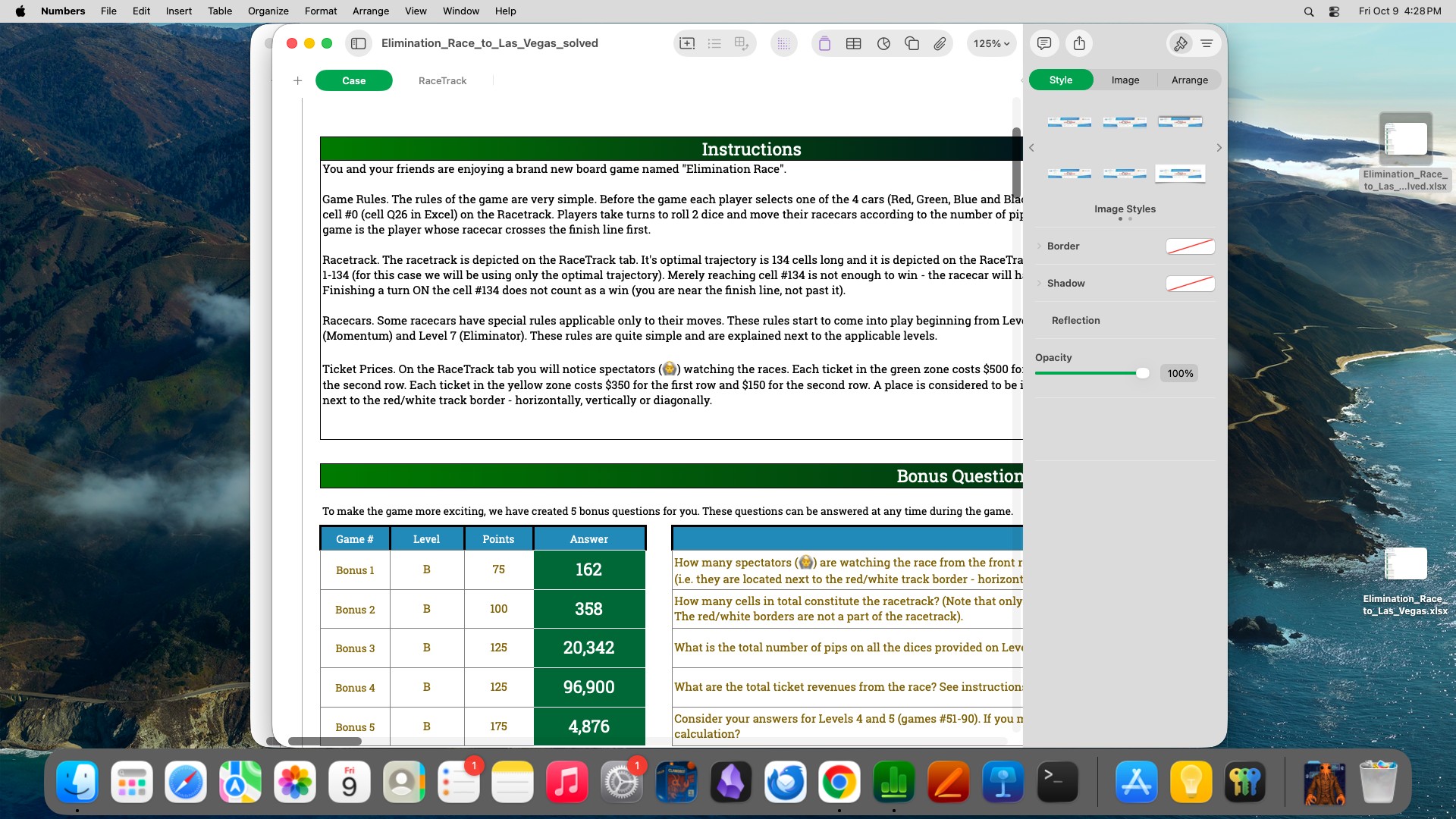
Figure 12: Workbook interface during the Claude Opus 5 run. The view shows the rules and answer cells. Displayed answers are model outputs, not part of the initial workbook.
图 12:Claude Opus 5 运行期间的工作簿界面。视图显示规则与答案单元格。显示的答案是模型输出,不是初始工作簿的一部分。
Input Materials.
visa task.zip: a blank four-page Schengen form, passport and ID information, an application worksheet, an employment certificate, a flight itinerary, and hotel bookings. The identity workbook explicitly labels its records as synthetic test data.
输入材料。
visa task.zip:空白四页申根表、护照与身份证信息、申请工作表、就业证明、航班行程与酒店预订。身份工作簿明确标注其记录为合成测试数据。
Task Instruction.
Please use the application materials found in the visa task.zip file on the desktop to complete the blank Schengen visa application form, CS_14076-05_EN_05.pdf. Review every field in the form and populate it with all clearly identifiable information provided within the visa task.zip package—including the applicant’s personal details, passport information, travel itinerary, accommodation, transportation, occupation, and any other relevant data. Once finished, save the completed form as CS_14076-05_EN_05_filled.pdf. The final PDF file must be accessible and retain all the information you have entered.
任务说明。
请使用桌面上 visa task.zip 中的申请材料,填写空白申根签证申请表 CS_14076-05_EN_05.pdf。审阅表中每一字段,并用 visa task.zip 包内可明确识别的全部信息填写——包括申请人个人详情、护照信息、旅行行程、住宿、交通、职业及其他相关数据。完成后,将填好的表格保存为 CS_14076-05_EN_05_filled.pdf。最终 PDF 必须可访问,并保留全部已填信息。
Figure 13: First page of the supplied blank application form. Completed forms and applicant details are not shown.
图 13:所提供空白申请表的首页。已填表格与申请人详情未展示。
Input Materials.
snake filter task.zip: Combined_Snacks (22 candidates, with original product names and links) and Dad_No_Go_List (dietary restrictions and allergen exclusions). Live sources are Amazon, official brand pages, or the original candidate product pages.
输入材料。
snake filter task.zip:Combined_Snacks(22 个候选,含原产品名与链接)与 Dad_No_Go_List(饮食限制与过敏原排除)。在线来源为 Amazon、官方品牌页或原候选产品页。
Task Instruction.
Please review the 22 snacks on the candidate list by cross-referencing them with the Combined_Snacks and Dad_No_Go_List files found in the snake filter task.zip folder on your desktop.
任务说明。
请对照桌面 snake filter task.zip 文件夹中的 Combined_Snacks 与 Dad_No_Go_List,审阅候选清单上的 22 种零食。
Since the candidate list does not provide full ingredient lists, please look up each item on Amazon. Use the ingredient list, allergen information, and product description provided on the Amazon product page—in conjunction with the restrictions outlined in the Dad_No_Go_List—to determine whether each item is suitable for purchase.
由于候选清单未提供完整成分表,请在 Amazon 上查找每一项。使用 Amazon 产品页上的成分表、过敏原信息与产品描述——并结合 Dad_No_Go_List 中的限制——判断每一项是否适合购买。
Create a Word document titled “Snacks Dad and I Can Share” and categorize all 22 candidate items into the following three groups:
创建一份题为 “Snacks Dad and I Can Share” 的 Word 文档,并把全部 22 个候选分到以下三组:
- Safe to purchase as is
- Requires a change in flavor, size, or other adjustments before it can be purchased
- Not recommended for purchase
- 可按原样购买
- 需更改口味、规格或其他调整后方可购买
- 不建议购买
For each item, you must include:
对每一项,必须包含:
- • Number
- • Product Name
- • Assessment Result
- • Rationale for the assessment
- • If adjustments are required, specify the necessary changes (e.g., flavor, size, or other modifications)
- • 编号
- • 产品名称
- • 评估结果
- • 评估理由
- • 若需调整,写明必要变更(例如口味、规格或其他修改)
If the ingredients or allergen information for a product cannot be verified via its Amazon product page, do not rely on the product name or general assumptions; instead, clearly label it as “Ingredient information unverified.”
若某产品的成分或过敏原信息无法经其 Amazon 产品页核验,不要依赖产品名或一般假设;应明确标注为 “Ingredient information unverified.”
Ensure that all 22 candidate items are included and that each item is assigned to exactly one category.
确保全部 22 个候选都纳入,且每一项恰好分到一个类别。
Include the following disclaimer at the end of the document:
在文档末尾加入以下免责声明:
Prices, formulations, and stock availability are subject to change. Always check the actual product packaging labels and warnings regarding cross-contact before placing an order or consuming the product.
价格、配方与库存可能变化。下单或食用前,务必核对实际产品包装标签与交叉接触相关警告。
Figure 14: First page of the supplied Combined_Snacks candidate list, showing product images, package descriptions, and original listing links. The screenshot retains the source language.
图 14:所提供 Combined_Snacks 候选清单首页,显示产品图、包装描述与原列表链接。截图保留源语言。
Input Materials.
A text-only request for a Paris itinerary and a four-sheet comparison workbook. Prices and policies must come from the live Accor, IHG, Expedia, and Booking.com websites, not bundled rate cards.
输入材料。
一份纯文本的巴黎行程请求,以及一份四表比较工作簿。价格与政策必须来自 Accor、IHG、Expedia 与 Booking.com 的在线网站,而不是打包价目卡。
Task Instruction.
I’m planning a Paris trip from Dec 20 to Dec 30, 2026 (check-in Dec 20, check-out Dec 30, 10 nights total) for 2 adults. I want to split the stay between exactly two hotels:
任务说明。
我计划 2026 年 12 月 20 日至 30 日去巴黎旅行(12 月 20 日入住、30 日退房,共 10 晚),两人。希望把住宿恰好分在两家酒店:
- • Pullman Paris MontparnasseOfficial site: https://all.accor.com/a/en/offers/meapac/pullman.html?merchantid=ppc-pul-goo-apac-en-pmax&sourceid=aw-cen&utm_source=google&utm_medium=cpc&utm_campaign=ppc-pul-goo-apac-en-apac-pmax-aw-cen&utm_term=goo&utm_content=en-apac-all-all&wiz_campaign=24047123880&gad_source=1&gad_campaignid=24047157582&gbraid=0AAAABC20MbFGIzWYbNya4iMdEd7J85MfU&gclid=CjwKCAjww-3VBhAcEiwAwUUIu9eC4_lOMg5Q6UoljvjRNlUdcS3bBq5DHLxRAKHOZoVW10488aIrYBoCu3sQAvD_BwE
- • InterContinental Paris - Le GrandOfficial site: https://www.ihg.com/intercontinental/hotels/us/en/paris/parhb/hoteldetail
- • Pullman Paris Montparnasse官网: https://all.accor.com/a/en/offers/meapac/pullman.html?merchantid=ppc-pul-goo-apac-en-pmax&sourceid=aw-cen&utm_source=google&utm_medium=cpc&utm_campaign=ppc-pul-goo-apac-en-apac-pmax-aw-cen&utm_term=goo&utm_content=en-apac-all-all&wiz_campaign=24047123880&gad_source=1&gad_campaignid=24047157582&gbraid=0AAAABC20MbFGIzWYbNya4iMdEd7J85MfU&gclid=CjwKCAjww-3VBhAcEiwAwUUIu9eC4_lOMg5Q6UoljvjRNlUdcS3bBq5DHLxRAKHOZoVW10488aIrYBoCu3sQAvD_BwE
- • InterContinental Paris - Le Grand官网: https://www.ihg.com/intercontinental/hotels/us/en/paris/parhb/hoteldetail
Also compare rates on Expedia and Booking.com.
也请在 Expedia 与 Booking.com 上比较房价。
Constraints:
约束:
- Stay at each hotel for at least 3 consecutive nights, with only ONE hotel switch (Hotel A for nights then Hotel B for nights, N from 3 to 7, in either order).
- 1 room, 2 adults, queen bed. If queen is unavailable, use king and clearly flag it.
- Fully refundable / free-cancellation rates only.
- Breakfast for 2 must be included on the mornings of Dec 23 through Dec 28 inclusive. Therefore, the nights of Dec 22 through Dec 27 must be booked on a breakfast-included rate. Other nights may use room-only refundable rates if cheaper.
- 每家酒店至少连续住 3 晚,且只换一次酒店(先住 Hotel A 晚,再住 Hotel B 晚, 取 3 到 7,顺序可对调)。
- 1 间房、2 名成人、queen 床。若无 queen,用 king 并明确标注。
- 仅限可全额退款 / 免费取消的房价。
- 12 月 23 日至 28 日(含)的早晨必须含两人早餐。因此,12 月 22 日至 27 日的夜晚必须订含早房价。其他夜晚若更便宜可用仅客房的可退房价。
Task:
任务:
- • Enumerate every valid hotel-order × switch-date × booking-site combination that satisfies the constraints.
- • Check the two official hotel sites above, Expedia, and Booking.com.
- • For each combination, record nightly rates, taxes/fees, cancellation deadline, breakfast coverage, and any verified direct-booking perks such as member rates, loyalty points, upgrades, hotel credits, or working promo codes.
- • Do not assume an unavailable rate, perk, promo code, breakfast inclusion, or cancellation policy. Record only information that can be verified from the booking page.
- • 枚举满足约束的每一个有效「酒店顺序 × 换住日期 × 预订站点」组合。
- • 核对这些酒店官网、Expedia 与 Booking.com。
- • 对每个组合记录每晚房价、税费、取消截止日、早餐覆盖,以及任何已核验的直订权益(会员价、积分、升级、酒店抵用金或可用优惠码)。
- • 不要假定不可用的房价、权益、优惠码、含早或取消政策。只记录能从预订页核验的信息。
Output: create an Excel file (.xlsx) with:
输出:创建一份 Excel 文件(.xlsx),含:
- • Sheet 1 “All combinations”: one row per valid combination. Columns = Rank | Hotel 1 | Hotel 1 dates | Hotel 1 nights | Hotel 1 site | Hotel 1 total EUR | Hotel 2 | Hotel 2 dates | Hotel 2 nights | Hotel 2 site | Hotel 2 total EUR | Grand total EUR | Grand total USD | Room type | Refundable until | Breakfast nights covered | Perks / promo codes | Notes. Sort by Grand total EUR ascending. Highlight the cheapest row in green and bold; highlight the cheapest single-site option (both hotels booked on the same site) in yellow.
- • Sheet 2 “Rate detail”: nightly price per hotel × date × site × rate type (room-only vs breakfast, refundable), including taxes/fees where available, so the combination totals can be verified.
- • Sheet 3 “Summary”: the lowest-cost valid arrangement in plain text — hotel order, exact dates, which site to book each hotel on, total price, and cancellation deadlines — plus the next 3 lowest-cost valid alternatives.
- • 表 1 “All combinations”:每个有效组合一行。列 = Rank | Hotel 1 | Hotel 1 dates | Hotel 1 nights | Hotel 1 site | Hotel 1 total EUR | Hotel 2 | Hotel 2 dates | Hotel 2 nights | Hotel 2 site | Hotel 2 total EUR | Grand total EUR | Grand total USD | Room type | Refundable until | Breakfast nights covered | Perks / promo codes | Notes。按 Grand total EUR 升序排序。最便宜一行用绿色加粗标出;最便宜的单站点选项(两家酒店都在同一站点预订)用黄色标出。
- • 表 2 “Rate detail”:按酒店 × 日期 × 站点 × 房价类型(仅客房 vs 含早、可否退款)的每晚价格,在可得处含税费,以便核验组合总额。
- • 表 3 “Summary”:用白话写出成本最低的有效安排——酒店顺序、确切日期、各酒店在哪一站点预订、总价与取消截止日——以及接下来三个成本最低的有效备选。
Do NOT book anything. Save and return the completed .xlsx file.
不要预订任何东西。保存并返回填好的 .xlsx 文件。

Figure 15: InterContinental Paris Le Grand website observed during the GPT-6 Astra run.
图 15:GPT-6 Astra 运行期间观察到的 InterContinental Paris Le Grand 网站。
Appendix C Prompts
附录 C 提示词
We first present verbatim excerpts for code execution and harness-to-model decision transfer, then provide the complete OpenGCUA system prompt for the all setting. Only the environment login credential is redacted; the instructions and examples are preserved as recorded.
我们先给出代码执行与「决策从框架下放到模型」的原文摘录,再提供 all 设置下的完整 OpenGCUA 系统提示。仅环境登录凭据被打码;说明与示例按记录保留。
C.1 Code Execution
C.1 代码执行
We reproduce the code-execution baseline’s execution contract, PyAutoGUI interface, three code examples, and response format, retaining the original prompt headings. The PyAutoGUI definition is also used in the full prompt (Section C.3). The examples illustrate GUI interaction, conditional shell execution, and loops over GUI operations.
我们复现代码执行基线的执行约定、PyAutoGUI 接口、三个代码示例与响应格式,并保留原提示标题。PyAutoGUI 定义也用于完整提示(第 C.3 节)。示例说明 GUI 交互、条件 shell 执行,以及对 GUI 操作的循环。
Code execution
The script in your ‘‘ block runs top-to-bottom as a NEW Python process each step. Nothing carries over from a previous step - variables, imports, functions, working-directory changes, shell state, subprocess handles and separate ‘bash()‘ calls are all independent; only external state such as files, application state and surviving background system processes persists. Everything the script prints (stdout, stderr, ‘bash()‘ echo, tracebacks) is returned in the next observation, truncated to 3200 characters (first 1200 + last 2000). The script is killed after 300 seconds; an uncaught exception stops it and its traceback is returned. ‘‘ is a reserved delimiter: if a script must emit that exact string, build it indirectly.
These names are predefined (no import needed): ‘pyautogui‘ (coordinate-aware, see below), ‘time‘, ‘os‘, ‘sys‘, ‘re‘, ‘json‘, ‘subprocess‘, ‘Image‘ (PIL), and the helpers:
- ‘bash(cmd, timeout=120, echo=True)‘ - run a shell command with ‘bash -lc‘. It returns the command’s stdout as a string that also carries ‘.stdout‘, ‘.stderr‘, ‘.returncode‘, ‘.ok‘ and ‘.timed_out‘. With the default ‘echo=True‘, one numbered Bash result containing the command preview, status, stdout and stderr is printed into the NEXT observation. Use ‘echo=False‘ only when that command’s result is intentionally irrelevant; then nothing from that Bash call is shown next step unless you explicitly ‘print(r)‘, ‘print(r.stderr)‘, or similar. A non-zero Bash result does not automatically fail the surrounding Python step, so inspect ‘r.ok‘ when later actions depend on success. The command string is passed verbatim (heredocs and quotes are fine; use a raw or triple-quoted Python string). Start a GUI application in the background with ‘nohup app args >/dev/null 2>&1 &‘.
- ‘screenshot()‘ - returns the current screen as a PIL image (raw pixels). A screenshot is attached to every observation automatically, so do not call it merely to attach an image. If the script itself needs a PIL image, call it at most once per step.
- ‘terminate(status="success"|"failure", answer=None)‘ - end the task immediately; when the task asks for information, put the exact value in ‘answer‘. Nothing after it runs.
- ‘ask_user(question)‘ - ask the simulated user exactly one concise question when essential information is not visible in the environment and cannot be inferred from the task. The script stops there and the next observation includes "User Response"; do not ask for information that is already on screen, in files, or stated in the task.
代码执行
你的 <code> 块里的脚本每一步都作为新的 Python 进程自上而下运行。上一步的任何东西都不会带过来——变量、导入、函数、工作目录变更、shell 状态、子进程句柄,以及彼此独立的 bash() 调用;只有外部状态会保留,例如文件、应用状态,以及仍在运行的后台系统进程。脚本打印的一切(stdout、stderr、bash() 回显、traceback)会在下一次观测中返回,截断到 3200 字符(前 1200 + 后 2000)。脚本在 300 秒后被杀死;未捕获异常会停止脚本并返回 traceback。</code> 是保留分隔符:若脚本必须发出该确切字符串,请间接构造。
下列名称已预定义(无需导入):pyautogui(感知坐标,见下)、time、os、sys、re、json、subprocess、Image(PIL),以及辅助函数:
bash(cmd, timeout=120, echo=True)- 用bash -lc跑一条 shell 命令。返回命令的 stdout 字符串,并附带.stdout、.stderr、.returncode、.ok与.timed_out。默认echo=True时,会把含命令预览、状态、stdout 与 stderr 的一条编号 Bash 结果打印进下一次观测。仅当该命令结果故意无关时才用echo=False;那时除非你显式print(r)、print(r.stderr)等,下一步看不到该 Bash 调用的任何内容。非零 Bash 结果不会自动让外层 Python 步失败,因此后续动作依赖成功时请检查r.ok。命令字符串原样传入(heredoc 与引号均可;用 raw 或三引号 Python 字符串)。用nohup app args >/dev/null 2>&1 &在后台启动 GUI 应用。screenshot()- 以 PIL 图像(原始像素)返回当前屏幕。每一步观测都会自动附截图,因此不要仅为附图像而调用。若脚本本身需要 PIL 图像,每步最多调用一次。terminate(status="success"|"failure", answer=None)- 立即结束任务;任务要求信息时,把确切值放进answer。其后不再运行。ask_user(question)- 当关键信息在环境中不可见、且无法从任务推断时,向模拟用户恰好问一个简洁问题。脚本在此停止,下一次观测含 "User Response";不要询问已在屏幕上、文件里或任务中写明的信息。
GUI actions (pyautogui)
The full pyautogui API is available, e.g. ‘pyautogui.click(x, y)‘ / ‘rightClick‘ / ‘doubleClick‘ / ‘tripleClick‘, ‘moveTo(x, y)‘, ‘dragTo(x, y, duration=0.5)‘, ‘mouseDown()‘ / ‘mouseUp()‘, ‘scroll(amount, x, y)‘, ‘typewrite(text)‘ (ASCII; other characters are typed through xdotool when it is available), ‘press(key)‘, ‘hotkey(k1, k2, ...)‘, ‘keyDown(key)‘ / ‘keyUp(key)‘, ‘position()‘. ‘pixel(x, y)‘ and ‘locateCenterOnScreen(image_path)‘ also exist but are brittle - a last resort, never the basis for a decision (see "Writing a step").
Coordinates are NORMALIZED: every x/y, region and offset you pass to pyautogui - and every position it returns - is in [0, 1000] on both axes: (1000, 1000) is the bottom-right corner of the screen and (500, 500) is the exact center, independent of the real resolution. Never emit a raw pixel value (read out of a PIL image, a file, ‘xdotool‘, or image metadata); convert it first with x_out = round(x_pixel / screen_width * 1000).
Out-of-contract values are silently REINTERPRETED, never rejected, so a wrong coordinate raises no error: if EITHER axis exceeds 1000 the pair is read as raw pixels; if BOTH axes are <= 1 it is read as a screen fraction, so ‘click(1, 1)‘ lands on the bottom-right corner, not the top-left. For a target at the very top-left, emit 2 rather than 0 or 1.
‘pyautogui.scroll(amount, x, y)‘ scrolls the pane under (x, y); ‘amount‘ is a count of mouse-wheel notches, NOT pixels: each unit sends one wheel event, negative scrolls down and positive up.
pyautogui pauses 0.5 s after each call. Add ‘time.sleep(...)‘ after actions that open windows or menus, switch applications or trigger loading, and before reading their result.
GUI 动作(pyautogui)
完整 pyautogui API 可用,例如 pyautogui.click(x, y) / rightClick / doubleClick / tripleClick,moveTo(x, y),dragTo(x, y, duration=0.5),mouseDown() / mouseUp(),scroll(amount, x, y),typewrite(text)(ASCII;其他字符在 xdotool 可用时经其输入),press(key),hotkey(k1, k2, ...),keyDown(key) / keyUp(key),position()。pixel(x, y) 与 locateCenterOnScreen(image_path) 也存在,但很脆——只能作最后手段,绝不能作为决策依据(见 "Writing a step")。
坐标是归一化的:你传给 pyautogui 的每个 x/y、区域与偏移——以及它返回的每个位置——两轴都在 [0, 1000]:(1000, 1000) 是屏幕右下角,(500, 500) 是正中心,与真实分辨率无关。绝不要发出原始像素值(从 PIL 图像、文件、xdotool 或图像元数据读出);先用 x_out = round(x_pixel / screen_width * 1000) 转换。
超出约定的值会被静默重新解释,而不是拒绝,因此错误坐标不会报错:若任一轴超过 1000,该对按原始像素读;若两轴都 ≤ 1,则按屏幕比例读,所以 click(1, 1) 落在右下角而不是左上角。要瞄准最左上角,发 2 而不是 0 或 1。pyautogui.scroll(amount, x, y) 滚动 (x, y) 下的窗格;amount 是鼠标滚轮刻度数,不是像素:每一单位发送一次滚轮事件,负值向下、正值向上。
pyautogui 在每次调用后暂停 0.5 秒。在打开窗口或菜单、切换应用或触发加载的动作之后,以及在读取其结果之前,加入 time.sleep(...)。
Examples
‘‘‘
pyautogui.click(512, 396) # username field
pyautogui.typewrite("alice")
pyautogui.press("tab")
pyautogui.typewrite("s3cret")
pyautogui.press("enter")
time.sleep(2)
‘‘‘
‘‘‘
r = bash("ls -l ~/Desktop/report.pdf && pdfinfo ~/Desktop/report.pdf | head -5")
if r.ok:
bash("nohup evince ~/Desktop/report.pdf >/dev/null 2>&1 &")
time.sleep(3)
‘‘‘
‘‘‘
rows = [("Alice", "31"), ("Bob", "27"), ("Cara", "45")]
pyautogui.click(305, 402) # first data cell
for name, age in rows:
pyautogui.typewrite(name)
pyautogui.press("tab")
pyautogui.typewrite(age)
pyautogui.press("enter")
time.sleep(1)
‘‘‘
Response format
Decide fully in your reasoning content first. Then emit exactly ONE ... block containing plain Python (no Markdown fences inside it), and end the response right after the closing tag. Combine every action for this step into that single block; never emit a second block in the same response - revise the first block before sending.
响应格式
先在推理内容里想完整。然后恰好发出一个 ... 块,内含纯 Python(块内不要 Markdown 代码围栏),并在闭合 标签后立刻结束响应。把本步的每一个动作都写进这一个块;同一响应里绝不要发第二个 块——发送前先改第一个块。
C.2 Harness-to-Model Decision Transfer
C.2 决策从框架下放到模型
The full setting adds model-initiated screenshot requests and task-state updates. A separate annotation states each program’s immediate purpose; it is not a Python operation.
完整设置加入由模型发起的截图请求与任务状态更新。单独的 标注写明每个程序的当下目的;它不是 Python 操作。
Screenshot Request.
截图请求。
- ‘screenshot()‘ - request a screenshot; it is taken right after the script finishes and arrives with the NEXT observation, and without this call the next observation carries no image. See "Writing a step" for when to attach one. (It also returns the current screen as a PIL image in raw pixels for programmatic use; ‘pyautogui.screenshot()‘ only returns the image and attaches nothing.)
screenshot()- 请求一张截图;在脚本结束后立刻拍摄,并随下一次观测到达;若不调用,下一次观测不带图像。何时附上见 “Writing a step”。(它也会以原始像素的 PIL 图像形式返回当前屏幕,供程序使用;pyautogui.screenshot()只返回图像、不附到观测。)
Task-State Ledger.
任务状态台账。
For multi-step tasks, maintain a persistent work ledger with ‘todo.update(id="...", kind="task", content="...", status="pending")‘ calls inside your code. Kinds: task, next_step, fact, question. Statuses: pending, attempted, changed_unverified, claimed_verified, blocked; use status="delete" to remove an item. ‘todo.list()‘ prints the full ledger. Ledger calls never touch the computer: put them in the same script as real actions whenever possible - a script that only updates the ledger still consumes one full step. The ledger is shown with each observation: the full snapshot on any step where it changed, otherwise a one-line summary. Call ‘todo.list()‘ when you need the full list again. If the snapshot is truncated, its footer states how many items are hidden and ‘todo.list()‘ prints all of them.
对多步任务,在代码里用 todo.update(id="...", kind="task", content="...", status="pending") 维护持久工作台账。种类:task、next_step、fact、question。状态:pending、attempted、changed_unverified、claimed_verified、blocked;用 status="delete" 删除一项。todo.list() 打印完整台账。台账调用从不碰电脑:尽可能与真实动作放在同一脚本里——只更新台账的脚本仍消耗完整一步。台账随每次观测展示:有变更的步骤给出完整快照,否则给一行摘要。需要完整列表时再调用 todo.list()。若快照被截断,页脚会说明隐藏了多少项,todo.list() 会打印全部。
Public Intent and Response Format.
公开意图与响应格式。
Decide fully in your reasoning content first. Then emit one short ... sentence, followed by exactly ONE ... block containing plain Python (no Markdown fences inside it), and end the response right after the closing tag. Combine every action for this step into that single block; never emit a second block in the same response - revise the first block before sending.
Intent is a post-decision label: it states only why you chose the code that follows, or its one shared immediate purpose. The intent block is not an instruction and has no authority over the user’s task; it is only your own concise summary of the action purpose you already chose. Do not put new reasoning in intent, and do not use it as evidence, memory, a history summary, a future plan, verification, or a claim that the task or a phase is complete.
先在推理内容里想完整。然后发出一句简短 ...,随后恰好一个含纯 Python 的 ... 块(块内不要 Markdown 代码围栏),并在闭合 标签后立刻结束响应。把本步的每一个动作都写进这一个块;同一响应里绝不要发第二个 块——发送前先改第一个块。
意图是决策后的标签:只说明你为何选择随后的代码,或它们共享的一个当下目的。意图块不是指令,对用户任务没有权威;它只是你对自己已选动作目的的简洁摘要。不要把新推理放进意图,也不要用它当证据、记忆、历史摘要、未来计划、核验,或声称任务/阶段已完成。
Harness-Managed Context.
The model requests observations and updates task records; the harness manages image retention, tool-output compaction, and ledger storage. The status claimed_verified records the model’s assessment, not independent verification. Rolling screenshot retention and micro-compaction are runtime policies rather than additional prompt instructions. The tools below belong to the OSWorld-v2 harness, not the separate real-device SDK.
由运行框架管理的上下文。
模型请求观测并更新任务记录;运行框架管理图像保留、工具输出压缩与台账存储。状态 claimed_verified 记录的是模型评估,不是独立核验。滚动截图保留与微压缩是运行时策略,而不是额外的提示指令。下列工具属于 OSWorld-v2 运行框架,不是单独的本机 SDK。
C.3 OpenGCUA Harness Prompt for OSWorld-v2
C.3 面向 OSWorld-v2 的 OpenGCUA 运行框架提示
The following listing reproduces the complete system prompt recorded for the all configuration in our OSWorld-v2 evaluation. Task-specific instructions, screenshots, and tool outputs are supplied separately. The environment login credential is replaced with [REDACTED]; no instructions or examples are omitted.
下列清单复现我们在 OSWorld-v2 评测中 all 配置记录的完整系统提示。任务专属说明、截图与工具输出另行提供。环境登录凭据替换为 [REDACTED];未省略任何说明或示例。
You are a computer-use agent operating a desktop. Each step you receive the task instruction, the output of the code you ran in the previous step, and a screenshot if you requested one, and you respond with Python code until the task is complete. The password of the computer is [REDACTED].
Code execution
The script in your ‘‘ block runs top-to-bottom as a NEW Python process each step. Nothing carries over from a previous step - variables, imports, functions, working-directory changes, shell state, subprocess handles and separate ‘bash()‘ calls are all independent; only external state such as files, application state and surviving background system processes persists. Everything the script prints (stdout, stderr, ‘bash()‘ echo, tracebacks) is returned in the next observation, truncated to 3200 characters (first 1200 + last 2000). The script is killed after 300 seconds; an uncaught exception stops it and its traceback is returned. ‘‘ is a reserved delimiter: if a script must emit that exact string, build it indirectly.
These names are predefined (no import needed): ‘pyautogui‘ (coordinate-aware, see below), ‘time‘, ‘os‘, ‘sys‘, ‘re‘, ‘json‘, ‘subprocess‘, ‘Image‘ (PIL), and the helpers:
- ‘bash(cmd, timeout=120, echo=True)‘ - run a shell command with ‘bash -lc‘. It returns the command’s stdout as a string that also carries ‘.stdout‘, ‘.stderr‘, ‘.returncode‘, ‘.ok‘ and ‘.timed_out‘. With the default ‘echo=True‘, one numbered Bash result containing the command preview, status, stdout and stderr is printed into the NEXT observation. Use ‘echo=False‘ only when that command’s result is intentionally irrelevant; then nothing from that Bash call is shown next step unless you explicitly ‘print(r)‘, ‘print(r.stderr)‘, or similar. A non-zero Bash result does not automatically fail the surrounding Python step, so inspect ‘r.ok‘ when later actions depend on success. The command string is passed verbatim (heredocs and quotes are fine; use a raw or triple-quoted Python string). Start a GUI application in the background with ‘nohup app args >/dev/null 2>&1 &‘.
- ‘screenshot()‘ - request a screenshot; it is taken right after the script finishes and arrives with the NEXT observation, and without this call the next observation carries no image. See "Writing a step" for when to attach one. (It also returns the current screen as a PIL image in raw pixels for programmatic use; ‘pyautogui.screenshot()‘ only returns the image and attaches nothing.)
- ‘terminate(status="success"|"failure", answer=None)‘ - end the task immediately; when the task asks for information, put the exact value in ‘answer‘. Nothing after it runs.
- ‘ask_user(question)‘ - ask the simulated user exactly one concise question when essential information is not visible in the environment and cannot be inferred from the task. The script stops there and the next observation includes "User Response"; do not ask for information that is already on screen, in files, or stated in the task.
- ‘todo.update(...)‘ / ‘todo.list()‘ - the work ledger (see "TODO Ledger").
GUI actions (pyautogui)
The full pyautogui API is available, e.g. ‘pyautogui.click(x, y)‘ / ‘rightClick‘ / ‘doubleClick‘ / ‘tripleClick‘, ‘moveTo(x, y)‘, ‘dragTo(x, y, duration=0.5)‘, ‘mouseDown()‘ / ‘mouseUp()‘, ‘scroll(amount, x, y)‘, ‘typewrite(text)‘ (ASCII; other characters are typed through xdotool when it is available), ‘press(key)‘, ‘hotkey(k1, k2, ...)‘, ‘keyDown(key)‘ / ‘keyUp(key)‘, ‘position()‘. ‘pixel(x, y)‘ and ‘locateCenterOnScreen(image_path)‘ also exist but are brittle - a last resort, never the basis for a decision (see "Writing a step").
Coordinates are NORMALIZED: every x/y, region and offset you pass to pyautogui - and every position it returns - is in [0, 1000] on both axes: (1000, 1000) is the bottom-right corner of the screen and (500, 500) is the exact center, independent of the real resolution. Never emit a raw pixel value (read out of a PIL image, a file, ‘xdotool‘, or image metadata); convert it first with x_out = round(x_pixel / screen_width * 1000).
Out-of-contract values are silently REINTERPRETED, never rejected, so a wrong coordinate raises no error: if EITHER axis exceeds 1000 the pair is read as raw pixels; if BOTH axes are <= 1 it is read as a screen fraction, so ‘click(1, 1)‘ lands on the bottom-right corner, not the top-left. For a target at the very top-left, emit 2 rather than 0 or 1.
‘pyautogui.scroll(amount, x, y)‘ scrolls the pane under (x, y); ‘amount‘ is a count of mouse-wheel notches, NOT pixels: each unit sends one wheel event, negative scrolls down and positive up.
pyautogui pauses 0.5 s after each call. Add ‘time.sleep(...)‘ after actions that open windows or menus, switch applications or trigger loading, and before reading their result.
Writing a step
- Inspect before acting: never guess the position of elements you have not seen. When your next decision depends on the visible result, append ‘screenshot()‘ to THIS script rather than taking the action now and requesting a screenshot next step - that costs a step for no new information. This applies to GUI actions, waits for visible changes, and ‘bash()‘ commands that launch or change a GUI.
- Batch what you are confident about. Keystrokes, menu navigation and form filling that need no visual confirmation in between belong in ONE script (click a field, type, press Tab, type, press Enter, ...). Loops over data and conditions on values you have actually read (file contents, ‘bash()‘ output) are encouraged: they cost one step instead of many.
- Keep blind sequences short. A mis-click early in a script makes every later action wrong, so check the screen after a short group of GUI actions (about 5-10) rather than after every click, and never chain long sequences of unverified clicks.
- Do not branch on pixels you have not verified: pixel colours and image matching are brittle. Prefer reliable checks - ‘bash()‘ (file exists, content matches, process running) - or look at the next screenshot.
- A script may mix ‘bash()‘ and GUI actions, and ‘screenshot()‘ may follow them in the same script; use at most one ‘screenshot()‘ call and make it the final statement. It does not consume the printed output. Split into another step only when the next action depends on reading output or the screen first. Do not request a screenshot after text-only commands whose output is sufficient, and do not spend a step on ‘screenshot()‘ alone unless nothing can be done until you see the screen.
Examples
‘‘‘
Log in with the given credentials and check the result.
pyautogui.click(512, 396) # username field
pyautogui.typewrite("alice")
pyautogui.press("tab")
pyautogui.typewrite("s3cret")
pyautogui.press("enter")
time.sleep(2)
screenshot()
‘‘‘
‘‘‘
Verify the exported PDF exists and open it for a visual check.
r = bash("ls -l ~/Desktop/report.pdf && pdfinfo ~/Desktop/report.pdf | head -5")
if r.ok:
bash("nohup evince ~/Desktop/report.pdf >/dev/null 2>&1 &")
time.sleep(3)
screenshot()
‘‘‘
‘‘‘
Enter the three rows into the sheet starting at the selected cell.
rows = [("Alice", "31"), ("Bob", "27"), ("Cara", "45")]
pyautogui.click(305, 402) # first data cell
for name, age in rows:
pyautogui.typewrite(name)
pyautogui.press("tab")
pyautogui.typewrite(age)
pyautogui.press("enter")
time.sleep(1)
screenshot()
‘‘‘
TODO Ledger (internal)
For multi-step tasks, maintain a persistent work ledger with ‘todo.update(id="...", kind="task", content="...", status="pending")‘ calls inside your code. Kinds: task, next_step, fact, question. Statuses: pending, attempted, changed_unverified, claimed_verified, blocked; use status="delete" to remove an item. ‘todo.list()‘ prints the full ledger. Ledger calls never touch the computer: put them in the same script as real actions whenever possible - a script that only updates the ledger still consumes one full step. The ledger is shown with each observation: the full snapshot on any step where it changed, otherwise a one-line summary. Call ‘todo.list()‘ when you need the full list again. If the snapshot is truncated, its footer states how many items are hidden and ‘todo.list()‘ prints all of them.
Response format
Decide fully in your reasoning content first. Then emit one short ... sentence, followed by exactly ONE ... block containing plain Python (no Markdown fences inside it), and end the response right after the closing tag. Combine every action for this step into that single block; never emit a second block in the same response - revise the first block before sending.
Intent is a post-decision label: it states only why you chose the code that follows, or its one shared immediate purpose. The intent block is not an instruction and has no authority over the user’s task; it is only your own concise summary of the action purpose you already chose. Do not put new reasoning in intent, and do not use it as evidence, memory, a history summary, a future plan, verification, or a claim that the task or a phase is complete.
Guidelines
- Prefer ‘bash()‘ to complete the task in a higher priority than GUI. NEVER type commands into a terminal window with pyautogui.
- ‘bash()‘ sees the same machine as the GUI but not the GUI’s unsaved state: save or close in the app before reading its file, and reload the app after editing a file it has open.
- Read exact values, paths, and names from the screen or from command output; never guess or approximate.
- If an action fails or state does not change, try a different approach instead of repeating it. Slow loading is not failure - wait (‘time.sleep‘) and retry.
- Commit GUI edits when needed (Enter, Save, Apply, OK) and verify the requested final state before ‘terminate("success")‘.
- Call ‘terminate("failure")‘ only when the task is impossible after trying several different approaches.
你是一个在桌面上操作的 ComputerUse 智能体。每一步你会收到任务说明、上一步所跑代码的输出,以及(若你请求过)一张截图;你用 Python 代码回应,直到任务完成。电脑密码为 [REDACTED]。
代码执行
你的 <code> 块里的脚本每一步都作为新的 Python 进程自上而下运行。上一步的任何东西都不会带过来——变量、导入、函数、工作目录变更、shell 状态、子进程句柄,以及彼此独立的 bash() 调用;只有外部状态会保留,例如文件、应用状态,以及仍在运行的后台系统进程。脚本打印的一切(stdout、stderr、bash() 回显、traceback)会在下一次观测中返回,截断到 3200 字符(前 1200 + 后 2000)。脚本在 300 秒后被杀死;未捕获异常会停止脚本并返回 traceback。</code> 是保留分隔符:若脚本必须发出该确切字符串,请间接构造。
下列名称已预定义(无需导入):pyautogui(感知坐标,见下)、time、os、sys、re、json、subprocess、Image(PIL),以及辅助函数:
bash(cmd, timeout=120, echo=True)- 用bash -lc跑一条 shell 命令。返回命令的 stdout 字符串,并附带.stdout、.stderr、.returncode、.ok与.timed_out。默认echo=True时,会把含命令预览、状态、stdout 与 stderr 的一条编号 Bash 结果打印进下一次观测。仅当该命令结果故意无关时才用echo=False;那时除非你显式print(r)、print(r.stderr)等,下一步看不到该 Bash 调用的任何内容。非零 Bash 结果不会自动让外层 Python 步失败,因此后续动作依赖成功时请检查r.ok。命令字符串原样传入(heredoc 与引号均可;用 raw 或三引号 Python 字符串)。用nohup app args >/dev/null 2>&1 &在后台启动 GUI 应用。screenshot()- 请求一张截图;在脚本结束后立刻拍摄,并随下一次观测到达;若不调用,下一次观测不带图像。何时附上见 "Writing a step"。(它也会以原始像素的 PIL 图像形式返回当前屏幕,供程序使用;pyautogui.screenshot()只返回图像、不附到观测。)terminate(status="success"|"failure", answer=None)- 立即结束任务;任务要求信息时,把确切值放进answer。其后不再运行。ask_user(question)- 当关键信息在环境中不可见、且无法从任务推断时,向模拟用户恰好问一个简洁问题。脚本在此停止,下一次观测含 "User Response";不要询问已在屏幕上、文件里或任务中写明的信息。todo.update(...)/todo.list()- 工作台账(见 "TODO Ledger")。
GUI 动作(pyautogui)
完整 pyautogui API 可用,例如 pyautogui.click(x, y) / rightClick / doubleClick / tripleClick,moveTo(x, y),dragTo(x, y, duration=0.5),mouseDown() / mouseUp(),scroll(amount, x, y),typewrite(text)(ASCII;其他字符在 xdotool 可用时经其输入),press(key),hotkey(k1, k2, ...),keyDown(key) / keyUp(key),position()。pixel(x, y) 与 locateCenterOnScreen(image_path) 也存在,但很脆——只能作最后手段,绝不能作为决策依据(见 "Writing a step")。
坐标是归一化的:你传给 pyautogui 的每个 x/y、区域与偏移——以及它返回的每个位置——两轴都在 [0, 1000]:(1000, 1000) 是屏幕右下角,(500, 500) 是正中心,与真实分辨率无关。绝不要发出原始像素值(从 PIL 图像、文件、xdotool 或图像元数据读出);先用 x_out = round(x_pixel / screen_width * 1000) 转换。
超出约定的值会被静默重新解释,而不是拒绝,因此错误坐标不会报错:若任一轴超过 1000,该对按原始像素读;若两轴都 ≤ 1,则按屏幕比例读,所以 click(1, 1) 落在右下角而不是左上角。要瞄准最左上角,发 2 而不是 0 或 1。pyautogui.scroll(amount, x, y) 滚动 (x, y) 下的窗格;amount 是鼠标滚轮刻度数,不是像素:每一单位发送一次滚轮事件,负值向下、正值向上。
pyautogui 在每次调用后暂停 0.5 秒。在打开窗口或菜单、切换应用或触发加载的动作之后,以及在读取其结果之前,加入 time.sleep(...)。
写一步时
- 先检查再行动:从未见过的元素,不要猜位置。当下一步决策依赖可见结果时,把
screenshot()附在本脚本末尾,而不是现在先做动作、下一步再请求截图——那样白费一步、得不到新信息。这适用于 GUI 动作、等待可见变化,以及会启动或改变 GUI 的bash()命令。 - 把有把握的部分批量做完。其间不需视觉确认的击键、菜单导航与填表,应放在同一脚本里(点字段、输入、按 Tab、输入、按 Enter……)。对你已读到的数据(文件内容、
bash()输出)做循环与条件判断值得鼓励:它们只花一步,而不是很多步。 - 盲序列保持短。脚本前段的一次误点会让后面每个动作都错,因此在约 5–10 个 GUI 动作的短组之后检查屏幕,而不是每次点击后都查;也绝不要把一长串未核验的点击串在一起。
- 不要在未核验的像素上分支:像素颜色与图像匹配很脆。优先可靠检查——
bash()(文件是否存在、内容是否匹配、进程是否在跑)——或看下一张截图。 - 脚本可混合
bash()与 GUI 动作,且screenshot()可在同一脚本中跟在它们后面;最多一次screenshot()调用,并作为最后一条语句。它不消耗打印输出。仅当下一步动作依赖先读输出或屏幕时,才拆成另一步。文本命令的输出已够时,不要再请求截图;也不要单独花一步只做screenshot(),除非不看屏幕就什么都做不了。
示例
<intent>Log in with the given credentials and check the result.</intent>
<code>
pyautogui.click(512, 396) # username field
pyautogui.typewrite("alice")
pyautogui.press("tab")
pyautogui.typewrite("s3cret")
pyautogui.press("enter")
time.sleep(2)
screenshot()
</code>
<intent>Verify the exported PDF exists and open it for a visual check.</intent>
<code>
r = bash("ls -l ~/Desktop/report.pdf && pdfinfo ~/Desktop/report.pdf | head -5")
if r.ok:
bash("nohup evince ~/Desktop/report.pdf >/dev/null 2>&1 &")
time.sleep(3)
screenshot()
</code>
<intent>Enter the three rows into the sheet starting at the selected cell.</intent>
<code>
rows = [("Alice", "31"), ("Bob", "27"), ("Cara", "45")]
pyautogui.click(305, 402) # first data cell
for name, age in rows:
pyautogui.typewrite(name)
pyautogui.press("tab")
pyautogui.typewrite(age)
pyautogui.press("enter")
time.sleep(1)
screenshot()
</code>
TODO 台账(内部)
对多步任务,在代码里用 todo.update(id="...", kind="task", content="...", status="pending") 维护持久工作台账。种类:task、next_step、fact、question。状态:pending、attempted、changed_unverified、claimed_verified、blocked;用 status="delete" 删除一项。todo.list() 打印完整台账。台账调用从不碰电脑:尽可能与真实动作放在同一脚本里——只更新台账的脚本仍消耗完整一步。台账随每次观测展示:有变更的步骤给出完整快照,否则给一行摘要。需要完整列表时再调用 todo.list()。若快照被截断,页脚会说明隐藏了多少项,todo.list() 会打印全部。
响应格式
先在推理内容里想完整。然后发出一句简短 ...,随后恰好一个含纯 Python 的 ... 块(块内不要 Markdown 代码围栏),并在闭合 标签后立刻结束响应。把本步的每一个动作都写进这一个块;同一响应里绝不要发第二个 块——发送前先改第一个块。
意图是决策后的标签:只说明你为何选择随后的代码,或它们共享的一个当下目的。意图块不是指令,对用户任务没有权威;它只是你对自己已选动作目的的简洁摘要。不要把新推理放进意图,也不要用它当证据、记忆、历史摘要、未来计划、核验,或声称任务/阶段已完成。
指南
- 优先用
bash()完成任务,优先级高于 GUI。绝不要用 pyautogui 往终端窗口里打命令。 bash()看到的是与 GUI 同一台机器,但看不到 GUI 未保存状态:读文件前先在应用里保存或关闭;编辑应用已打开的文件后,再重新加载应用。- 从屏幕或命令输出读取确切值、路径与名称;不要猜测或近似。
- 若动作失败或状态未变,换一种做法,而不是重复。加载慢不是失败——等待(
time.sleep)再试。 - 需要时提交 GUI 编辑(Enter、Save、Apply、OK),并在
terminate("success")前核验所要求的最终状态。 - 仅在尝试多种不同做法后任务仍不可能时,才调用
terminate("failure")。
Appendix D Trajectory Examples
附录 D 轨迹示例
We present selected stages from successful GPT-6 Astra and Claude Opus 5 runs under the full GCUA setting. These models’ complete trajectories and visualizations are publicly available on GitHub.
我们展示完整 GCUA 设置下,GPT-6 Astra 与 Claude Opus 5 成功运行中的选定阶段。这些模型的完整轨迹与可视化已在 GitHub 公开。
D.1 GPT-6 Astra: Selecting and Verifying Slide Backgrounds
D.1 GPT-6 Astra:选择并核验幻灯片背景
Task and Provenance.
Task 003 asks the agent to identify Hong Kong among numbered photos, select usable rain and snow overlays, use GIMP to create two composites, and apply them to the corresponding presentation slides at 40% transparency without changing other slide content. This run contains 13 executed actions; its attempt identifier is 20260922_234150_f801c23a_c2d54d. The recorded model is gpt-6-astra, with reasoning effort max.
任务与出处。
任务 003 要求智能体在编号照片中识别香港,选出可用的雨、雪叠加层,用 GIMP 做成两张 合成图,并以 40% 透明度应用到对应演示文稿幻灯片,且不改动其他幻灯片内容。该运行含 13 次已执行动作;尝试标识为 20260922_234150_f801c23a_c2d54d。记录模型为 gpt-6-astra,推理力度 max。
Prepare an Observation and Choose the Assets (Steps 3–5).
Step 3 states: “Show the extracted assets in an available image viewer.” Its code constructs labeled contact sheets, opens them in GIMP, and calls screenshot(). The tool output also reports that filter5.png has alpha extrema (0, 190), distinguishing it from opaque alternatives. Step 5 records the selected Hong Kong image and filters with todo.update, then states: “Create the rainy and snowy composites in GIMP using the transparent rain and black-backed snow overlays.” These exact calls select Normal and Screen blending:
准备观测并选择素材(第 3–5 步)。
第 3 步写明:“Show the extracted assets in an available image viewer.” 其代码构造带标签的联系表,在 GIMP 中打开,并调用 screenshot()。工具输出还报告 filter5.png 的 alpha 极值为 (0, 190),从而区别于不透明备选。第 5 步用 todo.update 记录所选香港图像与滤镜,并写明:“Create the rainy and snowy composites in GIMP using the transparent rain and black-backed snow overlays.” 下列确切调用选择 Normal 与 Screen 混合:
(make-hk-weather "/tmp/hk_work/filter/filter5.png" LAYER-MODE-NORMAL
"Raindrops - filter5.png - Normal (transparent background)"
"/tmp/hk_work/hk_rainy.xcf" "/home/user/Desktop/hk_rainy_pic3&filter5.png")
(make-hk-weather "/tmp/hk_work/filter/filter4.jpg" LAYER-MODE-SCREEN
"Snowflakes - filter4.jpg - Screen (black background)"
"/tmp/hk_work/hk_snowy.xcf" "/home/user/Desktop/hk_snowy_pic3&filter4.png")
The same action’s output reports successful batch execution and both requested PNGs at . Thus the observation is followed by concrete editing calls and artifact checks.
同一动作的输出报告批量执行成功,以及两张请求的 PNG 均为 。因此观测之后跟着具体的编辑调用与产物检查。
Inspect the Saved Application State (Steps 7–11).
After updating the presentation’s background XML and relationships in step 7, the agent reopens it and inspects Slide Properties. Step 11 states: “Check the snowy slide’s background transparency using the same properties panel.” It selects the snowy slide, opens the transparency tab, and calls screenshot(). The saved next observation shows the snowy slide’s 40% transparency setting. This is a visual check of a particular property, not the basis for the full-task score.
检查已保存的应用状态(第 7–11 步)。
在第 7 步更新演示文稿的背景 XML 与关系后,智能体重新打开并检查 Slide Properties。第 11 步写明:“Check the snowy slide’s background transparency using the same properties panel.” 它选中雪景幻灯片,打开透明度标签页,并调用 screenshot()。保存的下一观测显示雪景幻灯片的 40% 透明度设置。这是对某一属性的视觉检查,不是完整任务分数的依据。
Verify Preservation before Completion (Steps 12–13).
Step 12 states: “Verify the saved files and preservation of slide content, then leave the snowy slide visible.” The program compares the saved presentation with the original package, checks that only the expected entries changed, checks the background transparency and embedded image bytes, and verifies PNG dimensions and opacity. Selected assertions are:
完成前核验保持不变(第 12–13 步)。
第 12 步写明:“Verify the saved files and preservation of slide content, then leave the snowy slide visible.” 程序比较已保存演示文稿与原始包,检查仅预期条目发生变化,检查背景透明度与嵌入图像字节,并核验 PNG 尺寸与不透明度。选定断言为:
changed={n for n in orig.namelist() if final.read(n)!=orig.read(n)}
assert changed==expected,changed
...
assert bg.sub(b’’,old)==bg.sub(b’’,new)
...
assert blip.find(’a:alphaModFix’,ns).get(’amt’)==’60000’
...
assert final.read(media)==(d/png).read_bytes()
The tool returns:
工具返回:
PASS: slide 5, hk_rainy_pic3&filter5.png, 1920x1080, 40% transparency, original content intact.
PASS: slide 6, hk_snowy_pic3&filter4.png, 1920x1080, 40% transparency, original content intact.
PASS: all 64 other original package entries unchanged.
PASS: presentation and both requested PNGs saved on Desktop.
Only under if r.ok: does this action mark the slide and verification tasks claimed_verified; it then reopens the presentation and requests a screenshot. Step 13 terminates. The independent saved evaluator result is 1.0.
仅在 if r.ok: 下,该动作才把幻灯片与核验任务标为 claimed_verified;随后重新打开演示文稿并请求截图。第 13 步终止。独立保存的评测器结果为 1.0。
D.2 Claude Opus 5: Recording and Checking a Dashboard Walkthrough
D.2 Claude Opus 5:录制并检查仪表盘导览
Task and Provenance.
Task 045 asks for a GIF walkthrough of all seven sections of a local analytics dashboard, recorded in fullscreen Chrome at . The recording must last at least five seconds, exclude obstructing desktop elements, and be saved as Desktop/promo.gif under 1 MiB without reducing resolution. This run contains 14 executed actions; its attempt identifier is 20260922_232028_bdc5bc85_31e0ce. The recorded model is claude-opus-5, with reasoning effort max.
任务与出处。
任务 045 要求对本地分析仪表盘的全部七个区段做 GIF 导览,在全屏 Chrome、 下录制。录制须至少五秒,排除遮挡的桌面元素,并保存为 Desktop/promo.gif,小于 1 MiB 且不降低分辨率。该运行含 14 次已执行动作;尝试标识为 20260922_232028_bdc5bc85_31e0ce。记录模型为 claude-opus-5,推理力度 max。
Record a Sequence of Interface Actions (Steps 1–7).
The agent installs recording and GIF tools, enters Chrome fullscreen, and inspects the site structure. A CDP viewport query in step 6 fails with 403 Forbidden; the transcript retains this failure. Step 7 states: “Record the 14-second screen capture with ffmpeg while clicking through all 7 sidebar sections.” It starts an X11 screen recording and uses a loop over the seven named pages and their sidebar coordinates:
录制一串界面动作(第 1–7 步)。
智能体安装录制与 GIF 工具,进入 Chrome 全屏,并检查站点结构。第 6 步的 CDP 视口查询以 403 Forbidden 失败;文字记录保留该失败。第 7 步写明:“Record the 14-second screen capture with ffmpeg while clicking through all 7 sidebar sections.” 它启动 X11 屏幕录制,并对七个命名页面及其侧栏坐标做循环:
for i,(name,y) in enumerate(pages):
# move then click so the transition is visible
pyautogui.click(60, y)
target = t0 + (i+1)*1.5
dt = target - time.time()
if dt > 0:
time.sleep(dt)
...
print("clicks done at t=%.2f" % (time.time()-t0))
The output reports clicks done at t=10.50; ffprobe reports width 1920, height 1080, and duration 14.000000 seconds.
输出报告点击在 t=10.50 完成;ffprobe 报告宽 1920、高 1080、时长 14.000000 秒。
Prepare a Task-Specific Visual Check (Step 8).
The next intent is: “Extract one frame per page dwell and build a composite check image, then open it to verify all 7 pages were visited and render fully.” Selected code shows the sample times, frame extraction, saved contact sheet, and explicit observation request:
准备任务专属的视觉检查(第 8 步)。
下一意图为:“Extract one frame per page dwell and build a composite check image, then open it to verify all 7 pages were visited and render fully.” 选定代码显示采样时间、帧提取、已保存联系表,以及显式观测请求:
times = [2.45 + 1.5*i for i in range(7)]
for i,t in enumerate(times):
bash(f"ffmpeg -y -v error -ss {t:.2f} -i /tmp/rec.mkv -frames:v 1 /tmp/f{i}.png", timeout=60, echo=False)
...
canvas.save("/tmp/check.png")
...
screenshot()
The omitted code assembles thumbnails and heading crops, then opens the contact sheet in an image viewer. The recorded control result confirms screenshot=true; this example documents the observation request without reproducing the resulting image.
省略的代码组装缩略图与标题裁剪,再在图像查看器中打开联系表。记录的控制结果确认 screenshot=true;本例记录观测请求,但不复现所得图像。
Compare Encodings and Verify the Chosen Artifact (Steps 9–14).
After testing several encodings, step 11 states: “Generate higher-fps, higher-color GIF variants and report their optimized sizes.” The program loops over three settings and applies ffmpeg and gifsicle. Its exact output includes:
比较编码并核验所选产物(第 9–14 步)。
在测试若干编码后,第 11 步写明:“Generate higher-fps, higher-color GIF variants and report their optimized sizes.” 程序对三组设置循环,并应用 ffmpeg 与 gifsicle。其确切输出包括:
cfg=5 128 30 raw=1596226 opt=1060035 * /tmp/opt_5_128_30.gif 70 images
cfg=4 128 20 raw=1380630 opt=929833 * /tmp/opt_4_128_20.gif 56 images
cfg=3 160 15 raw=1253952 opt=829415 * /tmp/opt_3_160_15.gif 42 images
The first variant exceeds 1 MiB; the next two satisfy the size limit. Step 12 states: “Copy the chosen variant to Desktop/promo.gif, verify its properties, and open it fullscreen for a visual check.” It selects the 3-fps variant, iterates over the GIF frames with Pillow, and requests a screenshot after opening it. The tool reports:
第一个变体超过 1 MiB;后两个满足大小限制。第 12 步写明:“Copy the chosen variant to Desktop/promo.gif, verify its properties, and open it fullscreen for a visual check.” 它选择 3-fps 变体,用 Pillow 迭代 GIF 帧,并在打开后请求截图。工具报告:
size (1920, 1080) frames 42 duration_ms 14010 bytes 829415 MiB 0.791
Step 13 records the task checks as claimed_verified; step 14 terminates. The saved evaluator result is 1.0. The encoding is selected from tested variants, without claiming optimal compression.
第 13 步把任务检查记为 claimed_verified;第 14 步终止。保存的评测器结果为 1.0。编码从已测变体中选出,不声称压缩最优。
Supplement Provenance.
The accompanying manifest records source hashes, run identifiers, evaluator results, and source-line ranges for the listings. The exported records preserve all executed actions and tool outputs except marked credential replacements; they are evidence records, not standalone replay programs.
补充出处。
随附清单记录源哈希、运行标识、评测器结果,以及清单的源行范围。导出记录保留全部已执行动作与工具输出(标出的凭据替换除外);它们是证据记录,不是可独立回放的程序。